Dell Precision Intel Graphics Driver Installer Takes Long to Launch
Summary: Have trouble with the Dell Precision workstation Intel Graphics Driver Installer taking a long time to launch? Discover how to troubleshoot and resolve performance issues efficiently.
Symptoms
Under the following system configuration situation, the Intel Graphics Driver version 31.0.101.5382 installer(Intel-UHD-GraphicsDriver_Y85G9_WIN64_31.0.101.5382_A08.exe) takes a long time from clicking the INSTALL to the following Begin installation appearing under Windows 11 OS.
- The Security Intelligence version of Windows OS Virus & threat protection is 1.405.355.0
You can check the version of Virus & Threat Protection: Open settings → Click Privacy & security → Click Windows Security → Click Virus & Threat Protection → Click Protection updates.
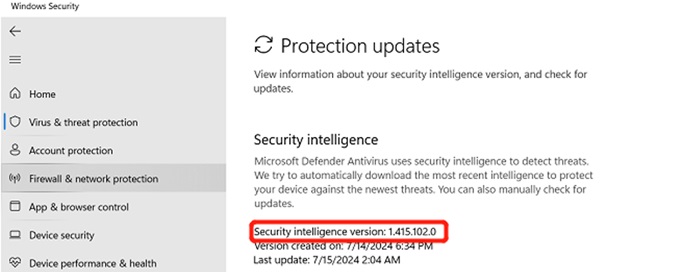
(Figure 1 - Windows Security)
Affected Platforms:
- Precision 7780
- Precision 7680
- Precision 7770
- Precision 7670
Cause
Windows Virus & threat prototyping takes to time to scan the newly added parts in graphic install the new version_1.415.102.0 and newer versions can resolve the issue.
Resolution
To solve this issue, you can follow the below two options to update the Security Intelligence version to 1.415.102.0 or above versions.
Option 1 - Update Virus & threat protection version in system settings:
- Open Settings
- On the left plane, click Privacy & security
- Click Windows Security
- Then click Virus & threat protection
- Click Protection updates
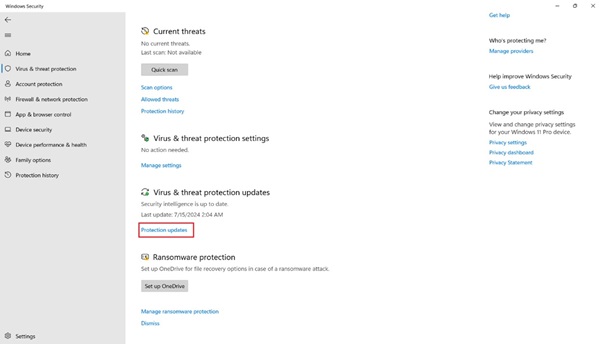
(Figure 2 - Windows Security)
- Click Check for updates and wait for the update to complete
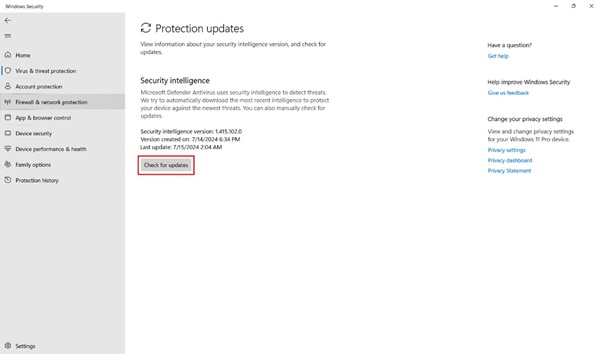
(Figure 3 - Windows Security)
Option 2 - Windows Update:
- Open Settings
- Then click Windows Update
- Click Check for updates and wait for the update to complete
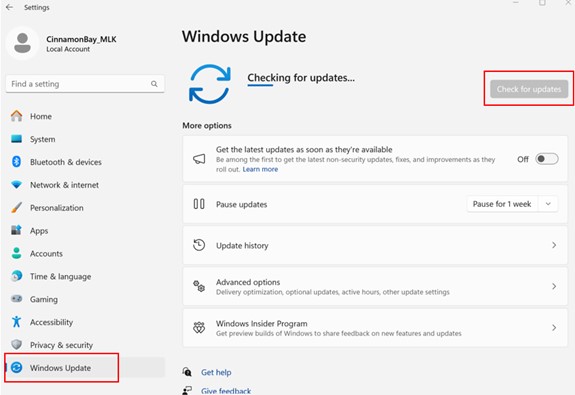
(Figure 4 - Windows Update)
Follow your L2 escalation path to your TL if the customer is not happy with the resolution as a Customer Experience (CE) failure.
If the issue continues, then follow your escalation path through your L2/QL to the L3/REC team - as dictated by the system's warranty.