Data Domain precheck error for existent license in the system is being deprecated
Summary: Data Domain system gives a pre-check alert for licenses going deprecated.
Bu makale şunlar için geçerlidir:
Bu makale şunlar için geçerli değildir:
Bu makale, belirli bir ürüne bağlı değildir.
Bu makalede tüm ürün sürümleri tanımlanmamıştır.
Symptoms
When performing a DDOS pre-check on a system configured with legacy licenses, the following warning messages may be displayed:
sysadmin@ddsystemxxx# system upgrade status
Current Upgrade Status: DD OS upgrade Failed
Node   Severity   Issue                           Solution
----   --------   ------------------------------  --------
0      WARNING    The existent license in the     Please visit Software
                  system is being deprecated      License Central to update
                  and will be unavailable in      your license.
Cause
Starting with DDOS 8.6.x and subsequent releases, support for legacy licensing formats (.lic and .xml) is being phased out as Dell Dynamic Licensing (DL) becomes the preferred licensing model.
Resolution
This pre-upgrade check generates a warning only and does not prevent the upgrade from proceeding. The upgrade can continue and is expected to complete successfully.
After completing the upgrade to a version that supports Dynamic Licensing, customers are encouraged to migrate their existing licensing configuration to the Dynamic Licensing.
The procedure is outlined below-
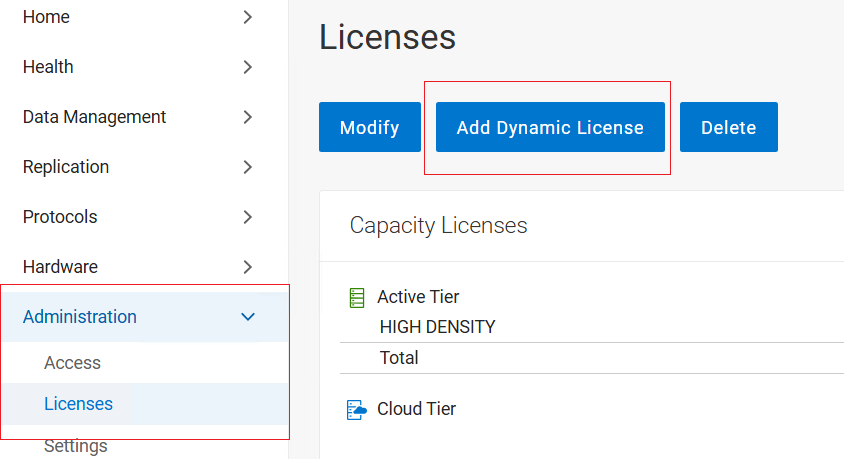
From the Data Domain UI, navigate to Administration > Licenses, and then select the "Add Dynamic License" option from the right pane.
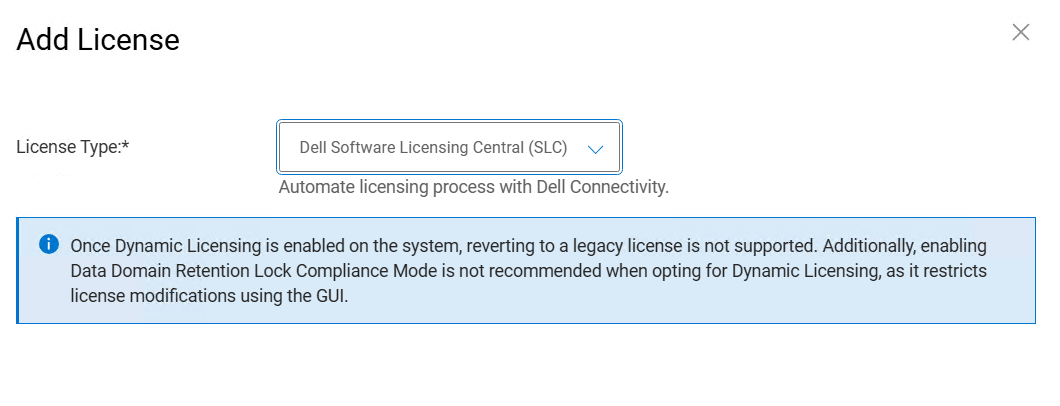
Option 1 -
Click on Apply button and Verify that the message "The license was applied successfully" is displayed.
Option 1 -
The Dell Software Licensing Central (SLC) option is recommended for systems connected through Dell Connectivity Services or a Secure Connect Gateway (SCG).
Click on Apply button and Verify that the message "The license was applied successfully" is displayed.
Option 2 -
Select License Type "Offline Registration File" and hit the Upload button to browse and select .dl file. and click on apply.
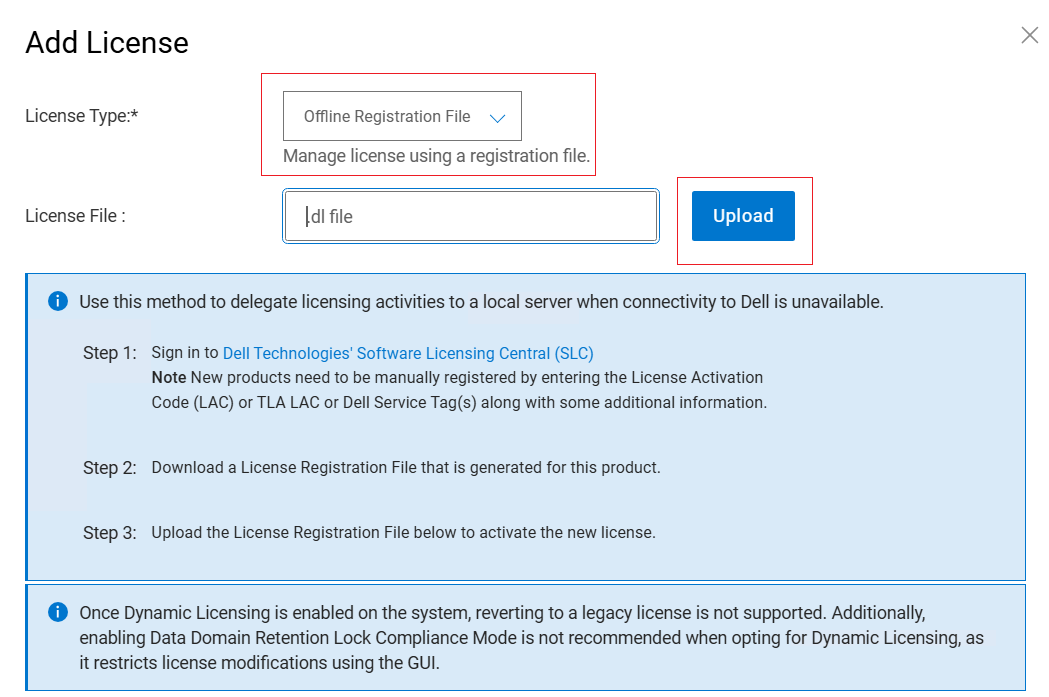
Verify that the message "The license was applied successfully" is displayed and that the license details are visible on the Licenses page.
Additional Information
If you encounter any issues while converting a legacy license to a Dynamic License, please refer to the steps outlined in the associated guide. https://dl.dell.com/content/manual55607184
Etkilenen Ürünler
Data DomainMakale Özellikleri
Article Number: 000491930
Article Type: Solution
Son Değiştirme: 29 Tem 2026
Version: 1
Sorularınıza diğer Dell kullanıcılarından yanıtlar bulun
Destek Hizmetleri
Aygıtınızın Destek Hizmetleri kapsamında olup olmadığını kontrol edin.