errori I/O remoti di NFS; la modifica del proprietario del bucket per il bucket abilitato per il file system può rendere impossibile per le applicazioni e/o gli utenti accedere ai file NFS (in inglese)
摘要: Il proprietario del bucket precedente non è consentito o è limitato ObjectControllerException: il metodo updateObjectInternal non è consentito per il proprietario del bucket precedente
本文适用于
本文不适用于
本文并非针对某种特定的产品。
本文并非包含所有产品版本。
症状
Modifica apportata dall'utente alla pagina del proprietario del bucket nell'interfaccia utente:
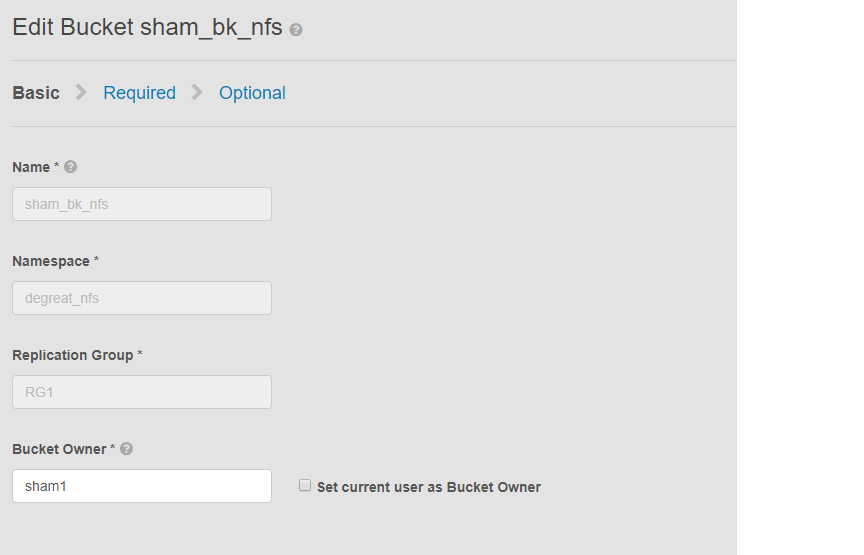
Questo problema si applica ai bucket abilitati per NFS e a una modifica del proprietario del bucket da parte dell'interfaccia utente. Ciò potrebbe causare la perdita dell'accesso al bucket sul file system Linux per le applicazioni o gli utenti connessi. Anche se ripristiniamo nuovamente la modifica al proprietario originale, l'accesso non sarà possibile, determinando la non disponibilità dei dati.
In questo esempio:
Il proprietario del bucket è stato modificato in "sham2" utilizzando l'interfaccia utente. A causa di una limitazione in ECS, anche dopo aver modificato nuovamente il nome del proprietario del bucket in "sham1". ECS non ripristina il proprietario del bucket su "sham1" utilizzando l'interfaccia utente. Questa operazione può essere eseguita per il momento solo con la CLI che utilizza un'API con payload per reimpostare il flag di proprietario su true.
Modi per identificare il problema, sul computer Linux chiedere all'utente di toccare un file, ad esempio:
Questo problema si applica ai bucket abilitati per NFS e a una modifica del proprietario del bucket da parte dell'interfaccia utente. Ciò potrebbe causare la perdita dell'accesso al bucket sul file system Linux per le applicazioni o gli utenti connessi. Anche se ripristiniamo nuovamente la modifica al proprietario originale, l'accesso non sarà possibile, determinando la non disponibilità dei dati.
In questo esempio:
Il proprietario del bucket è stato modificato in "sham2" utilizzando l'interfaccia utente. A causa di una limitazione in ECS, anche dopo aver modificato nuovamente il nome del proprietario del bucket in "sham1". ECS non ripristina il proprietario del bucket su "sham1" utilizzando l'interfaccia utente. Questa operazione può essere eseguita per il momento solo con la CLI che utilizza un'API con payload per reimpostare il flag di proprietario su true.
Modi per identificare il problema, sul computer Linux chiedere all'utente di toccare un file, ad esempio:
admin@node1~>touch file
touch: setting times of `file': Remote I/O error

se svc_log with the string  "method updateObjectInternal "

Command:
# svc_log -a -sr dataheadsvc | grep "method updateObjectInternal"
Example:
admin@node1~>svc_log -a -sr dataheadsvc | grep "method updateObjectInternal"
svc_log v1.0.22 (svc_tools v1.5.3)                 Started 2019-06-06 10:45:04

Running on nodes:              <All nodes>
Time range:                    2019-06-05 10:45:04 - 2019-06-06 10:45:04
Filter string(s):              <All messages>
Show nodename(s):              True
Search reclaim logs (if any):  False

com.emc.storageos.data.object.exception.ObjectControllerException: method updateObjectInternal not allowed for previous bucket owner sham1
Caused by: com.emc.storageos.data.object.exception.ObjectControllerException: method updateObjectInternal not allowed for previous bucket owner sham1
原因
Creazione di un bucket con un utente specifico come proprietario, seguita da una modifica della proprietà del bucket. Infine, la concessione del controllo completo al proprietario originale tramite la pagina ACLs ha esito negativo con l'eccezione del registro ECS:
ObjectControllerException: method updateObjectInternal not allowed for previous bucket owner <ownerid>
This is a known issue currently being evaluated by Dell EMC at this time.
解决方案
La soluzione alternativa consiste nel modificare il proprietario del bucket utilizzando l'API tramite CLI con il payload per reimpostare il flag resetowner su true.
1. Determinare il proprietario corrente del bucket.
2. Creare un semplice file xml utilizzando l'editor vi. Nell'esempio seguente viene chiamato /tmp/bucket-owner.xml. Si tratta di una procedura in due fasi. Dobbiamo impostarlo temporaneamente su un nuovo proprietario di sham2. Come nell'esempio riportato di seguito, prima di ripristinare il proprietario originale sham1, verificare l'output:
. 7. Una volta apportata la modifica alla configurazione, non dovrebbe più visualizzare lo stesso errore
1. Determinare il proprietario corrente del bucket.
Richiedere la password root dell'interfaccia utente per generare il TOKEN. Ad esempio:
admin@ecsnode1:~> tok=$(curl -iks https://XX.XX.XX.XX:4443/login -u 'root:ChangeMe' | grep X-SDS-AUTH-TOKEN)
Verificare il proprietario corrente del bucket (sostituire bucket e namespace nella propria situazione):
admin@node1:~> curl -s -k -X GET -H "$tok" https://XX.XX.XX.XX:4443/object/bucket/sham_bk_nfs/info?namespace=degreat_nfs | xmllint --format - | grep '<owner>'
  <owner>sham2</owner>
In questo modo si conferma che il parametro reset_previous_owners deve essere impostato su true. Il proprietario del bucket ripristinato si trova nell'interfaccia utente, ma l'API tramite CLI conferma che ECS continua a visualizzare il proprietario del bucket come "sham2".
2. Creare un semplice file xml utilizzando l'editor vi. Nell'esempio seguente viene chiamato /tmp/bucket-owner.xml. Si tratta di una procedura in due fasi. Dobbiamo impostarlo temporaneamente su un nuovo proprietario di sham2. Come nell'esempio riportato di seguito, prima di ripristinare il proprietario originale sham1, verificare l'output:
admin@node1:~ # vi /tmp/bucket-owner.xml

admin@ecsnode1:~ # cat /tmp/bucket-owner.xml
<object_bucket_update_owner>
   <namespace>degreat_nfs</namespace>
   <new_owner>sham2</new_owner>
   <reset_previous_owners>true</reset_previous_owners>
</object_bucket_update_owner>

3. Change the bucket owner to the temporary owner.
La sintassi API richiesta per modificare il proprietario del bucket in "sham2" tramite il file xml è la seguente:
admin@ecsnode1:~> curl -v -k -X "POST" "https://xx.xx.xx.xx:4443/object/bucket/sham_bk_nfs/owner" -H "$tok" -H "Content-Type: application/xml" -H "ACCEPT:application/xml" -d @/tmp/bucket-owner.xml -v
* Hostname was NOT found in DNS cache
*   Trying xx.xx.xx.xx...
* Connected to xx.xx.xx.xx (xx.xx.xx.xx) port 4443 (#0)
* successfully set certificate verify locations:
*   CAfile: none
  CApath: /etc/ssl/certs/
* SSLv3, TLS unknown, Certificate Status (22):
* SSLv3, TLS handshake, Client hello (1):
* SSLv3, TLS handshake, Server hello (2):
* SSLv3, TLS handshake, Certificate (11):
* SSLv3, TLS handshake, Server key exchange (12):
* SSLv3, TLS handshake, Server finished (14):
* SSLv3, TLS handshake, Client key exchange (16):
* SSLv3, TLS change cipher, Client hello (1):
* SSLv3, TLS handshake, Finished (20):
* SSLv3, TLS change cipher, Client hello (1):
* SSLv3, TLS handshake, Finished (20):
* SSL connection using TLSv1.2 / ECDHE-RSA-AES256-GCM-SHA384
* Server certificate:
*        subject: CN=localhost
*        start date: 2019-03-25 09:53:41 GMT
*        expire date: 2029-03-22 09:53:41 GMT
*        issuer: CN=localhost
*        SSL certificate verify result: self signed certificate (18), continuing anyway.
> POST /object/bucket/sham_bk_nfs/owner HTTP/1.1
> User-Agent: curl/7.37.0
> Host: xx.xx.xx.xx:4443
> X-SDS-AUTH-TOKEN: BAAcUy9KYlhxTlVYb2M0bnF3bTNscEsvSEdDeWhJPQMAjAQASHVybjpzdG9yYWdlb3M6VmlydHVhbERhdGFDZW50ZXJEYXRhOmJhOGQ3ZTkzLTMyMGYtNDNmNy05Y2FkLWM4YWQzMWFiMzY1MAIADTE1NTk3Mzk3OTA2MDgDAC51cm46VG9rZW46YjQ4NGNiZjEtNTkwNy00YWI3LTgzYTctM2Y3OGRhM2RiY2NiAgAC0A8=
> Content-Type: application/xml
> ACCEPT:application/xml
> Content-Length: 179
>
* upload completely sent off: 179 out of 179 bytes
< HTTP/1.1 200 OK
< Date: Thu, 06 Jun 2019 10:56:08 GMT
< Content-Length: 0
< Connection: keep-alive
<
* Connection #0 to host xx.xx.xx.xx left intact
4. Edit the simple.xml file previously created in step 2 and this time insert original owner of sham1
admin@node1:~ # vi /tmp/bucket-owner.xml

admin@ecsnode1:~ # cat /tmp/bucket-owner.xml
<object_bucket_update_owner>
   <namespace>degreat_nfs</namespace>
   <new_owner>sham1</new_owner>
   <reset_previous_owners>true</reset_previous_owners>
</object_bucket_update_owner>

5. Change the bucket owner back to the original owner
The API syntax required to change the bucket owner back to "sham1" through the xml file is as follows:
admin@ecsnode1:~> curl -v -k -X "POST" "https://xx.xx.xx.xx:4443/object/bucket/sham_bk_nfs/owner" -H "$tok" -H "Content-Type: application/xml" -H "ACCEPT:application/xml" -d @/tmp/bucket-owner.xml -v
* Hostname was NOT found in DNS cache
*   Trying xx.xx.xx.xx...
* Connected to xx.xx.xx.xx (xx.xx.xx.xx) port 4443 (#0)
* successfully set certificate verify locations:
*   CAfile: none
  CApath: /etc/ssl/certs/
* SSLv3, TLS unknown, Certificate Status (22):
* SSLv3, TLS handshake, Client hello (1):
* SSLv3, TLS handshake, Server hello (2):
* SSLv3, TLS handshake, Certificate (11):
* SSLv3, TLS handshake, Server key exchange (12):
* SSLv3, TLS handshake, Server finished (14):
* SSLv3, TLS handshake, Client key exchange (16):
* SSLv3, TLS change cipher, Client hello (1):
* SSLv3, TLS handshake, Finished (20):
* SSLv3, TLS change cipher, Client hello (1):
* SSLv3, TLS handshake, Finished (20):
* SSL connection using TLSv1.2 / ECDHE-RSA-AES256-GCM-SHA384
* Server certificate:
*        subject: CN=localhost
*        start date: 2019-03-25 09:53:41 GMT
*        expire date: 2029-03-22 09:53:41 GMT
*        issuer: CN=localhost
*        SSL certificate verify result: self signed certificate (18), continuing anyway.
> POST /object/bucket/sham_bk_nfs/owner HTTP/1.1
> User-Agent: curl/7.37.0
> Host: xx.xx.xx.xx:4443
> X-SDS-AUTH-TOKEN: BAAcUy9KYlhxTlVYb2M0bnF3bTNscEsvSEdDeWhJPQMAjAQASHVybjpzdG9yYWdlb3M6VmlydHVhbERhdGFDZW50ZXJEYXRhOmJhOGQ3ZTkzLTMyMGYtNDNmNy05Y2FkLWM4YWQzMWFiMzY1MAIADTE1NTk3Mzk3OTA2MDgDAC51cm46VG9rZW46YjQ4NGNiZjEtNTkwNy00YWI3LTgzYTctM2Y3OGRhM2RiY2NiAgAC0A8=
> Content-Type: application/xml
> ACCEPT:application/xml
> Content-Length: 179
>
* upload completely sent off: 179 out of 179 bytes
< HTTP/1.1 200 OK
< Date: Thu, 06 Jun 2019 10:56:08 GMT
< Content-Length: 0
< Connection: keep-alive
<
* Connection #0 to host xx.xx.xx.xx left intact


6.  Confirm the bucket owner change is reflected.
Verificare che la modifica del proprietario del bucket sia ora "sham1".
admin@ecsnode1:~> curl -s -k -X GET -H "$tok" https://XX.XX.XX.XX:4443/object/bucket/sham_bk_nfs/info?namespace=degreat_nfs | xmllint --format - | grep '<owner>'
<owner>sham1</owner>
Una volta ripristinato il proprietario del bucket nell'API, verificare che l'host possa ora accedere al bucket sul file system Linux.
. 7. Una volta apportata la modifica alla configurazione, non dovrebbe più visualizzare lo stesso errore
svc_log -f "method updateObjectInternal not allowed" -start "20 hour ago" -sr all -sh -st hour
svc_log v1.0.22 (svc_tools v1.6.8)                 Started 2020-01-23 09:28:17

Running on nodes:              <All nodes>
Time range:                    2020-01-22 13:28:17 - 2020-01-23 09:28:17
Filter string(s):              'method updateObjectInternal not allowed'
Show nodename(s):              True
Search reclaim logs (if any):  False

Count of message occurrences per hour:

2020-01-22 13:xx - 5066
2020-01-22 14:xx - 9580
2020-01-22 15:xx - 9574
2020-01-22 16:xx - 9580
2020-01-22 17:xx - 9570
2020-01-22 18:xx - 9576
2020-01-22 19:xx - 9564
2020-01-22 20:xx - 9576
2020-01-22 21:xx - 9576
2020-01-22 22:xx - 9572
2020-01-22 23:xx - 9564
2020-01-23 00:xx - 9586
2020-01-23 01:xx - 9574
2020-01-23 02:xx - 9572
2020-01-23 03:xx - 4564
2020-01-23 04:xx - 0
2020-01-23 05:xx - 0
2020-01-23 06:xx - 0
2020-01-23 07:xx - 0
2020-01-23 08:xx - 0
2020-01-23 09:xx - 0


Dell EMC is aware of this issue and are working on a fix in a future release.
其他信息
Articoli della Knowledge Base su NFS correlati:
- come creare un'esportazione NFS di base e montarla su un client
- ECS: errore di streaming del registro dataheadsvc: LINK procedura NFSv3 non supportato nella richiesta ReadLinkRequest
- ECS, mounting di NFS non riuscito con errore No such file or directory o ERROR_OBJECT_NOT_FOUND
- errori I/O remoti di NFS; la modifica del proprietario del bucket per il bucket abilitato per il file system può rendere impossibile per applicazioni/utenti accedere ai file NFS (in inglese)
- la scrittura in NFS genera un errore di I/O dopo una determinata quantità di dati. (in inglese)
- utilizzo della condivisione file NFS da ECS con un datastore NFS VMware (in inglese)
- best practice per il mounting delle esportazioni NFS ECS (in inglese)
- ECS, come montare la condivisione NFS su un client Windows
- NFS non riesce a eseguire il mounting dopo aver modificato le impostazioni di esportazione dei file nell'interfaccia utente (in inglese)
- Oracle WebCenter Content (WCC) è compatibile con ECS? (in inglese)
Iscriviti per ricevere gli aggiornamenti del prodotto.
È possibile iscriversi agli aggiornamenti seguendo le istruzioni riportate nell'articolo della knowledgebase riportato di seguito:
DELL EMC: Come iscriversi alle pagine dei prodotti - Supporto Dell?
受影响的产品
Elastic Cloud Storage产品
ECS Appliance, ECS Appliance Software with Encryption, ECS Appliance Software without Encryption, Elastic Cloud Storage文章属性
文章编号: 000055535
文章类型: Solution
上次修改时间: 29 7月 2026
版本: 5
从其他戴尔用户那里查找问题的答案
支持服务
检查您的设备是否在支持服务涵盖的范围内。