Dell Unity:复制恢复指示在同步故障切换后完全同步
摘要: 在 Dell Unity OE 5.0.x 中,在同步故障切换操作后显示的恢复确认消息错误地指出将为所有选定的复制会话启动完全同步。这只是用户界面消息传递问题,不会影响实际的复制行为。Dell Unity 开发部门已发现该问题,并计划针对 Dell Unity OE 5.1 进行修复,其中“恢复”摘要消息将正确反映正在执行的复制操作。
本文适用于
本文不适用于
本文并非针对某种特定的产品。
本文并非包含所有产品版本。
症状
在 Dell Unity OE 5.0.x 中,在执行同步故障切换后,复制会话的恢复选项将显示一条确认消息,指出将为所有受影响的复制会话启动完全同步。
此消息是 Unity OE 5.0.x 中的一项新功能引入的,用于通知用户预期的同步行为。尽管该消息指示将进行完全同步,但 Dell Unity 开发部门已发现并在未来版本中纠正此行为。
在 Failover with Sync 操作后恢复复制时,运行 Unity OE 5.0.x 的任何 Dell Unity 阵列上可能会显示此消息。
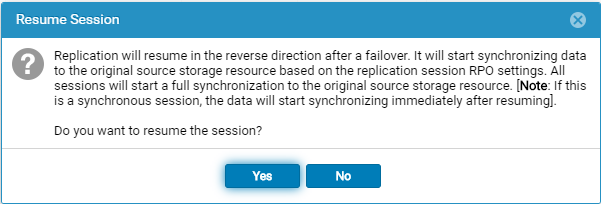
在同步故障切换操作后选择恢复选项时,将显示以下消息:
Replication will resume in the reverse direction after a failover. It will start synchronizing data to the original source storage resource based on the replication session RPO settings. All sessions will start a full synchronization to the original source storage resource. [Note: If this is a synchronous session, the data will start synchronizing immediately after resuming].

Do you want to resume the session?
原因
恢复摘要消息不正确。执行 同步故障切换后,选择 恢复 时显示的确认消息将为所有复制会话启动 完全同步 。但是,此消息并不能准确反映实际的复制行为。
该问题仅限于用户界面中显示的消息,并不表示将发生完全同步。Dell Unity 开发部门已将此问题识别为 Unity OE 5.0.x 中的一个问题,并正在努力纠正。
解决方案
恢复摘要消息不正确,将在未来的 Unity OE 版本中进行更正。
该消息当前指示将为所有复制会话启动 完全同步 。这只是显示问题,并不反映将要执行的实际复制操作。
此问题的修复计划包含在 Dell Unity OE 5.1 中。在此之前,用户可以安全地忽略 Unity OE 5.0.x 中显示的不正确的完全同步消息。
正确的消息应为:
故障恢复确认消息
Failback will perform a synchronization from the destination storage resource to the source storage resource, block access to the destination storage resource to allow it to be used for replication, and change the source storage resource access to read/write mode. Replication will then resume. The synchronization could be either delta or full synchronization depending on the replicated snapshots. This operation will be lengthy if a full synchronization is needed during failback.
When the failback operation is complete, you can then connect your hosts to the source storage resource.
Note: Before you begin, you should block writes to the destination storage resource because it will be placed in read-only mode.
故障切换时恢复确认
Replication will resume in the reverse direction after a failover. It will start synchronizing data to the original source storage resource based on the replication session RPO settings.
All sessions will start a synchronization to the original source storage resource. The synchronization could be either delta or full synchronization depending on the replicated snapshots.
Note: If this is a synchronous session, the data will start synchronizing immediately after resuming. Do you want to resume the session?
受影响的产品
Dell Unity 300, Dell EMC Unity 300F, Dell EMC Unity 400, Dell EMC Unity 400F, Dell EMC Unity 450F, Dell EMC Unity 500, Dell EMC Unity 550F, Dell EMC Unity 600, Dell EMC Unity 600F, Dell EMC Unity 650F, Dell EMC Unity Family产品
Dell EMC Unity XT 380, Dell EMC Unity XT 380F, Dell EMC Unity XT 480, Dell EMC Unity XT 480F, Dell EMC Unity XT 680, Dell EMC Unity XT 680F, Dell EMC Unity XT 880, Dell EMC Unity XT 880F, Dell EMC Unity Family |Dell EMC Unity All Flash
, Dell EMC Unity Family, Dell EMC Unity Hybrid, Dell EMC UnityVSA Professional Edition/Unity Cloud Edition
...
文章属性
文章编号: 000063277
文章类型: Solution
上次修改时间: 16 7月 2026
版本: 8
从其他戴尔用户那里查找问题的答案
支持服务
检查您的设备是否在支持服务涵盖的范围内。