Funksjonsveiledning for Dell Precision 5550 tastatur
摘要: Følgende veiledning inneholder tilgjengelige hurtigtaster og funksjonene de utfører på Dell Precision mobil arbeidsstasjon 5550.
本文适用于
本文不适用于
本文并非针对某种特定的产品。
本文并非包含所有产品版本。
说明
Tabellen nedenfor viser en liste over snarveisfunksjoner for kombinasjoner som er tilgjengelige på Dell Precision mobil arbeidsstasjon 5550.
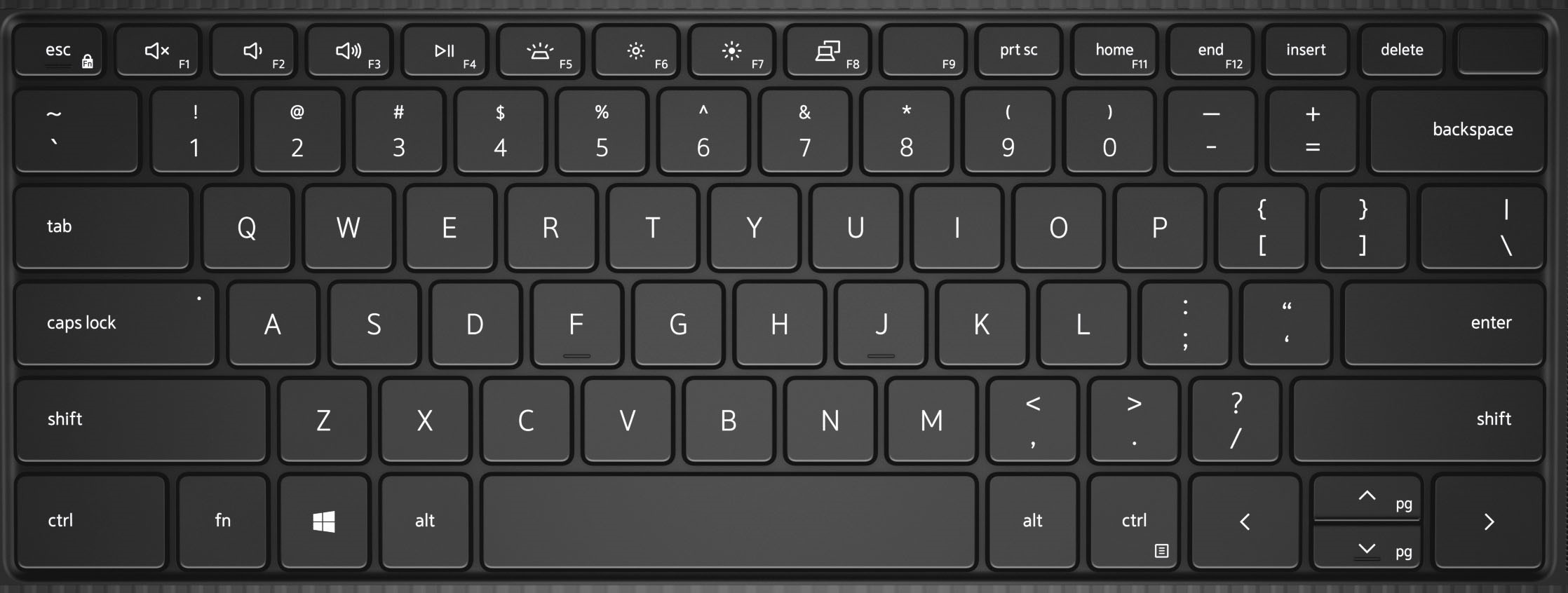
| Taster | Primæratferd |
|---|---|
| Fn+F1 | Demp lyd |
| Fn+F2 | Reduser volumet |
| Fn+F3 | Øk volumet |
| Fn+F4 | Spill av / pause |
| Fn+F5 | Tastaturbaklys |
| Fn+F6 | Reduser lysstyrken på skjermen |
| Fn+F7 | Øk lysstyrken på skjermen |
| Fn+F8 | Slå skjerm av/på (Win+P) |
| Fn+F10 | Print Screen |
| Fn+F11 | Hjem |
| Fn+F12 | End |
| Fn+Esc | Aktiverer/deaktiverer Fn-tastelåsen |
| Fn+Ctrl | Emulerer høyreklikkmeny |
| Fn+B | Pause |
| Fn+S | Aktiverer/deaktiverer Scroll Lock |
| Fn+R | Systemforespørsel |
其他信息
 Gå til kunnskapsbasen for tastaturet hvis du vil ha flere ressurser og mer informasjon.
 Besøk støttesiden for styreplater for å finne flere artikler og mer informasjon.
 Du finner også flere artikler og informasjon på støttesiden for mus.
受影响的产品
Precision 5550文章属性
文章编号: 000123348
文章类型: How To
上次修改时间: 19 4月 2026
版本: 7
从其他戴尔用户那里查找问题的答案
支持服务
检查您的设备是否在支持服务涵盖的范围内。