CrowdStrike お客様 ID の入手方法
Summary: 次の手順に従って、CrowdStrike CID(お客様ID)を検索する方法について説明します。これらの手順は、Windows、Mac、およびLinuxをサポートしています。
This article applies to
This article does not apply to
This article is not tied to any specific product.
Not all product versions are identified in this article.
Instructions
CrowdStrikeお客様識別番号(CID)は次の目的で使用されます。
- CrowdStrike Falcon Sensorのアクティブ化
- CrowdStrike Falcon Consoleのトラブルシューティング
対象製品:
- CrowdStrike
対象オペレーティング システム:
- Windows
- Mac
- Linux
次の手順に従って、CrowdStrike Falcon Consoleでお客様ID (CID)を見つけます。
- Google ChromeまたはMicrosoft Edgeブラウザーで、Falcon ConsoleのログインURLに移動します。
- ファルコンUS-1: https://falcon.crowdstrike.com/login/
- ファルコンUS-2: https://falcon.us-2.crowdstrike.com/login/
- ファルコンEU-1: https://falcon.eu-1.crowdstrike.com/login/
- Falcon US-GOV-1: https://falcon.laggar.gcw.crowdstrike.com/login/
- ファルコンUS-1: https://falcon.crowdstrike.com/login/
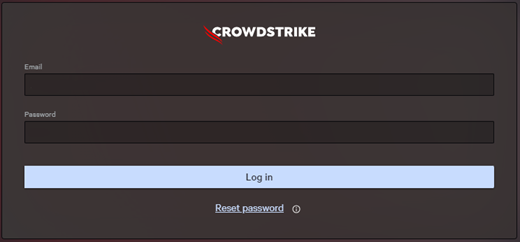
- CrowdStrikeアカウント所有者の認証情報を入力し、[ Log In]をクリックします。
- 左側のメニュー ウィンドウで、 [ホストのセットアップと管理 アプリ] アイコンを選択し、 [ センサーのダウンロード] を選択します。
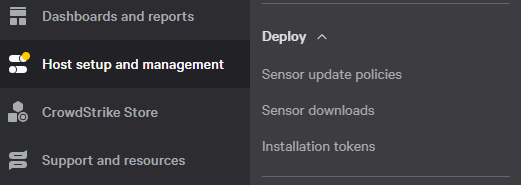 メモ: この例のレイアウトは、ご使用の環境によって若干異なる場合があります。
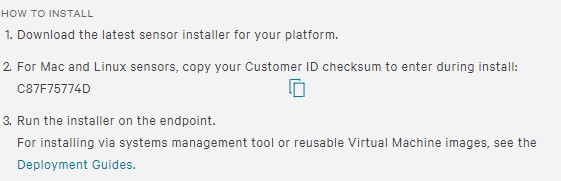
 - [インストール方法]にお客様IDを入力します。
 注:
注:- お客様IDは、ご使用の環境によって異なります。
- 例では、C87F75774Dがお客様IDです。

Additional Information
Videos
Affected Products
CrowdStrikeArticle Properties
Article Number: 000129349
Article Type: How To
Last Modified: 23 7月 2026
Version: 19
Find answers to your questions from other Dell users
Support Services
Check if your device is covered by Support Services.