Dell Data Security Shield 模式
摘要: 本文討論 Dell Data Security (先前稱為 Dell Data Protection) 護蓋模式。
本文适用于
本文不适用于
本文并非针对某种特定的产品。
本文并非包含所有产品版本。
症状
受影響的產品:
- Credant Mobile Guardian
- Dell Encryption Enterprise
- Dell Data Protection | Enterprise Edition
- Dell Encryption External Media
- Dell Data Protection | External Media Edition
- Dell Encryption Personal
- Dell Data Protection | Personal Edition
- Dell Data Protection | 安全性工具
- 適用於伺服器的 Dell Encryption Enterprise
- Dell Data Protection | Server Edition
受影響的平台:
- Windows
原則式 Dell Data Security (先前稱為 Dell Data Protection) 軟體會使用遮罩模式識別符進行產品分類。
原因
警告:
- Shield 模式是在產品安裝時決定,無法手動修改。
- Shield 模式僅用於故障診斷產品類型或狀態。
解决方案
Dell Data Security 產品的遮罩模式為:
| ID | 模式 | 產品 |
|---|---|---|
| 0 | 未知/未初始化 | 未初始化/未佈建1 |
| 1 | Enterprise 模式 | Dell Encryption Enterprise \ Dell Data Protection Enterprise Edition 護蓋 |
| 2 | 獨立模式 | Credant Mobile Guardian |
| 3 | 僅限企業 EME 模式 | Dell Encryption External Media \ Dell Data Protection |外部媒體版 |
| 4 | 本機管理模式 | Dell Encryption Personal \ Dell Data Protection |個人版 |
| 5 | Essentials 模式 | 戴爾數據保護 |安全性工具2 |
| 6 | 伺服器加密模式 | 適用於伺服器的 Dell Encryption Enterprise \ Dell Data Protection |伺服器加密 |
| 7 | Saas 模式 | Dell Encryption Enterprise Shield |
1所有 Dell Data Protection 產品在啟動前均保持未佈建狀態。
2基本模式僅在 Dell Data Protection 安裝時發生 |安全性工具。
找到 Shield 模式:
警告:將您帶入 Windows 登錄:
- 編輯登錄可能會導致電腦在下次重新開機時沒有回應。
- 如果您對執行此步驟有任何疑慮,請聯絡 Dell Data Security 國際支援電話號碼以取得協助。
- 在 Windows「開始」功能表上按右鍵,然後選取執行。
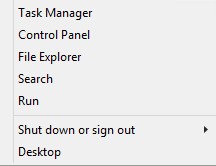
圖 1:(僅英文) 執行
- 在「執行」使用者介面 (UI) 中輸入 regedit ,然後按下 確定。
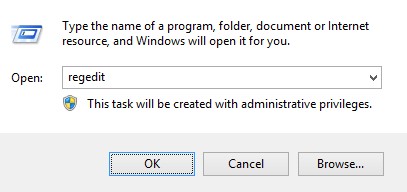
圖 2:(僅英文)鍵入 regedit
- 前往 HKEY_LOCAL_MACHINE\SOFTWARE\Credant\CMGShield。
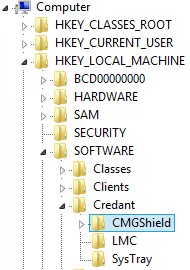
圖 3:(僅英文) CMGShield
- 找到 DWORD 金鑰 SM。
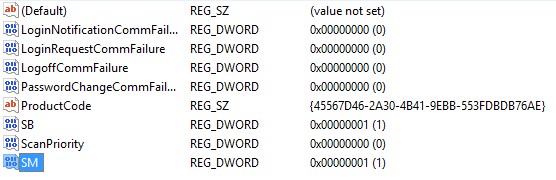
圖 4:(僅英文)SM
注意:在範例中,SM 金鑰設定為 1。這可識別 Shield 模式企業版。
如要聯絡支援部門,請參閱 Dell Data Security 國際支援電話號碼。
請前往 TechDirect,以線上產生技術支援要求。
如需更多深入見解與資源,請加入 Dell 安全性社群論壇。
受影响的产品
Dell Encryption文章属性
文章编号: 000132837
文章类型: Solution
上次修改时间: 19 4月 2026
版本: 11
从其他戴尔用户那里查找问题的答案
支持服务
检查您的设备是否在支持服务涵盖的范围内。