Avamar:如何使用 mapall 工具
摘要: Avamar 有一个名为“mapall”的命令行工具,可用于向网格中的一个或多个节点发出指令。本文介绍如何使用该工具。
本文适用于
本文不适用于
本文并非针对某种特定的产品。
本文并非包含所有产品版本。
说明
本文演示如何使用 mapall 工具,用于从实用程序节点向其他节点发出命令。
而 mapall 工具可以访问在 probe.xml 文件中定义。
这些脚本是标准安全外壳 (ssh) 工具 (ssh) 和安全复制协议 (SCP)),并且都是用 Perl 编写的。
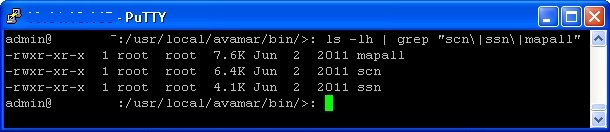
mapall- 向多个节点发送命令- SSN号 - ssh 的包装器,接受(物理)节点编号,而不是 IP 地址或主机名
- SCN号 - SCP的包装器,如上所述
MAPALL:
指定要在其上运行命令的节点:
要仅在选定节点上运行命令,请执行以下作:
要仅在节点 0 上运行该<命令>,请执行以下作:0、0。2 和 0.3:
mapall --nodes=0.0,0.2,0.3 <command>
要在除实用程序节点和 0.0 以外的所有节点上运行该 <命令> ,请执行以下作:
mapall --nodes=all+,-0.s,0.0 <command>
有用标志:
以下是一些可与这三种工具配合使用的有用标志。(这些标记完整记录在 Avamar 技术附录中)
与任何 Avamar 命令行任务一样,运行时要小心谨慎。
与任何 Avamar 命令行任务一样,运行时要小心谨慎。
-
--user=<username> : Specify the user on the remote system that runs the command. -
--verbose : Provides maximum information. -
--quiet : Disable all messages. -
--parallel : Runs the command on all nodes simultaneously. -
--noerror : Do not stop if an error occurs. (This flag should always be used) For legacy reasons, mapall command execution stops if an error occurs. -
--bg : Run the command in the background and does not wait for completion. -
--debug : Enable extended debugging information (for example, which nodes map to which IP addresses). -
--copy : Copies a file from the utility node to remote nodes. -
--get : Pulls a file to the utility node from remote nodes. -
--all : Issues the command on all the data nodes plus the utility node -
--all+ : Issues the command on all the nodes in probe.xml, including NDMP accelerator nodes, spare nodes so forth.
MAPALL 示例:
MAPALL GET:这与复制命令相反。
获取 GSAN 二进制文件,并将其拷贝到 Avamar 应用工具节点,以便 /home/admin/0.*/gsan:
mapall --noerror get 'gsan'
MAPALL 拷贝:
复制 /etc/hosts 文件复制到 /root/etc/hosts 在每个数据节点上。
mapall --noerror --user=root copy 'etc/hosts'
这在实践中是如何工作的:
1.而
mapall copy 命令创建 tarball 包含指定的文件。
2.使用
scp 要将 tarball 到每个节点。
3.解压缩
tarball 在用户主目录中。
其他信息
SSN 示例:
连接到节点 0.1 并打开交互式 shell。
ssn 0.1
连接到节点 0.2 并发出 date 命令。
ssn 0.2 'date'
SCN 示例:
复制 /home/admin/gsan 从节点 0.1 到 btfix Avamar Utility Node 上的目录。
scn 0.1:/home/admin/gsan ./btfix
复制 ”testscript“ 从实用程序节点的 /home/admin 目录复制到节点 0.2 上,并将其放置为”runscript“在 /data01/cur:
scn testscript 0.2:/data01/cur/runscript
提醒:而
必须在两步作中使用实用程序节点复制文件,或者,也可以使用
scn 命令不能用于将文件从一个数据节点复制到另一个数据节点。
必须在两步作中使用实用程序节点复制文件,或者,也可以使用
scp 直接在两个节点之间传输文件。
受影响的产品
Avamar, Avamar Server产品
Avamar文章属性
文章编号: 000156632
文章类型: How To
上次修改时间: 01 10月 2025
版本: 10
从其他戴尔用户那里查找问题的答案
支持服务
检查您的设备是否在支持服务涵盖的范围内。