The secondary drive is not detected or seen as a USB device on the Latitude 5424 Rugged laptop
摘要: The following article provides information about an issue where the secondary drive is either not detected or is seen as a USB device. This has been seen on the Latitude 5424 Rugged laptop. ...
本文适用于
本文不适用于
本文并非针对某种特定的产品。
本文并非包含所有产品版本。
症状
Secondary drive issues reported on the Latitude 5424 Rugged laptop
There have been reports that there are problems with the secondary drive. Issues with reading or writing to it, being reported as a USB device, or not being detected at all.
Computer models reporting this issue:
- Latitude 5424 Rugged
原因
Dell engineering confirmed that the secondary storage drive slot uses the internal USB hub.
It is only compatible with SATA drives, in order to support hot-swapping.
This means that a SATA drive will operate at slower read and write speeds, when used in the secondary slot.
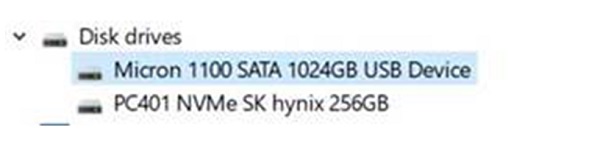
(Figure.1 Device Manager: Drives List)
解决方案
Note: The computer hardware is working as designed.
If you fit a PCIe/NVMe drive into the secondary slot, it will not be detected.
If you fit a SATA drive into the secondary slot, it runs on the internal USB hub and will run slower. This is necessary to let you hot swap the drive, while the computer is in use.
If you fit a SATA drive into the secondary slot and it is not detected, reseat the drive, and if the issue continues contact Dell.
受影响的产品
Latitude 5424 Rugged文章属性
文章编号: 000179583
文章类型: Solution
上次修改时间: 07 5月 2026
版本: 7
从其他戴尔用户那里查找问题的答案
支持服务
检查您的设备是否在支持服务涵盖的范围内。