PowerEdge: 13G/14G服务器BIOS设置详解-集成设备控制器和端口的设置
摘要: 本文章介绍BIOS设置中的集成设备控制器(Integrated Devices)和端口的设置
本文适用于
本文不适用于
本文并非针对某种特定的产品。
本文并非包含所有产品版本。
说明
目录:
开机过程中按F2键进入主菜单,选择System BIOS后选择Integrated Devices选项。
可在页面最下方点击Slot Disablement选项以进行PCIe插槽的启用/禁用。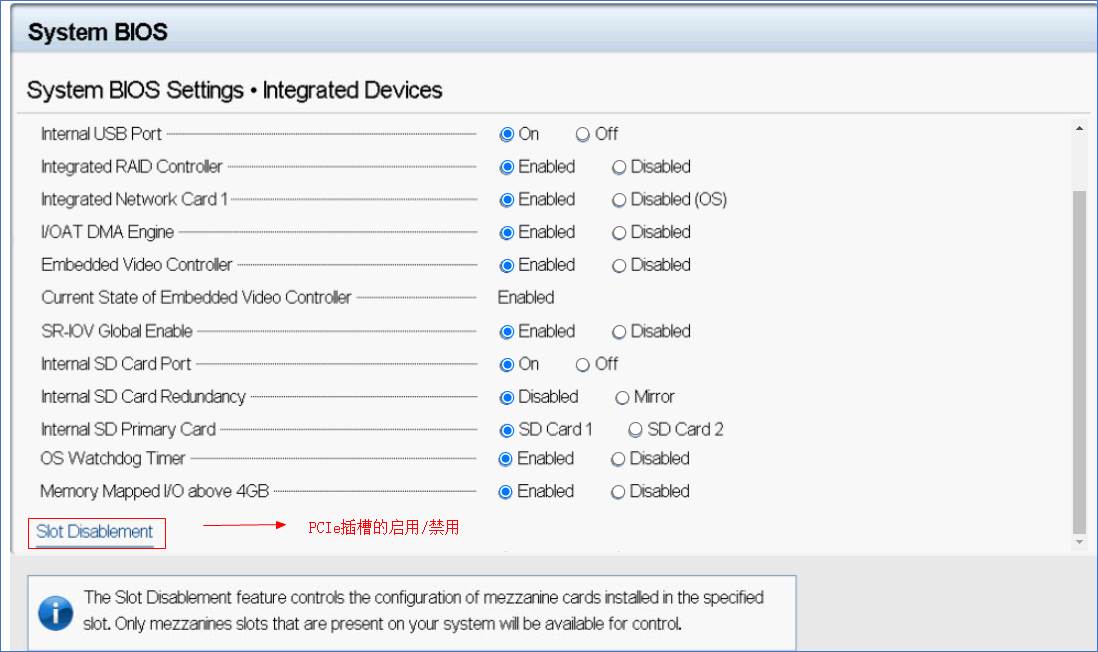
| Option Description | ||
| User Accessible USB Ports | Configures the user accessible USB ports. Selecting Only Back Ports On disables the front USB ports; selecting All Ports Off disables all front and back USB ports; selecting All Ports Off (Dynamic) disables all front and back USB ports during POST and front ports can be enabled or disabled dynamically by an authorized user or authorized users without resetting the system. | 配置用户可访问的USB端口。仅选择后部端口即禁用正面的USB端口;选择所有端口关闭,即所有的正面和背面的USB端口; 选择所有端口关闭(动态)将禁用POST期间的所有正面和背面USB端口,并且可以由授权用户或授权用户动态启用或禁用前端端口,而无需重置系统。 |
| The USB keyboard and mouse function in certain USB ports during the boot process, depending on the selection. | 在启动过程中,根据选择,某些键盘上的USB键盘和鼠标功能。 | |
| After the boot process is complete, the USB ports will be enabled or disabled as per the setting. | 引导过程完成后,将根据设置启用或禁用USB端口。 | |
| Internal USB Port | Enables or disables the internal USB port. This option is set to On or Off. This option is set to On by default. | 启用或禁用内部USB端口。此选项设置为开或关。此选项默认设置为开。 |
| NOTE: The Internal SD Card Port on the PCIe riser is controlled by Internal USB Port. | 注:PCIe Riser卡上的内部SD卡端口由内部USB端口控制。 | |
| iDRAC Direct USB Port | The iDRAC Direct USB port is managed by iDRAC exclusively with no host visibility. This option is set to ON or OFF. When set to OFF, iDRAC does not detect any USB devices installed in this managed port. This option is set to On by default. | iDRAC Direct USB端口仅由iDRAC管理,没有主机可见性。 此选项设置为ON或OFF。 设置为OFF时,iDRAC不会检测到此受管端口中安装的任何USB设备。 默认情况下,此选项设置为“开”。 |
| Integrated RAID Controller | Enables or disables the integrated RAID controller. This option is set to Enabled by default. | 启用或禁用集成RAID控制器。此选项默认设置为启用。(Mini PERC) |
| Integrated Network Card 1 | Enables or disables the integrated network card (NDC). When set to Disabled, the NDC is not available to the operating system (OS). This option is set to Enabled by default. | 启用或禁用集成网卡(NDC)。当设置为禁用,则NDC在操作系统中不可用,此选项默认设置为启用。 |
| NOTE: If set to Disabled (OS), the Integrated NICs might still be available for shared network access by iDRAC. | 注:如果设置为Disabled(OS),集成网卡可能仍然是可供iDRAC的共享网络接入。 | |
| I/OAT DMA Engine | Enables or disables the I/O Acceleration Technology (I/OAT) option. I/OAT is a set of DMA features designed to accelerate network traffic and lower CPU utilization. Enable only if the hardware and software support the feature.This option is set to Disabled by default. | 启用或禁用I / O加速技术(I / OAT)选项。 I / OAT是一组DMA功能,旨在加快网络流量并降低CPU利用率。 仅在硬件和软件支持此功能时启用。默认情况下,此选项设置为“禁用”。 |
| Embedded Video Controller | Enables or disables the use of Embedded Video Controller as the primary display. When set to Enabled, the Embedded Video Controller is used as the primary display even if add-in graphic cards are installed. When set to Disabled, an add-in graphics card is used as the primary display. BIOS will output displays to both the primary add-in video and the embedded video during POST and pre-boot environment. The embedded video is disabled before the operating system boots. This option is set to Enabled by default. | 启用或禁用将嵌入式视频控制器用作主显示。 设置为“启用”时,即使安装了附加图形卡,嵌入式视频控制器也将用作主要显示。 设置为“禁用”时,附加图形卡将用作主显示。 在POST和预引导环境中,BIOS会将显示内容同时输出到主要外接视频和嵌入式视频。 操作系统启动之前,将禁用嵌入式视频。 默认情况下,此选项设置为“启用”。 |
| NOTE: When there are multiple add-in graphic cards installed in the system, the first card discovered during PCI enumeration is selected as the primary video. You might have to re-arrange the cards in the slots in order to control which card is the primary video. | 注:如果系统中安装了多个附加图形卡,则在PCI枚举期间发现的第一个卡将被选为主视频。 您可能必须重新排列插槽中的卡,才能控制哪个卡是主要视频。 | |
| Current State of Embedded Video Controller | Displays the current state of the embedded video controller. The Current State of Embedded Video Controller option is a read-only field. If the Embedded Video Controller is the only display capability in the system (that is, no add-in graphics card is installed), then the Embedded Video Controller is automatically used as the primary display even if the Embedded Video Controller setting is set to Enabled. | 显示嵌入式视频控制器的当前状态。 “嵌入式视频控制器的当前状态”选项是一个只读字段。 如果嵌入式视频控制器是系统中唯一的显示功能(即,未安装任何外接图形卡),则即使嵌入式视频控制器设置设置为“已启用”,嵌入式视频控制器也会自动用作主显示器。 。 |
| SR-IOV Global Enable | Enables or disables the BIOS configuration of Single Root I/O Virtualization (SR-IOV) devices. This option is set to Disabled by default. | 启用或禁用Single Root I/O Virtualization(SR-IOV)设备的BIOS配置。 默认情况下,此选项设置为“禁用”。(如果需要配置PCIe设备直通,通常需要启用此选项) |
| Internal SD Card Port | Enables or disables the internal SD card port of the Internal Dual SD Module (IDSDM). This option is set to On by default. | 启用或禁用内部双SD模块IDSDM的SD卡端口。此选项默认设置为开。 |
| Internal SD Card Redundancy | Configures the redundancy mode of the Internal Dual SD Module (IDSDM). When set to Mirror Mode, data is written on both SD cards. After failure of either card and replacement of the failed card, the data of the active card is copied to the offline card during the system boot. | 配置内部双SD模块(IDSDM)的冗余模式。 设置为镜像模式时,数据将写入两个SD卡中。 在任何一张卡发生故障并更换了故障的卡之后,活动卡的数据将在系统引导期间复制到脱机卡。 |
| When Internal SD Card Redundancy is set to Disabled, only the primary SD card is visible to the OS. This option is set to Disabled by default. | 当“内部SD卡冗余”设置为“禁用”时,操作系统仅可见主SD卡。 默认情况下,此选项设置为“禁用”。 | |
| Internal SD Primary Card | By default, the primary SD card is selected to be SD Card 1. If SD Card 1 is not present, then the controller selects SD Card 2 to be the primary SD card. | 默认情况下,主SD卡选择为SD卡1。如果不存在SD卡1,则控制器选择SD卡2作为主SD卡。 |
| OS Watchdog Timer | If your system stops responding, this watchdog timer aids in the recovery of your operating system. When this option is set to Enabled, the operating system initializes the timer. When this option is set to Disabled (the default), the timer does not have any effect on the system. | 如果您的系统停止响应,则该看门狗计时器有助于恢复操作系统。 当此选项设置为“启用”时,操作系统将初始化计时器。 当此选项设置为“禁用”(默认值)时,计时器对系统没有任何影响。 |
| Empty Slot Unhide | Enables or disables the root ports of all the empty slots that are accessible to the BIOS and OS. This option is set to Disabled by default. | 启用或禁用BIOS和OS可访问的所有空插槽的根端口。 默认情况下,此选项设置为“禁用”。 |
| Memory Mapped I/O above 4 GB | Enables or disables the support for the PCIe devices that need large amounts of memory. Enable this option only for 64-bit operating systems. This option is set to Enabled by default. | 启用或禁用对需要大量内存的PCIe设备的支持。 仅对64位操作系统启用此选项。 默认情况下,此选项设置为“启用”。 |
| Memory Mapped I/O Base | When set to 12 TB, the system maps the MMIO base to 12 TB. Enable this option for an OS that requires 44 bit, PCIe addressing. When set to 512 GB, the system maps the MMIO base to 512 GB, and reduces the maximum support for memory to less than 512 GB. Enable this option only for the 4 GPU DGMA issue. This option is set to 56 TB by default. | 设置为12 TB时,系统会将MMIO基本映射到12 TB。 为需要44位PCIe寻址的操作系统启用此选项。 当设置为512 GB时,系统会将MMIO基本映射为512 GB,并将对内存的最大支持减少到小于512 GB。 仅对4 GPU DGMA问题启用此选项。 默认情况下,此选项设置为56 TB。 |
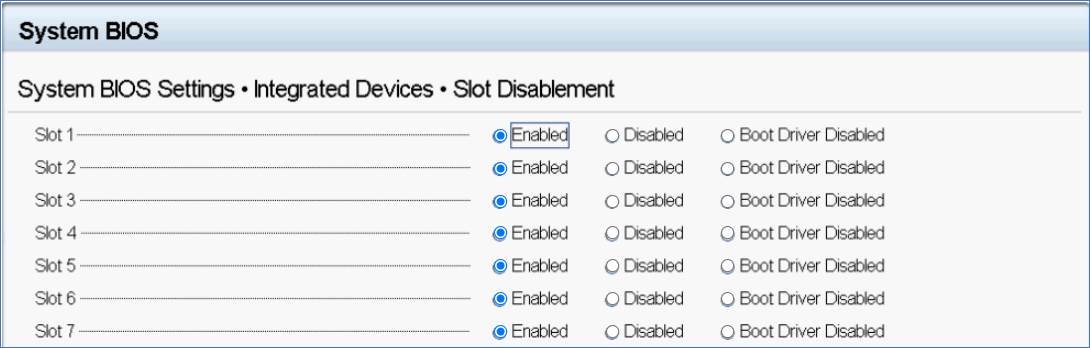
| Slot Disablement | Enables or disables the available PCIe slots on your system. The slot disablement feature controls the configuration of the PCIe cards installed in the specified slot. Slots must be disabled only when the installed peripheral card prevents booting into the operating system or causes delays in system startup. If the slot is disabled, both the Option ROM and UEFI drivers are disabled. Only slots that are present on the system are available for control. | 启用或禁用系统上可用的PCIe插槽。 插槽禁用功能控制指定插槽中安装的PCIe卡的配置。 仅当已安装的外围卡阻止引导至操作系统或导致系统启动延迟时,才必须禁用插槽。 如果禁用了插槽,则将禁用Option ROM和UEFI驱动程序。 仅系统上存在的插槽可用于控制。 |
| Option: Description | 选项:说明 | |
| Slot 1: Enables or disables the PCIe slot 1. This option is set to Enabled by default. | 插槽1:启用或禁用PCIe插槽1。该选项默认设置为启用。 | |
| Slot n: Enables or disables or only the boot driver is disabled for the PCIe slot 3. This option is set to Enabled by default. | 插槽n:启用或禁用或仅启动驱动程序的PCIe插槽3.此选项默认设置为启用禁用。 | |
| Slot Bifurcation | Allows Platform Default Bifurcation, Auto Discovery of Bifurcation and Manual Bifurcation Control. The default is set to Platform Default Bifurcation. The slot bifurcation field is accessible when set to Manual Bifurcation Control and is disabled when set to Platform Default Bifurcation or Auto Discovery of Bifurcation. | 允许手动修改PCIe槽位速率,或设置允许在自动模式。 |
| NOTE: Slot Bifurcation options vary depend on the Riser configurations. | 注:插槽速率选项会有所不同取决于不同的Riser配置。 | |
| Option: Description | 选项:说明 | |
| Auto Discovery Bifurcation Mode: The option is set to Platform Default Bifurcation. | 自动发现模式:该选项设置为默认选项。 | |
| Slot 1 Bifurcation: x16 or x8 or x4 or x4x4x8 or x8x4x4 Bifurcation | 插槽1:X16或x8或x4或x4x4x8或x8x4x4 | |
| Slot 3 Bifurcation: x16 or x8 or x4 or x4x4x8 or x8x4x4 Bifurcation | 插槽n:X16或x8或x4或x4x4x8或x8x4x4 |
更多信息请参考以下手册:
BIOS Setup User Guide for 13th Generation Dell PowerEdge Servers
Setting up BIOS on 14th Generation (14G) Dell EMC PowerEdge Servers
受影响的产品
Rack Servers, Tower Servers文章属性
文章编号: 000191848
文章类型: How To
上次修改时间: 04 3月 2026
版本: 9
从其他戴尔用户那里查找问题的答案
支持服务
检查您的设备是否在支持服务涵盖的范围内。