Avamar:选中“Use certificate authentication for REST communication”复选框时,无法在 AUI 中编辑 DD 系统
摘要: Avamar:选中“Use certificate authentication for REST communication”复选框时,无法在 AUI 中编辑 DD 系统
本文适用于
本文不适用于
本文并非针对某种特定的产品。
本文并非包含所有产品版本。
症状
Avamar 版本 19.x
Avamar:选中“Use certificate authentication for REST communication”复选
框时,无法在 AUI 中编辑 DD 系统 此问题仅存在于 AUI 中,而非 Java GUI 中。
问题在于,当您转至 AUI -> System -> Data Domain -> Edit DD 时,您输入 ddboost 凭据,然后单击 验证失败并显示以下错误消息。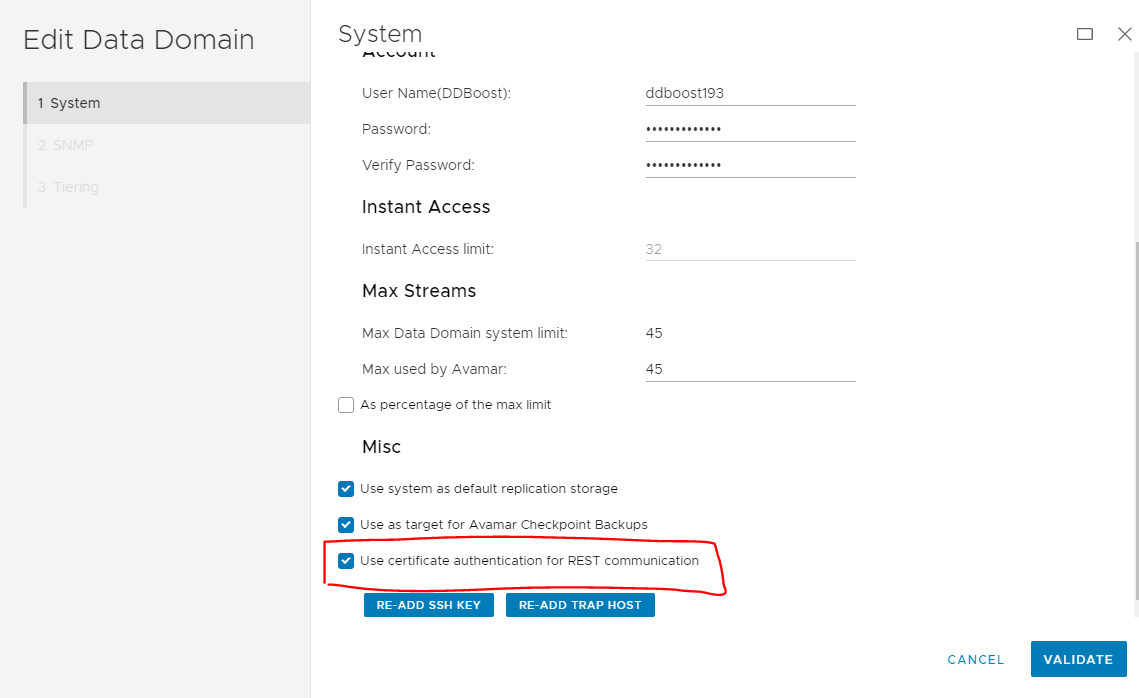
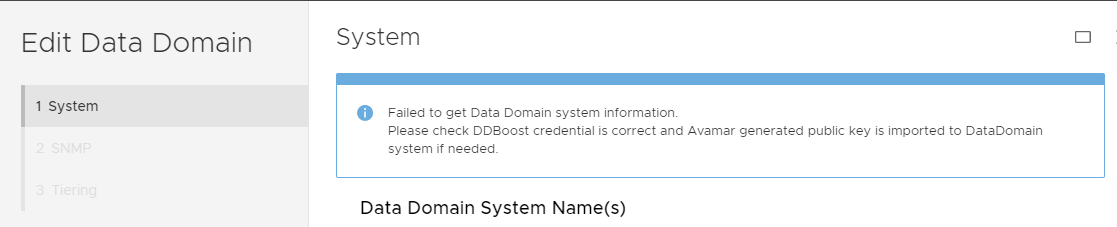
Avamar:选中“Use certificate authentication for REST communication”复选
框时,无法在 AUI 中编辑 DD 系统 此问题仅存在于 AUI 中,而非 Java GUI 中。
问题在于,当您转至 AUI -> System -> Data Domain -> Edit DD 时,您输入 ddboost 凭据,然后单击 验证失败并显示以下错误消息。
Failed to get Data Domain system information.
Please check DDBoost credential is correct and Avamar generated public key is imported to DataDomain system if needed.
原因
仅当启用 Avamar 会话安全功能时,才支持“使用证书身份验证进行 REST 通信”功能。
如果 Avamar 会话安全性处于禁用状态,您将从 症状 部分收到错误。
如果 Avamar 会话安全性处于禁用状态,您将从 症状 部分收到错误。
解决方案
在 Avamar Server 上使用以下命令作为 root,以检查当前会话安全设置是什么:
如果会话安全性处于禁用状态,它将显示以下内容:
如果已启用会话安全性,它将显示以下内容:
行动
如果会话安全性处于禁用状态,只需取消选中 AUI DD Edit 中的“Use certificate authentication for REST communication”复选框即可。
如果已启用会话安全性,则应能够选中该复选框。
enable_secure_config.sh --showconfig
如果会话安全性处于禁用状态,它将显示以下内容:
Current Session Security Settings
----------------------------------
"encrypt_server_authenticate"                           ="false"
"secure_agent_feature_on"                               ="false"
"session_ticket_feature_on"                             ="false"
"secure_agents_mode"                                    ="unsecure_only"
"secure_st_mode"                                        ="unsecure_only"
"secure_dd_feature_on"                                  ="false"
"verifypeer"                                            ="no"

Client and Server Communication set to Default (Workflow Re-Run) mode with No Authentication.
Client Agent and Management Server Communication set to unsecure_only mode.
Secure Data Domain Feature is Disabled.
如果已启用会话安全性,它将显示以下内容:
Current Session Security Settings
----------------------------------
"encrypt_server_authenticate"                           ="true"
"secure_agent_feature_on"                               ="true"
"session_ticket_feature_on"                             ="true"
"secure_agents_mode"                                    ="mixed"
"secure_st_mode"                                        ="mixed"
"secure_dd_feature_on"                                  ="true"
"verifypeer"                                            ="no"
行动
如果会话安全性处于禁用状态,只需取消选中 AUI DD Edit 中的“Use certificate authentication for REST communication”复选框即可。
如果已启用会话安全性,则应能够选中该复选框。
受影响的产品
Avamar, Data Domain文章属性
文章编号: 000203336
文章类型: Solution
上次修改时间: 15 5月 2026
版本: 7
从其他戴尔用户那里查找问题的答案
支持服务
检查您的设备是否在支持服务涵盖的范围内。