无法注册 PowerMax 阵列,VSI 插件程序中出现错误“400 无法发现 VMAX 系统”
摘要: 无法注册存储系统,收到消息“No PowerMax/VMAS arrays visible”,并且在注册存储系统时收到消息“400 无法发现 VMAX 系统,连接无效。状态码:400,错误请求。”
本文适用于
本文不适用于
本文并非针对某种特定的产品。
本文并非包含所有产品版本。
症状
错误
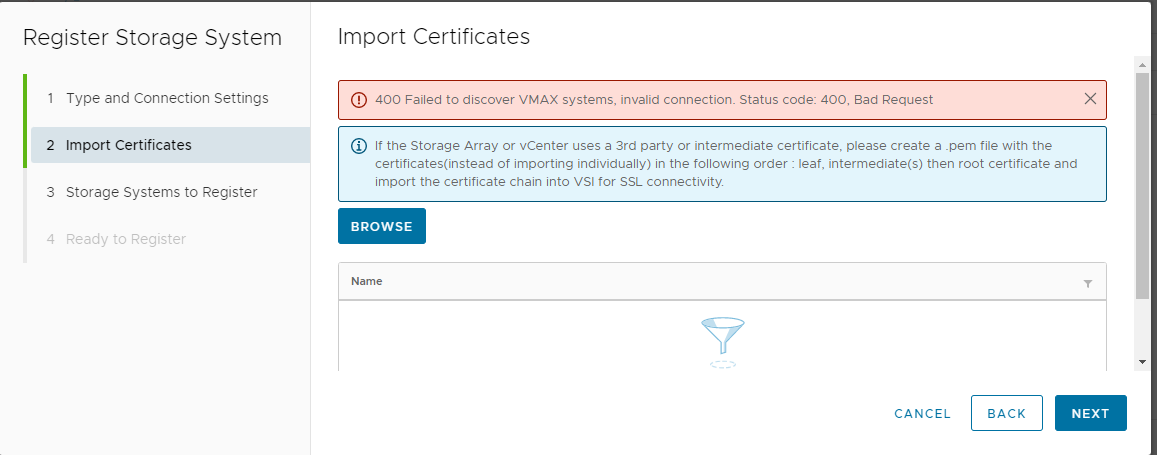
在步骤 3 中,消息
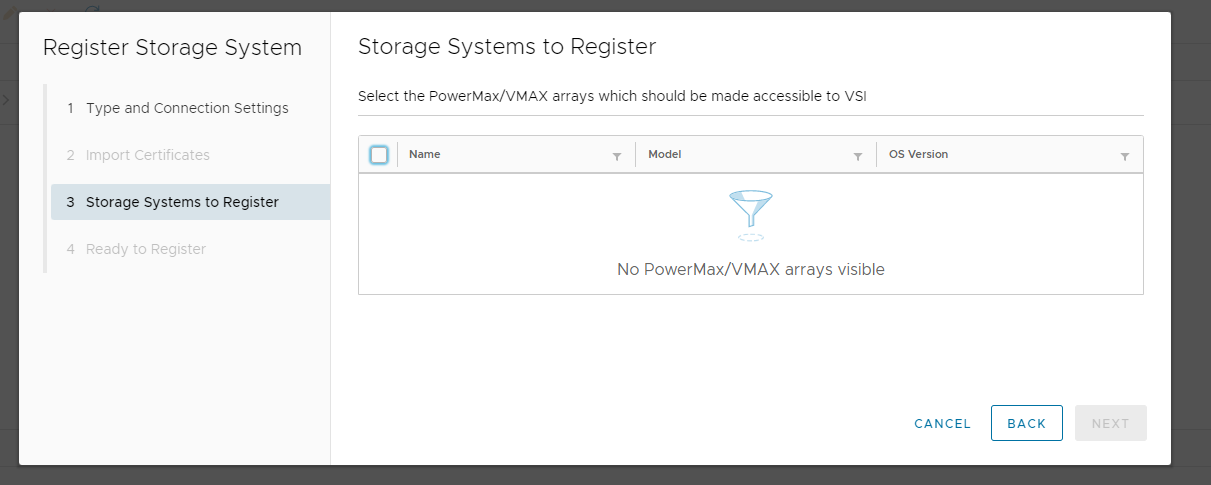
在以下位置看到消息:
在以下位置看到消息:
400 Failed to discover VMAX system, invalid connection. Status code: 400, Bad Request 显示在在虚拟存储集成商 (VSI) 插件程序中注册存储系统的步骤 2 中:
在步骤 3 中,消息
No Storage systems are available to Register in the VSI Plugin 收到。
在以下位置看到消息:
iapi-rest log:
Caused by: com.emc.iapi.core.exception.IapiException: Invalid port number '443' Status code: 400, Bad Request

com.emc.iapi.core.exception.IapiException: Failed to discover VMAX systems, invalid connection. Status code: 400, Bad Request

org.jooby.Err: (400): Bad Request

Caused by: com.emc.iapi.core.exception.IapiException: Failed to discover VMAX systems, invalid connection. Status code: 400, Bad Request
在以下位置看到消息:
iapi-rest-error log:
com.emc.iapi.core.exception.IapiException: Invalid port number '443' Status code: 400, Bad Request

org.jooby.Err: (400): Bad Request

Caused by: com.emc.iapi.core.exception.IapiException: Invalid port number '443' Status code: 400, Bad Request

2022-09-01 14:12:59 [utow task-2] ERROR c.e.p.a.v.c.u.UnisphereConnection:80 - The request to the server failed: com.emc.pie.commons.exception.ErrorStatusCodeException: The HTTP request to host [hostname] failed with status [400]: [connect timed out]

com.emc.iapi.core.exception.IapiException: Failed to discover VMAX systems, invalid connection. Status code: 400, Bad Request

org.jooby.Err: (400): Bad Request

Caused by: com.emc.iapi.core.exception.IapiException: Failed to discover VMAX systems, invalid connection. Status code: 400, Bad Request
原因
对嵌入 Unisphere 的连接请求超时。
容器上长时间 的正常运行时间似乎阻止了从 VSI 插件发现阵列。
此外,还观察到 Unisphere for PowerMax UI 运行缓慢。
容器上长时间 的正常运行时间似乎阻止了从 VSI 插件发现阵列。
此外,还观察到 Unisphere for PowerMax UI 运行缓慢。
解决方案
重新启动管理容器。
重新启动容器后,阵列即可在 VSI 插件程序中注册。
重新启动容器后,阵列即可在 VSI 插件程序中注册。
受影响的产品
Virtual Storage Integrator (VSI), Unisphere for PowerMax文章属性
文章编号: 000203472
文章类型: Solution
上次修改时间: 15 5月 2026
版本: 5
从其他戴尔用户那里查找问题的答案
支持服务
检查您的设备是否在支持服务涵盖的范围内。