PowerEdge:PERC11 或 10HII 配置实用程序和 iDRAC 不支持阵列扩展
摘要: PowerEdge RAID 控制器(PERC11、PERC10)、人机接口基础架构 (HII) 配置实用程序和 iDRAC 不支持阵列扩展。
本文适用于
本文不适用于
本文并非针对某种特定的产品。
本文并非包含所有产品版本。
症状
当磁盘组中的硬盘替换为较大的磁盘时, Expand Virtual Disk 选项在 PERC HII 配置实用程序中不可用:系统设置 -> PERC Setup -> VD Operation 下拉列表: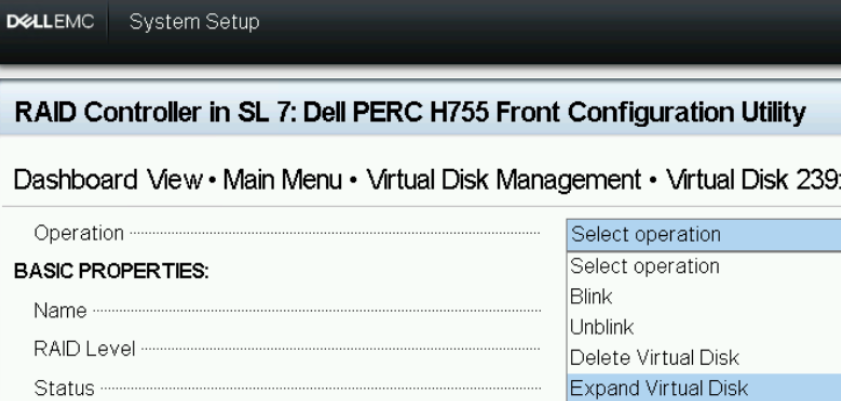
图 1:HII 配置实用程序 — VD作
而 Edit Disk Capacity 选项在 iDRAC WebGUI-Storage-Virtual>> Disks -> VD Actions下拉列表中可用:
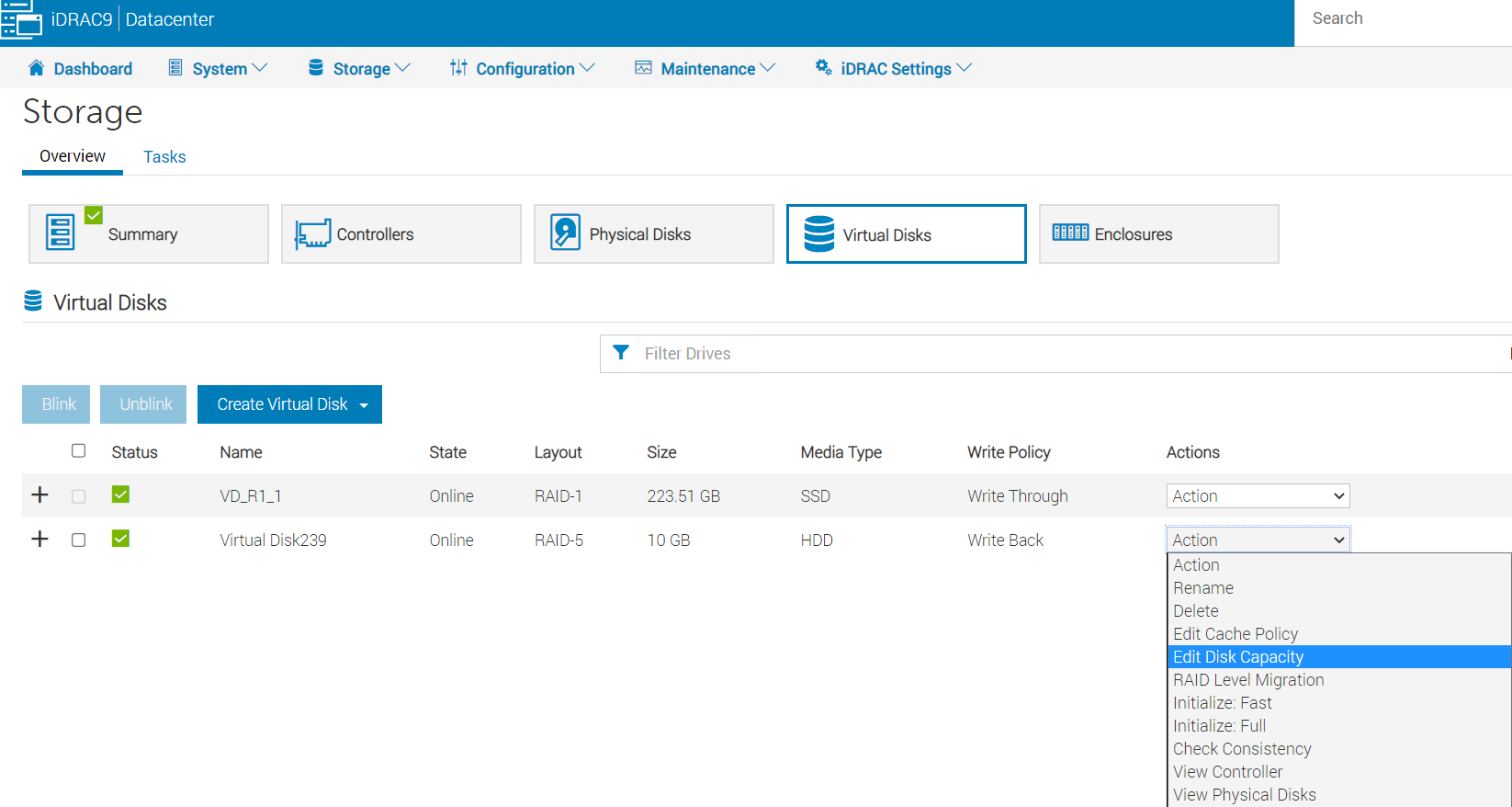
图 2: iDRAC WebGUI->存储->虚拟磁盘
而 Available Space 显示 0.00 GB 选择后 Edit Disk Capacity管理此进程:
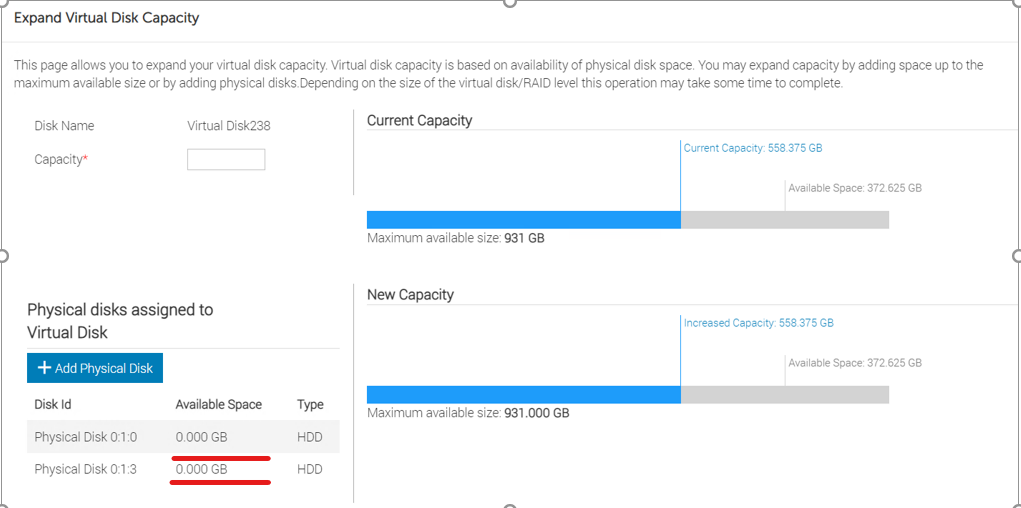
图 3: iDRAC WebGUI-Expand> Virtual Disk Capacity 页面。
尝试通过在“容量 ”字段中输入最大可用大小来扩展虚拟磁盘容量时,作失败: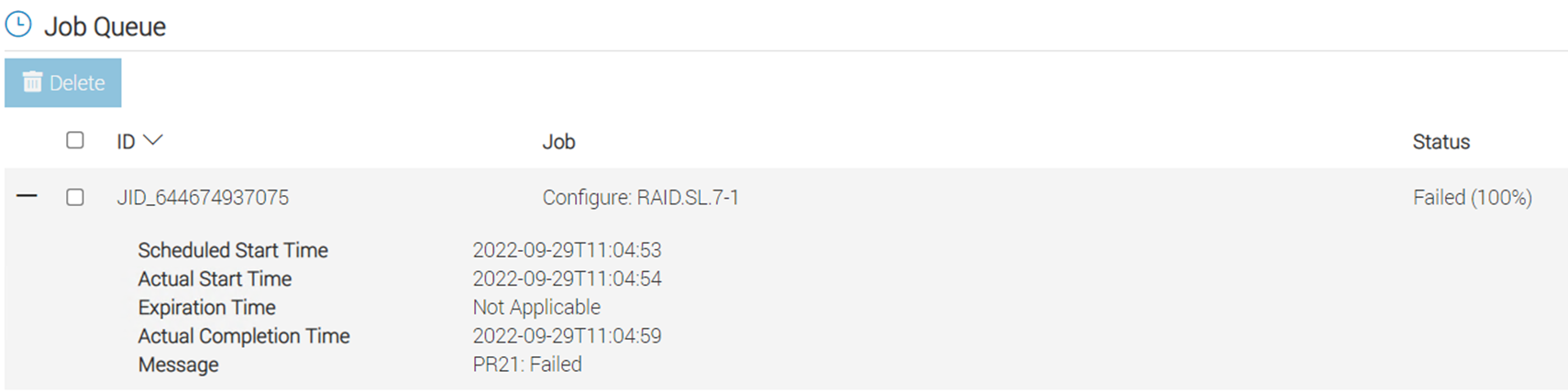
图 4:作业队列错误消息
如果现有阵列中有可用空间,请使用 PERCCLI 实用程序进行扩展。
PERCCLI /cx/vx show expansion 显示下方的可用空间 NoArrExp.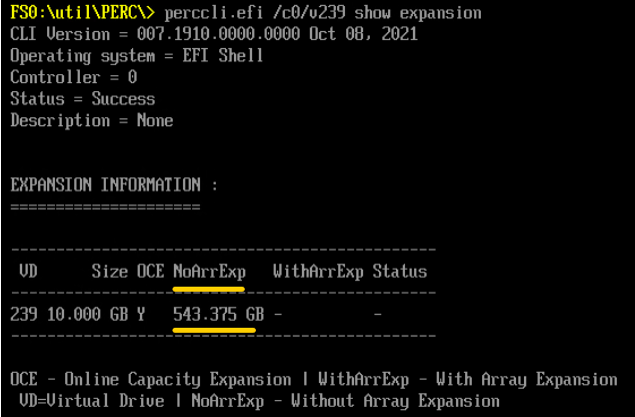
图 5: PERCCLI 输出 NoArrExp
但是,如果磁盘组中的硬盘已更换为更大的磁盘,则可用空间将显示在 WithArrExp 在 PERCCLI /cx/vx show expansion 输出: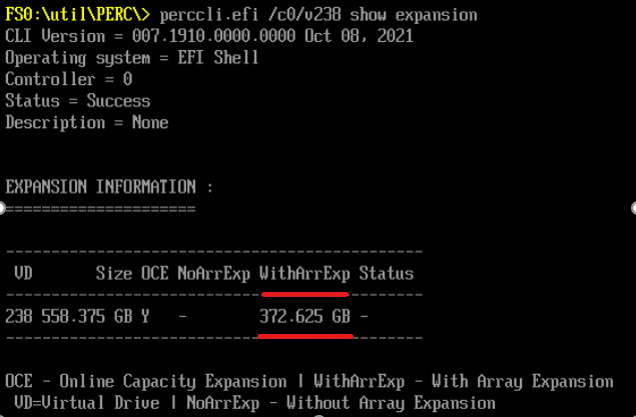
图 6: PERCCLI 输出 WithArrExp
原因
PERC HII 配置实用程序和 iDRAC 不支持扩展阵列容量。
解决方案
使用 Dell 扩展阵列容量 PERCCLI 实用:
1. Run "perccli /cx/vx show expansion" to determine the available expansion space.

2. Then run "perccli /cx/vx expand Size=<xx> expandarray" to perform the array expansion.

            The expand command will expand the virtual drive within the existing array if there is available space, or expand into additional capacity if the drives have been replaced with larger ones.
            The <xx> size value is specified in MB.
            If the "expandarray" option is specified, the full array capacity will be expanded.
            If this option is not specified, only the virtual drive capacity will be expanded rather than the full array.
将所有阵列成员替换为更大的驱动器后,使用 PERCCLI 实用程序,可使用 将现有虚拟磁盘扩展到更大的大小 expandarray 参数。
此行为也记录在 PERC11 用户指南的“PowerEdge RAID 控制器 11 的功能”->“重新配置虚拟磁盘”部分下:https://www.dell.com/support/home/en-us/product-support/product/perc-h755/docs
受影响的产品
OEMR R240, OEMR R250, OEMR XE R250, OEMR R260, OEMR XE R260, OEMR R340, OEMR R350, OEMR XE R350, OEMR R360, OEMR XE R360, OEMR R440, PowerEdge XR2, OEMR R450, OEMR R540, OEMR R550, OEMR R640, OEMR XL R640, OEMR R6415, OEMR R650, OEMR R650xs
, OEMR R6515, OEMR R6525, OEMR R660, OEMR XL R660, OEMR R660xs, OEMR R6615, OEMR R6625, OEMR R740, OEMR XL R740, OEMR R740xd, OEMR XL R740xd, OEMR R740xd2, OEMR R7415, OEMR R7425, OEMR R750, OEMR R750xa, OEMR R750xs, OEMR R7515, OEMR R7525, OEMR R760, OEMR R760xa, OEMR R760XD2, OEMR XL R760, OEMR R760xs, OEMR R7615, OEMR R7625, OEMR R840, OEMR R860, OEMR R940, OEMR R940xa, OEMR R960, OEMR T140, OEMR T150, OEMR T340, OEMR T350, OEMR T360, OEMR T440, OEMR T550, OEMR T560, OEMR T640, OEMR XL T640, OEMR XL R240, OEMR XL R340, OEMR XL R660xs, OEMR XL R6615, OEMR XL R6625, OEMR XL R760xs, OEMR XL R7615, OEMR XL R7625, OEMR XR11, OEMR XR12, PowerEdge RAID Controller H745, PowerEdge RAID Controller H745P MX, PowerEdge RAID Controller H750 Adapter SAS, PowerEdge RAID Controller H755 Adapter, PowerEdge RAID Controller H755 MX Adapter, PowerEdge RAID Controller H755N Front NVMe, PowerEdge RAID Controller H755 Front SAS, Poweredge C4140, PowerEdge C6420, PowerEdge C6520, PowerEdge C6525, PowerEdge C6615, PowerEdge C6620, PowerEdge FC640, PowerEdge HS5610, PowerEdge HS5620, PowerEdge M640, PowerEdge M640 (for PE VRTX), PowerEdge MX740C, PowerEdge MX750c, PowerEdge MX760c, PowerEdge MX840C, PowerEdge R240, PowerEdge R250, PowerEdge R260, PowerEdge R340, PowerEdge R350, PowerEdge R360, PowerEdge R440, PowerEdge R450, PowerEdge R540, PowerEdge R550, PowerEdge R640, PowerEdge R6415, PowerEdge R650, PowerEdge R650xs, PowerEdge R6515, PowerEdge R6525, PowerEdge R660, PowerEdge R660xs, PowerEdge R6615, PowerEdge R6625, PowerEdge R740, PowerEdge R740XD, PowerEdge R740XD2, PowerEdge R7415, PowerEdge R7425, PowerEdge R750, PowerEdge R750XA, PowerEdge R750xs, PowerEdge R7515, PowerEdge R7525, PowerEdge R760, PowerEdge R760XA, PowerEdge R760xd2, PowerEdge R760xs, PowerEdge R7615, PowerEdge R7625, PowerEdge R840, PowerEdge R860, PowerEdge R940, PowerEdge R940xa, PowerEdge R960, PowerEdge RAID Controller H740P, PowerEdge T140, PowerEdge T150, PowerEdge T160, PowerEdge T340, PowerEdge T350, PowerEdge T360, PowerEdge T440, PowerEdge T550, PowerEdge T560, PowerEdge T640, PowerEdge XR11, PowerEdge XR12
...
产品
PowerEdge文章属性
文章编号: 000203958
文章类型: Solution
上次修改时间: 15 5月 2026
版本: 6
从其他戴尔用户那里查找问题的答案
支持服务
检查您的设备是否在支持服务涵盖的范围内。