Dell Networking - 通过中继端口通道连接到 Dell PowerSwitch 的 HP 交换机上报告 PVID 不匹配
摘要: PVID 不匹配 报告于 HP 交换机通过中继端口通道连接到运行 OS9 或 OS10 的 Dell PowerSwitch 型号。
本文适用于
本文不适用于
本文并非针对某种特定的产品。
本文并非包含所有产品版本。
症状
受影响的版本
运行 OS9 或 OS10 的所有 Dell PowerSwitch 型号受影响的平台
所有 OS9 和 OS10 平台描述
HP 交换机通过中继端口连接到 Dell PowerSwitch 时显示以下警告消息。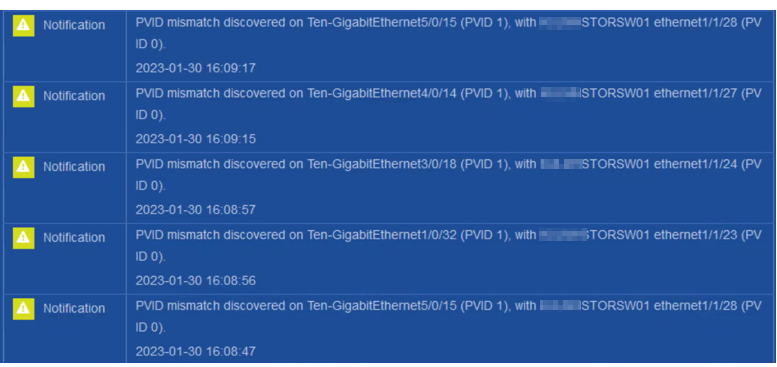
原因
PVID(本机 VLAN)在戴尔交换机的端口通道中继链路上报告为 0,而在 HP 交换机上报告为 1。
它取决于供应商在 LLDP PVID 中用于端口通道中继链路的值。
以下是来自 HP 交换机的 LLDP 数据包,如 Wireshark 中所示。
PVID(本机 VLAN)在 HP 交换机的端口通道中继链路上报告为 1。
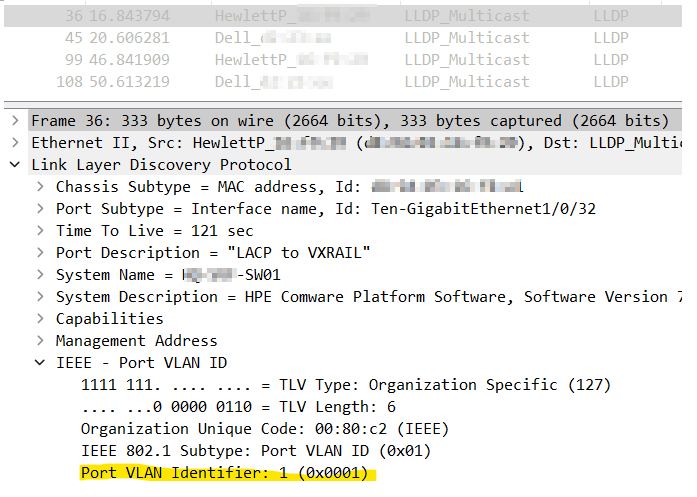
以下是来自 DELL (OS10) 交换机的 LLDP 数据包,如 Wireshark 中所示。
在戴尔交换机与 HP 交换机的端口通道中继链路之间的链路上,PVID(本机 VLAN)报告为 0。
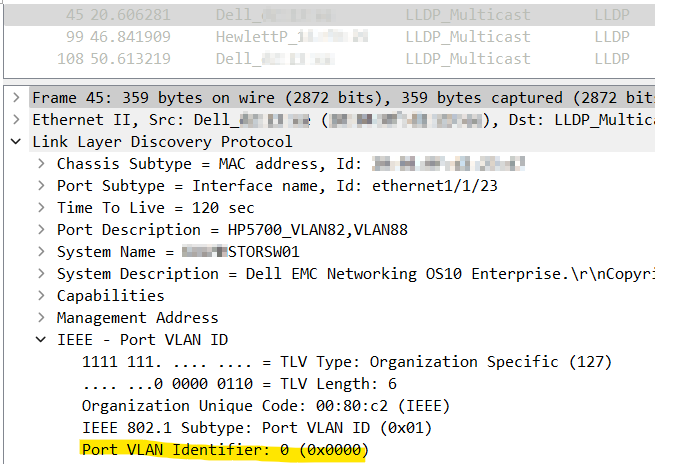
它取决于供应商在 LLDP PVID 中用于端口通道中继链路的值。
以下是来自 HP 交换机的 LLDP 数据包,如 Wireshark 中所示。
PVID(本机 VLAN)在 HP 交换机的端口通道中继链路上报告为 1。
以下是来自 DELL (OS10) 交换机的 LLDP 数据包,如 Wireshark 中所示。
在戴尔交换机与 HP 交换机的端口通道中继链路之间的链路上,PVID(本机 VLAN)报告为 0。
解决方案
解决方法
在 LLDP 中禁用 TLV PVIDOS9
no “advertise dot1-tlv port-vlan-id
OS10
no lldp tlv-select dot1tlv port-vlan-id
修复
无 — 这是预期行为。
受影响的产品
S Series, OS9, PowerSwitch S3048-ON, PowerSwitch S4048-ON, PowerSwitch S4810P, PowerSwitch S4810-ON, PowerSwitch S4820T, PowerSwitch S5000, PowerSwitch S6000, PowerSwitch S6000 ON, C1048P Port Extender, C9000 Series Line Cards
, C9010 Modular Chassis Switch, Dell EMC Networking MX5108n, Dell EMC Networking MX9116n, PowerSwitch S4048T-ON, PowerSwitch S4112F-ON/S4112T-ON, PowerSwitch S4128F-ON/S4128T-ON, PowerSwitch S4148F-ON/S4148T-ON/S4148FE-ON, PowerSwitch S4148U-ON, PowerSwitch S4248FB-ON /S4248FBL-ON, PowerSwitch S5048F-ON, PowerSwitch S5148F-ON, PowerSwitch S5212F-ON, PowerSwitch S5224F-ON, PowerSwitch S5232F-ON, PowerSwitch S5248F-ON, PowerSwitch S5296F-ON, PowerSwitch S5448F-ON, PowerSwitch S6010-ON, PowerSwitch S6100-ON, PowerSwitch Z9100-ON, PowerSwitch Z9264F-ON, PowerSwitch Z9332F-ON, PowerSwitch Z9432F-ON, SmartFabric OS10 Software
...
文章属性
文章编号: 000209775
文章类型: Solution
上次修改时间: 19 9月 2023
版本: 2
从其他戴尔用户那里查找问题的答案
支持服务
检查您的设备是否在支持服务涵盖的范围内。