NetWorker: File mancanti nel backup del file system di Windows per client Azure
摘要: Il file system Windows su Azure ignora i file anche se non esiste alcuna direttiva NetWorker a tale scopo.
本文适用于
本文不适用于
本文并非针对某种特定的产品。
本文并非包含所有产品版本。
症状
Il file system Windows su Azure ignora i file anche se non esiste alcuna direttiva NetWorker a tale scopo.
L'output del salvataggio del debug mostra
L'output del salvataggio del debug mostra
87713:save: Found prototype specification for '\\?\GLOBALROOT\Device\HarddiskVolumeShadowCopy1288\': skip : hiberfil.sys
87713:save: Found prototype specification for '\\?\GLOBALROOT\Device\HarddiskVolumeShadowCopy1288\Areas Compartidas\':+ skip : *.*
原因
Il file system di backup si trova nel volume di archiviazione di Azure. Il sistema utilizza il writer del servizio Copia Shadow del volume (VSS) "Sync Share Service Writer". Ignora i file per progettazione.
Per verificare che questa sia la causa,
- Aprire un prompt dei comandi come amministratore ed eseguire:
C:\>  DISKSHADOW /l writers.txt
DISKSHADOW> LIST WRITERS DETAILED
DISKSHADOW> exit
- Esaminare il file di output per writers.txt. Se viene visualizzato il seguente messaggio, il problema è confermato.
* WRITER "Sync Share Service Writer"
.////
and that writer contains Components with affected drive
            - Components:
            - File List: Path = J:\DataFiles, Filespec = *.*
            - Paths affected by this component:
                - J:\DataFiles
            - Volumes affected by this component:
                               - \\?\Volume{c34a534a-63a2-4aee-b47a-e2092dc7a901}\ [J:\]
解决方案
Disattivare VSS per eseguire il backup dei volumi di storage Azure con il comando:
VSS:*=off
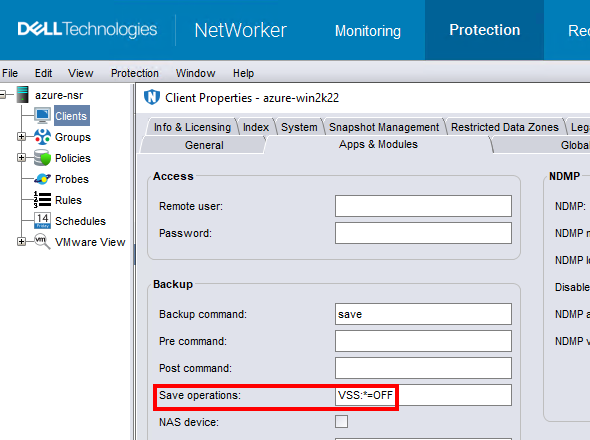
NOTA: Eseguire questa operazione solo per i client che eseguono il backup dei dati del file system. L'esecuzione di un backup senza VSS rende impossibile eseguire il backup delle finestre
DISASTER_RECOVERY:\ set di salvataggio; Ciò significa che il ripristino bare-metal (BMR) della macchina virtuale Windows non sarebbe possibile.
受影响的产品
NetWorker产品
NetWorker Family文章属性
文章编号: 000210906
文章类型: Solution
上次修改时间: 04 3月 2026
版本: 3
从其他戴尔用户那里查找问题的答案
支持服务
检查您的设备是否在支持服务涵盖的范围内。