Data Domain DD6400:在 DD6400 上添加更换磁盘
摘要: 本文介绍如何在 DD6400 型号上添加更换磁盘。
本文适用于
本文不适用于
本文并非针对某种特定的产品。
本文并非包含所有产品版本。
说明
具有更换磁盘且显示未知“U”的其他 Data Domain 产品可以是“磁盘取消损坏”,使其成为备用磁盘。DD6400 等存储池产品仅接受“storage add”命令,以将新磁盘添加到系统中。
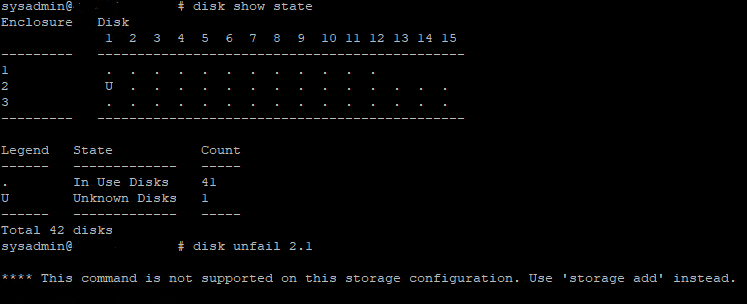
图 1:Data Domain CLI — 磁盘显示状态、磁盘取消故障
图 1:Data Domain CLI — 磁盘显示状态、磁盘取消故障
- 下面是将替换操作系统(1.1 和 1.2)或数据磁盘添加到 DD6400 的 CLI 命令。
- 运行 storage add force disk 命令,将更换磁盘添加到系统,其中磁盘是更换磁盘的数量
# storage add force disk 2.1

The 'storage add force' command will make the disk available to the
        filesystem. Any existing data on this will be lost.
        Are you sure? (yes|no) [no]: yes

Checking storage requirements...done
Adding disk 2.1 to the system...done

Updating system information...done

Disk 2.1 successfully added to the system
- 使用以下命令检查 Data Domain 系统是否识别磁盘驱动器。在命令显示屏中, 磁盘状态 应为备用或重建。
# disk show state

Enclosure   Disk
             1  2  3  4  5  6  7  8  9  10 11 12 13 14 15
---------   ----------------------------------------------
1            .  .  .  .  .  .  .  .  .  .  .  .
2            v  .  .  .  .  .  .  .  .  .  .  .  .  .  .
---------   ----------------------------------------------

Legend   State             Count
------   ---------------   -----
.        In Use Disks      26
v        Available Disks   1
------   ---------------   -----
Total 27 disks

Estimated total time remaining for reconstruction (minutes) 874
- 下面是将更换磁盘添加到 DD6400 缓存层(1.3 和 1.4)的 CLI 命令。
- 运行 storage add disk 1. 命令以将磁盘添加回高速缓存层,其中 是来自硬件故障警报消息的磁盘数量。
- 运行 filesys expand 命令,将新高速缓存磁盘设置为正在使用中。
受影响的产品
DD6400 Appliance产品
Data Domain文章属性
文章编号: 000214343
文章类型: How To
上次修改时间: 18 5月 2026
版本: 5
从其他戴尔用户那里查找问题的答案
支持服务
检查您的设备是否在支持服务涵盖的范围内。