Connectrix:B 系列:执行 configdownload 命令时遇到配置文件中的标头无效错误
摘要: 使用 configdownload 命令将备份的交换机配置加载到交换机时,会出现此问题。
本文适用于
本文不适用于
本文并非针对某种特定的产品。
本文并非包含所有产品版本。
症状
Error: Invalid header in config file
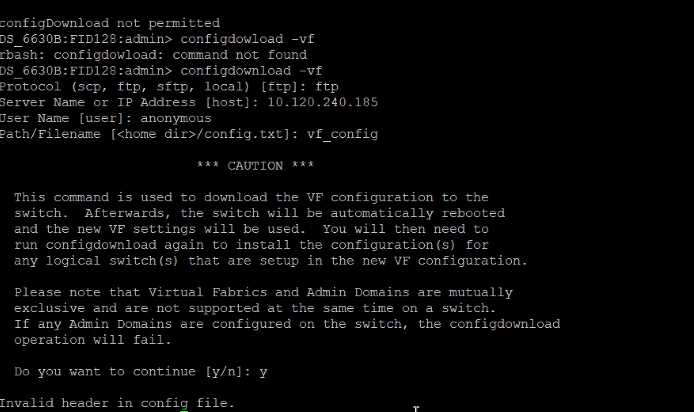
原因
此问题是由于交换机横幅图案的差异造成的。
在交换机更换过程中会遇到这种情况,其中旧交换机配置文件包含不同的交换机横幅。新的交换机配置文件具有不同的模式,从而导致不匹配。
在交换机更换过程中会遇到这种情况,其中旧交换机配置文件包含不同的交换机横幅。新的交换机配置文件具有不同的模式,从而导致不匹配。
解决方案
步骤 1:比较旧交换机配置文件和新交换机配置文件,并注意横幅中的差异。
步骤2:例如:
旧交换机横幅
============================================================= ATTENTION: It is recommended that you change the default passwords for all the switch accounts. Refer to the product release notes and the administrator's guide if you need further information. =============================================================
新交换机横幅:
-------------------------------------------------------------------------------------------- ATTENTION It is recommended that you change the default passwords for all the switch accounts. Refer to the product release notes and the administrator's guide if you need further information. --------------------------------------------------------------------------------------------
步骤 3:根据旧交换机横幅手动编辑新交换机横幅。
步骤4:保存配置文件,然后尝试执行 configdownload。
受影响的产品
Connectrix B-Series文章属性
文章编号: 000214361
文章类型: Solution
上次修改时间: 18 5月 2026
版本: 5
从其他戴尔用户那里查找问题的答案
支持服务
检查您的设备是否在支持服务涵盖的范围内。