PowerProtect Data Manager:无法创建存储单元,错误代码为 CFG0001
摘要: 无法创建存储单元,错误代码为 CFG0001
本文适用于
本文不适用于
本文并非针对某种特定的产品。
本文并非包含所有产品版本。
症状
创建新策略时,无法创建存储单元。
从 UI:
从 UI:
CFG0001: xxx: Unable to configure the protection policy because of the following error: Failed to connect to PowerProtect DD System. errorNum: 5007 errorMessage: operation is not implemented从作业日志中:
ddboost.log: 2023-08-11T23:15:17.931Z ERROR [] [pool-26-thread-1] [00000000-0000-4000-b000-000000000000][][][TRACE_ID:81a3388041e49793;JOB_ID:9ea4884359c07119][plc.id:2eab4e3d,asset.id:,pcs.id:] ddboost.log(52) - severity:1 msg:[D688:7FF690077BA0] ddp_connect_with_config() failed, Hostname: xxx, Err: 5007-nfs ddp getinfo failed (nfs: Operation not supported)已确认不存在网络问题、证书问题,并且已在使用 sysadmin 添加 Data Domain(发现工作正常)。
原因
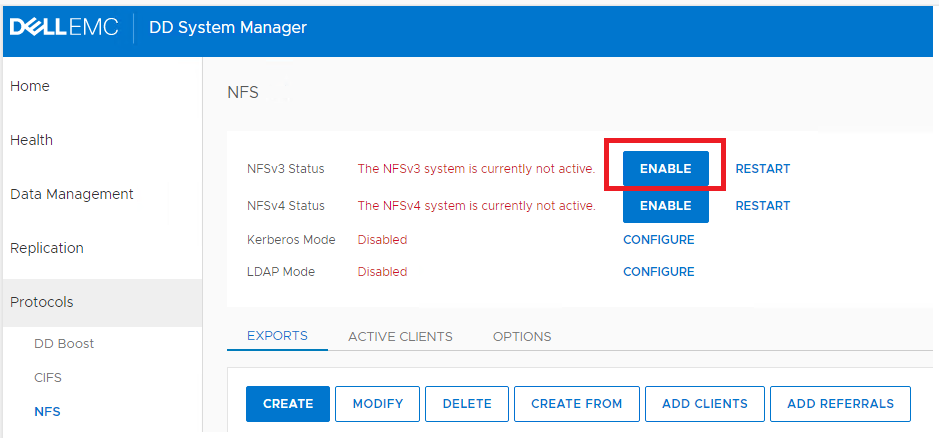
Data Domain NFS 服务处于禁用状态。
解决方案
在 Data Domain UI 上,单击“ENABLE”以启用 NFSv3。
受影响的产品
PowerProtect Data Manager, PowerProtect Software文章属性
文章编号: 000216695
文章类型: Solution
上次修改时间: 18 5月 2026
版本: 6
从其他戴尔用户那里查找问题的答案
支持服务
检查您的设备是否在支持服务涵盖的范围内。