Openshift:群集 LCM 在节点重新启动期间失败
摘要: 由于 CSI 控制器 Pod 和返厂维修管理器 Pod 陷入死锁,LCM 在节点重新启动期间失败。
本文适用于
本文不适用于
本文并非针对某种特定的产品。
本文并非包含所有产品版本。
症状
LCM 在 OCP 升级或节点重新启动期间失败,更新 UI 无法访问。
登录 OCP,运行“oc get pods -n dell-acp”命令以检查 Pod 状态,发现一个 csi-vxflexos-controller pod 处于 ImagePullBackOff 状态,一个 mcp-depot-manager pod 处于 ContainerCreating 状态。例如:
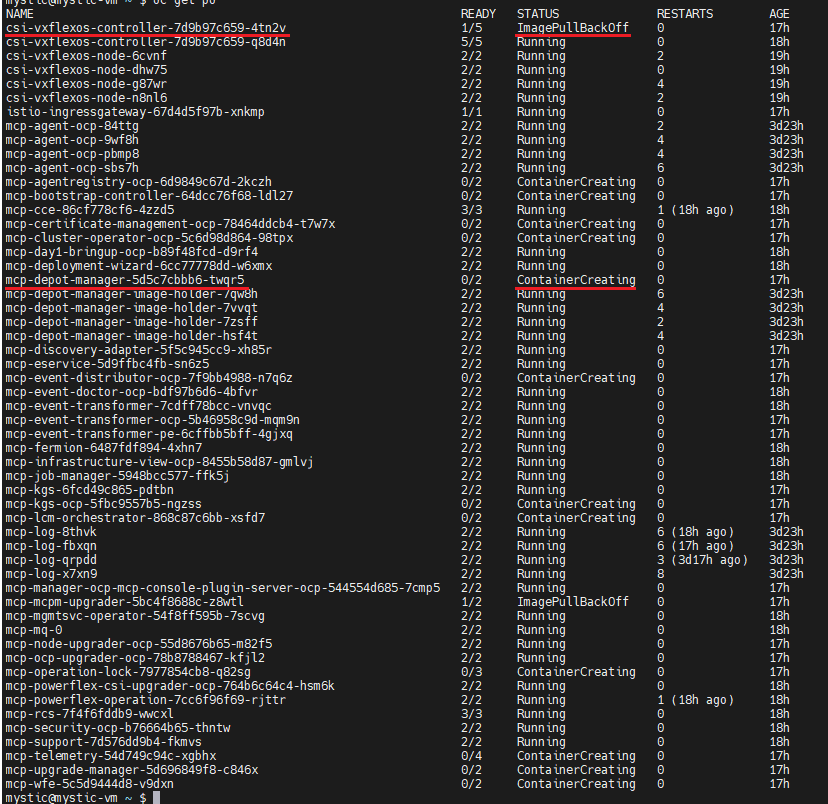
运行“oc logs <pod_name> -n dell-acp -c driver”命令以检查 Pod 日志。
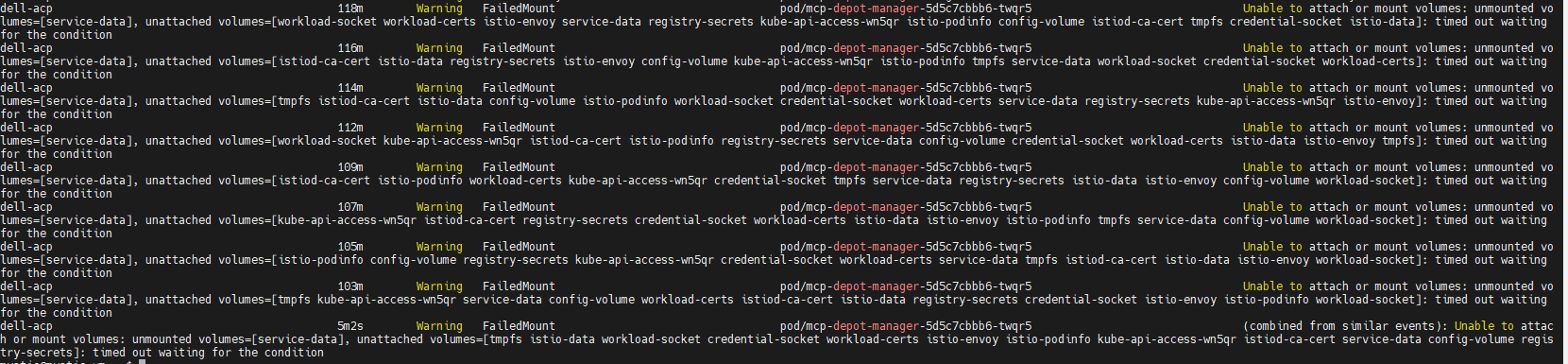
运行“oc describe pod pod_name> -n dell-acp”命令检查ContainerCreating mcp-depot-manager(在上面的示例屏幕截图中,pod名称为mcp-depot-manager-5d5c7cbbb6-twqr5),它报告FailedMount警告如下:运行“oc get nodes<”命令查看节点状态,有一个节点处于SchedulingDisabled状态,例如:

登录 OCP,运行“oc get pods -n dell-acp”命令以检查 Pod 状态,发现一个 csi-vxflexos-controller pod 处于 ImagePullBackOff 状态,一个 mcp-depot-manager pod 处于 ContainerCreating 状态。例如:
运行“oc logs <pod_name> -n dell-acp -c driver”命令以检查 Pod 日志。
- 在“Running csi-vxflexos-controller”pod 中,日志显示它正在尝试获取主机箱租约,例如:
mystic@mystic-vm:~$ oc logs csi-vxflexos-controller-7d9b97c659-q8d4n -n dell-acp -c driver
I0918 08:33:23.460955 1 leaderelection.go:248] attempting to acquire leader lease dell-acp/driver-csi-vxflexos-dellemc-com...
I0918 08:33:23.460955 1 leaderelection.go:248] attempting to acquire leader lease dell-acp/driver-csi-vxflexos-dellemc-com...
- 在 ImagePullBackOff csi-vxflexos-controller pod 中,日志显示它已成功获取主机箱租约,例如:
mystic@mystic-vm:~$ oc logs csi-vxflexos-controller-7d9b97c659-4tn2v -n dell-acp -c driver
I0918 09:07:30.076298 1 leaderelection.go:248] attempting to acquire leader lease dell-acp/driver-csi-vxflexos-dellemc-com...
I0918 09:07:46.074524 1 leaderelection.go:258] successfully acquired lease dell-acp/driver-csi-vxflexos-dellemc-com
time=“2023-09-18T09:07:46Z” level=info msg=“configured 69de1f95f50e390f” allSystemNames= endpoint=“https://dellpowerflex.h01.com” isDefault=true nasName=0xc000489950 nfsAcls= password=“********” skipCertificateValidation=false systemID=69de1f95f50e390f user=admin
time=“2023-09-18T09:07:46Z” level=info msg=“驱动程序配置文件” file=/vxflexos-config-params/driver-config-params.yaml
time=“2023-09-18T09:07:46Z” level=info msg=“Read CSI_LOG_FORMAT from log configuration file” format=text
time=“2023-09-18T09:07:46Z” level=info msg=“Read CSI_LOG_LEVEL from log configuration file” fields.level=debug
time=“2023-09-18T09:07:46Z” level=info msg=“array configuration file” file=/vxflexos-config/config
time=“2023-09-18T09:07:46Z” level=info msg=“探测所有数组。阵列数量:1“
time=”2023-09-18T09:07:46Z“ level=info msg=”default array is set to array ID:69de1f95f50e390f“
time=”2023-09-18T09:07:46Z“ level=info msg=”69de1f95f50e390f 是默认阵列,跳过 VolumePrefixToSystems 映射更新。\n“
time=”2023-09-18T09:07:46Z“ level=info msg=”array 69de1f95f50e390f probed successfully“
time=”2023-09-18T09:07:46Z“ level=info msg=”configured csi-vxflexos.dellemc.com“ IsApproveSDCEnabled=false IsHealthMonitorEnabled=false IsQuotaEnabled=false IsSdcRenameEnabled=false MaxVolumesPerNode=0 allowRWOMultiPodAccess=false autoprobe=true externalAccess= mode=controller nfsAcls= privatedir=/dev/disk/csi-vxflexos sdcGUID= sdcPrefix= thickprovision=false
time=“2023-09-18T09:07:46Z” level=info msg=“Identity service registered”
time=“2023-09-18T09:07:46Z” level=info msg=“controller service registered”
time=“2023-09-18T09:07:46Z” level=info msg=“Registering additional GRPC servers”
time=“2023-09-18T09:07:46Z” level=info msg=serving endpoint=“unix:///var/run/csi/csi.sock”
I0918 09:07:30.076298 1 leaderelection.go:248] attempting to acquire leader lease dell-acp/driver-csi-vxflexos-dellemc-com...
I0918 09:07:46.074524 1 leaderelection.go:258] successfully acquired lease dell-acp/driver-csi-vxflexos-dellemc-com
time=“2023-09-18T09:07:46Z” level=info msg=“configured 69de1f95f50e390f” allSystemNames= endpoint=“https://dellpowerflex.h01.com” isDefault=true nasName=0xc000489950 nfsAcls= password=“********” skipCertificateValidation=false systemID=69de1f95f50e390f user=admin
time=“2023-09-18T09:07:46Z” level=info msg=“驱动程序配置文件” file=/vxflexos-config-params/driver-config-params.yaml
time=“2023-09-18T09:07:46Z” level=info msg=“Read CSI_LOG_FORMAT from log configuration file” format=text
time=“2023-09-18T09:07:46Z” level=info msg=“Read CSI_LOG_LEVEL from log configuration file” fields.level=debug
time=“2023-09-18T09:07:46Z” level=info msg=“array configuration file” file=/vxflexos-config/config
time=“2023-09-18T09:07:46Z” level=info msg=“探测所有数组。阵列数量:1“
time=”2023-09-18T09:07:46Z“ level=info msg=”default array is set to array ID:69de1f95f50e390f“
time=”2023-09-18T09:07:46Z“ level=info msg=”69de1f95f50e390f 是默认阵列,跳过 VolumePrefixToSystems 映射更新。\n“
time=”2023-09-18T09:07:46Z“ level=info msg=”array 69de1f95f50e390f probed successfully“
time=”2023-09-18T09:07:46Z“ level=info msg=”configured csi-vxflexos.dellemc.com“ IsApproveSDCEnabled=false IsHealthMonitorEnabled=false IsQuotaEnabled=false IsSdcRenameEnabled=false MaxVolumesPerNode=0 allowRWOMultiPodAccess=false autoprobe=true externalAccess= mode=controller nfsAcls= privatedir=/dev/disk/csi-vxflexos sdcGUID= sdcPrefix= thickprovision=false
time=“2023-09-18T09:07:46Z” level=info msg=“Identity service registered”
time=“2023-09-18T09:07:46Z” level=info msg=“controller service registered”
time=“2023-09-18T09:07:46Z” level=info msg=“Registering additional GRPC servers”
time=“2023-09-18T09:07:46Z” level=info msg=serving endpoint=“unix:///var/run/csi/csi.sock”
运行“oc describe pod pod_name> -n dell-acp”命令检查ContainerCreating mcp-depot-manager(在上面的示例屏幕截图中,pod名称为mcp-depot-manager-5d5c7cbbb6-twqr5),它报告FailedMount警告如下:运行“oc get nodes<”命令查看节点状态,有一个节点处于SchedulingDisabled状态,例如:
原因
如果活动的 csi-controller pod 和 mcp-depot-manager 位于同一节点上,则当 LCM 重新启动节点时,csi-controller 和 depot-manager 将重新安排到新节点。在 pod 启动期间,csi-controller 和 depot-manager 陷入死锁,无法启动。
解决方案
1.运行“oc get pods -n dell-acp |grep csi”命令以识别不良状态 CSI 控制器 Pod 的 Pod 名称。
2.运行“oc delete pod <pod_name> -n dell-acp”命令以删除识别的 pod/pod。
例如:

3。等待几分钟,然后运行“oc get pods -n dell-acp”命令,确保所有 Pod 都处于正在运行状态。如果仍有 csi-controller pod 或 mcp-depot-manager 未运行,请再次重试上述步骤。
4.在所有 Pod 都处于“Running”状态之前,重试 LCM 以继续群集升级。
2.运行“oc delete pod <pod_name> -n dell-acp”命令以删除识别的 pod/pod。
例如:
3。等待几分钟,然后运行“oc get pods -n dell-acp”命令,确保所有 Pod 都处于正在运行状态。如果仍有 csi-controller pod 或 mcp-depot-manager 未运行,请再次重试上述步骤。
4.在所有 Pod 都处于“Running”状态之前,重试 LCM 以继续群集升级。
文章属性
文章编号: 000217992
文章类型: Solution
上次修改时间: 18 9月 2026
版本: 4
从其他戴尔用户那里查找问题的答案
支持服务
检查您的设备是否在支持服务涵盖的范围内。