在部署 Windows S 模式和 SE 教育版期间,审核模式下显示错误消息
摘要: 本文提供有关在部署 Windows 10 S 模式、Windows 11 S 模式和 Windows 11 SE 教育版期间在审核模式下显示的错误消息的信息。
本文适用于
本文不适用于
本文并非针对某种特定的产品。
本文并非包含所有产品版本。
症状
受影响的平台:
- Latitude 3120
- Latitude 3140
- Latitude 3190
- Inspiron 灵越 3880
- Inspiron 灵越 3891
- Inspiron 灵越 3910
- Inspiron 灵越 5301
- Inspiron 灵越 5402/5409
- Inspiron 灵越 5405
- Inspiron 灵越 5502/5509
- Inspiron 灵越 5505
- Inspiron 灵越 13 5310
- Inspiron 灵越 13 5320
- Inspiron 灵越 14 5410/5418
- Inspiron 灵越 14 5415
- Inspiron 灵越 14 5420
- Inspiron 灵越 14 5425
- Inspiron 灵越 14 5406 二合一电脑
- Inspiron 灵越 14 5410 二合一电脑
- Inspiron 灵越 14 7415 二合一电脑
- Inspiron 灵越 14 7420 二合一电脑
- Inspiron 灵越 14 7425 二合一电脑
- Inspiron 灵越 15 3501
- Inspiron 灵越 15 3502
- Inspiron 灵越 15 3505
- Inspiron 灵越 15 3510
- Inspiron 灵越 15 3511
- Inspiron 灵越 15 3515
- Inspiron 灵越 15 3520
- Inspiron 灵越 15 3521
- Inspiron 灵越 15 3525
- Inspiron 灵越 15 5510/5518
- Inspiron 灵越 15 5515
- Inspiron 灵越 16 5620
- Inspiron 灵越 16 5625
- Inspiron 16 7610
- Inspiron 灵越 16 7620 二合一电脑
- Vostro 成就 5301
受影响的操作系统:
- Windows 10 S 模式
- Windows 11 S 模式
- Windows 11 SE 教育版
如果设备安装了 Windows 10 S 模式、Windows 11 S 模式或 Windows 11 SE,然后尝试重新安装相同的作系统,则会失败并显示以下错误:
Windows 无法解析或处理无人参与应答文件 [C:\Windows\Panther\Unattend.xml]
原因
默认情况下,S 模式和 SE 不允许运行任何命令,这是作系统级别的限制。由于此限制,执行 unattend.xml 调用的批处理脚本会导致此错误消息。
解决方案
通过在 BIOS 中禁用“Secure Boot”来安装 S 模式或 SE,使安装成功。Dell Technologies 不建议禁用安全启动。在启用安全启动的情况下再次重复相同的步骤。
按照以下分步过程在启用安全启动的情况下恢复设备:
- 连接带有 S 模式或 SE 的 USB 闪存盘 。
- 打开 设备。
- 按 F2 键几次(屏幕上出现戴尔标识时按 F2 键)引导至 UEFI 固件设置。
- 在 UEFI 固件设置>中,引导配置>安全引导>关闭。
- 单击 应用 并 退出 UEFI 固件设置(此过程将重新启动设备)。
- 出现 Dell 徽标时按 F12 键以显示 Boot device selection menu。
- 选择 USB Key ,然后按 Enter 键(这将启动从 USBkey 启动)。
- 按照屏幕上的说明开始部署。
- 设备进入开箱即用体验 (OOB) 模式后,按住电源按钮五秒钟以关闭设备。
- 打开 设备。
- 按 F2 键几次(屏幕上出现戴尔标识时按 F2 键)引导至 UEFI 固件设置。
- 在 UEFI 固件设置>中,引导配置>安全引导打开>ON中。
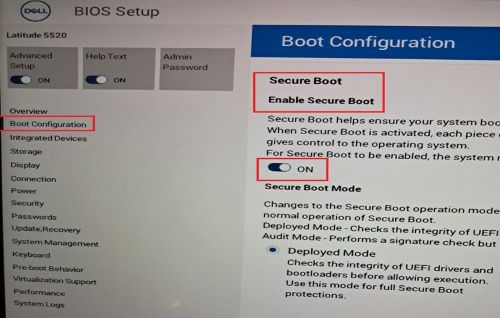
- 单击 应用 并 退出 UEFI 固件设置(此过程将重新启动设备)。
- 出现戴尔徽标时按 F12 键,以进入 引导设备选择菜单。
- 选择 USB Key ,然后按 Enter 键(这将启动从 USB 闪存盘启动)。
- 根据屏幕上的说明开始作系统部署。
- 设备进入 OOB 状态后,按照屏幕上的说明作,然后登录到桌面。
- 打开 系统属性 并确认作系统是否为 S 模式或 SE。
- 右键单击“开始”菜单中>的 Windows 图标,单击“系统>”,然后单击“关于”
- 在 “Windows 规范”下,“版本”应显示为:
- Windows 10 S 模式
- Windows 11 S 模式
- Windows 11 SE

受影响的产品
Inspiron 5301, Inspiron 13 5310, Inspiron 13 5320, Inspiron 5402/5409, Inspiron 5405, Inspiron 5406 2-in-1, Inspiron 14 5410 2-in-1, Inspiron 14 5410/5418, Inspiron 5415, Inspiron 14 5420, Inspiron 14 5425, Inspiron 7415 2-in-1
, Inspiron 14 7420 2-in-1, Inspiron 14 7425 2-in-1, Inspiron 3501, Inspiron 3502, Inspiron 3505, Inspiron 15 3510, Inspiron 15 3511, Inspiron 15 3515, Inspiron 15 3520, Inspiron 15 3521, Inspiron 15 3525, Inspiron 5502/5509, Inspiron 5505, Inspiron 15 5510/5518, Inspiron 5515, Inspiron 16 5620, Inspiron 16 5625, Inspiron 16 7610, Inspiron 16 7620 2-in-1, Inspiron 3880, Inspiron 3891, Inspiron 3910, Latitude 3120, Latitude 3140, Latitude 3190, Vostro 5301
...
文章属性
文章编号: 000223620
文章类型: Solution
上次修改时间: 15 4月 2025
版本: 5
从其他戴尔用户那里查找问题的答案
支持服务
检查您的设备是否在支持服务涵盖的范围内。