Data Protection Advisor: Analysis Ruleset "Filesystem utilization high" Does Not Trigger an Event for PowerProtect Data Domain
摘要: Analysis Ruleset "Filesystem utilization high" does not trigger an event for PowerProtect Data Domain.
本文适用于
本文不适用于
本文并非针对某种特定的产品。
本文并非包含所有产品版本。
症状
The alerts do not trigger when attempting to configure alerts for a PowerProtect Data Domain using an Analysis Policy in Data Protection Advisor (DPA). The Analysis Policy is configured to use the integrated Ruleset "Filesystem Utilization High." This is an Event-Based Ruleset.
There is DPA documentation that states this should work. One example of the documentation states the following:
There is DPA documentation that states this should work. One example of the documentation states the following:
File system utilization high
Attack vector: Ransomware/malware
During a ransomware or similar viral attack, attackers would employ malware to encrypt filesystems, subsequently generating a lot of “unique data” to be sent to the backup appliance, such as Dell PowerProtect DD. This rule can be used to monitor the “data” filesystem of a PowerProtect DD for high filesystem utilization. The high utilization threshold can be set by the use
As stated above, after attempting this configuration and verifying that the conditions are met, no Alert is triggered.
原因
The product is functioning as designed.
This is a documentation Issue, Defect in Data Protection Advisor.
The "Filesystem Utilization High" Ruleset cannot be used with a PowerProtect Data Domain.
This is a documentation Issue, Defect in Data Protection Advisor.
The "Filesystem Utilization High" Ruleset cannot be used with a PowerProtect Data Domain.
解决方案
This is a Request for Enhancement (RFE) being considered for Data Protection Advisor. Contact your Dell Account Team or Dell Product Management for more details.
There is a workaround available for this issue.
The workaround is to use a Scheduled Ruleset in the Analysis Policy. While this is not exactly the same as an Event-Based Ruleset, the frequency can be set high enough to provide a reasonable detection of file system space issues on the PowerProtect Data Domain.
Here is an example of configuring a Scheduled Ruleset and Analysis Policy.
- Create a custom Report Template from the system Report Template "Data Domain Filesystem Utilization for Warning or Critical Systems" or "Data Domain Filesystem Utilization." Set the utilization percentage threshold to the expected value. In this example, it is set it to 10 for ease of testing the triggering of the Alert.
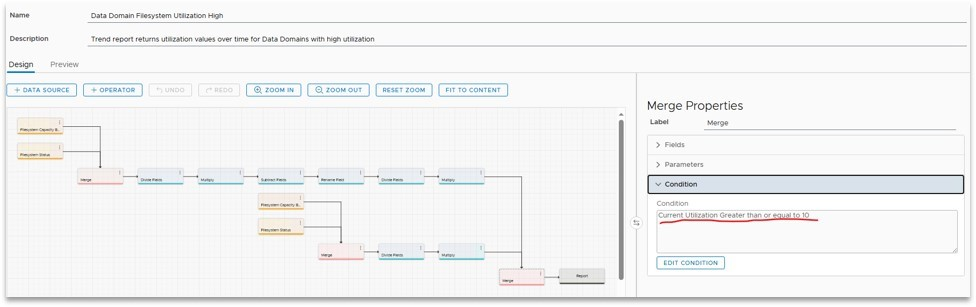
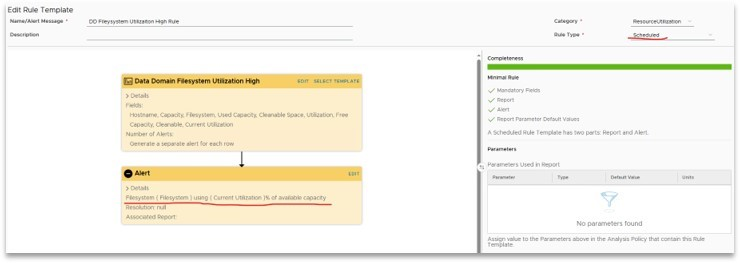
- Create a custom Rule Template using the custom Report Template in step 1. Configure the rule type to "Scheduled" and update the Alert content.
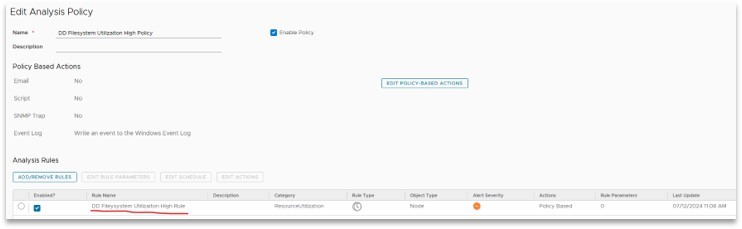
- Create an Analysis Policy using the custom Rule Template in step 2. Configure the schedule and actions for the policy.
Note: It is not recommended to schedule too aggressively. Since these Scheduled Rulesets do run the Report in the background, setting the frequency too high may cause the DPA Application to become loaded down. This may lead to unresponsiveness or other misbehaviors.
- Apply the Analysis policy to the PowerProtect Data Domain. If the PowerProtect Data Domain utilization exceeds the threshold, an Alert is triggered.
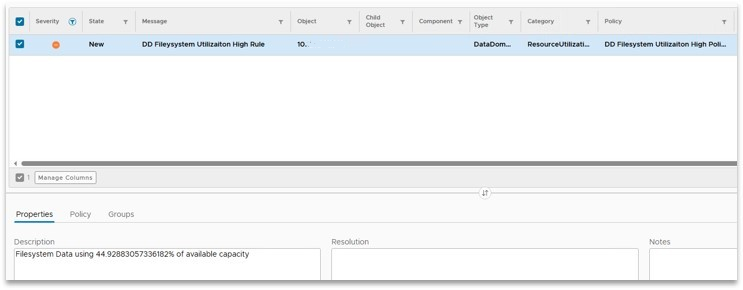
This is an example of how this can be configured. Your requirements may differ.
Contact Dell Technical Support for further details or information.
文章属性
文章编号: 000226979
文章类型: Solution
上次修改时间: 22 8月 2024
版本: 2
从其他戴尔用户那里查找问题的答案
支持服务
检查您的设备是否在支持服务涵盖的范围内。