NVIDIA RTX Desktop Manager holder skrivebordet åbent
摘要: Denne artikel indeholder oplysninger om det nyoprettede skrivebordsproblem for NVIDIA RTX Desktop Manager kan ikke lukkes.
本文适用于
本文不适用于
本文并非针对某种特定的产品。
本文并非包含所有产品版本。
症状
Dell-computere med dedikeret NVIDIA GPU kan opleve, at NVIDIA RTX Desktop Manager ikke kan lukke den nyoprettede stationære pc.
- Åbn NVIDIA RTX Desktop Manager, og klik på ENABLE RTX DESKTOP MANAGER™, mens programmet opretter Desktop 1 som standard.
- Klik på knappen nyt skrivebord for at oprette et andet skrivebord.
- Klik på X-ikonet i øverste højre hjørne af Desktop 2 , men find ud af, at det ikke kan lukkes.
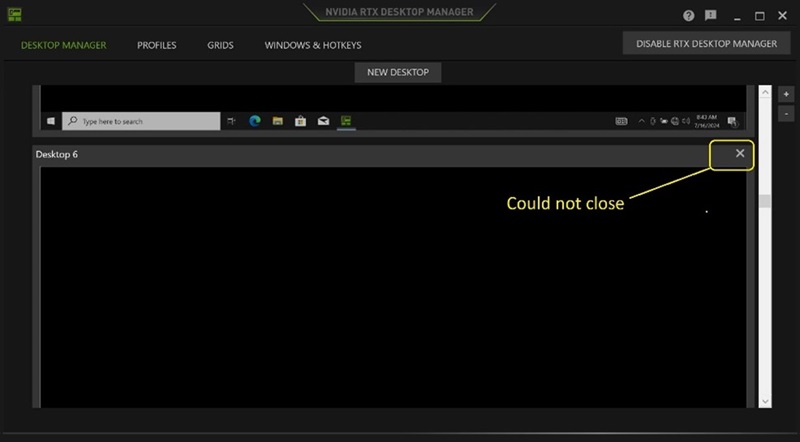
(Figur 1 - NVIDIA RTX Desktop Manager)
Berørte platforme:
- Precision 7780
- Precision 7680
- Precision 7770
- Precision 7670
- Precision 7560
- Precision 7760
- Precision 7550
- Precision 7750
- Precision 7540
- Precision 7740
- Precision 7530
- Precision 7730
- Precision 7520
- Precision 7720
- Precision 5480
- Precision 5490
- Latitude 3490
- Latitude 3480
- Latitude 3470
- Latitude 3550
- Latitude 3530
- Latitude 3520
原因
Ikke tilgængelig
解决方案
Opdatering af NVIDIA Graphic Driver til version 552.84 eller nyere på computeren løser problemet. For at downloade og installere driveren henvises til Sådan downloades og installeres Dell-drivere.
受影响的产品
Dell Latitude 3480/3488, Latitude 3490, Latitude 3520, Latitude 3530, Latitude 3550, Latitude 3470, Precision 5480, Precision 5490, Precision 7520, Precision 7530, Precision 7540, Precision 7550, Precision 7560, Precision 7670, Precision 7680
, Precision 7720, Precision 7730, Precision 7740, Precision 7750, Precision 7760, Precision 7770, Precision 7780
...
文章属性
文章编号: 000227614
文章类型: Solution
上次修改时间: 21 5月 2026
版本: 3
从其他戴尔用户那里查找问题的答案
支持服务
检查您的设备是否在支持服务涵盖的范围内。