Dell APEX 云平台:无法将硬件更新包上传到暂存节点
摘要: 更新失败,并显示“无法将硬件更新包上传到暂存节点”
本文适用于
本文不适用于
本文并非针对某种特定的产品。
本文并非包含所有产品版本。
症状
更新失败,并显示“无法将硬件更新包上传到暂存节点”
Dell APEX Cloud Platform (ACP) UI 报告:
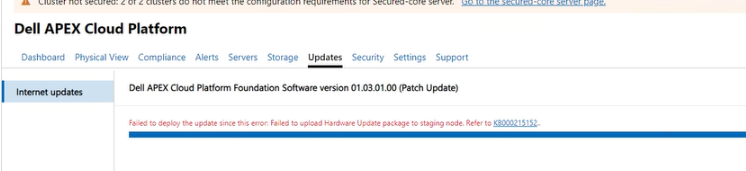
Life-Cycle Manager (LCM) 日志可能会报告不同的错误,如下所示:
错误 1:
Failed to upload /lcm/data/store/unpacked/SBE_Dell_APEXCP_4.1.2411.28880068.xml to //<stagenode name>/c$ /ClusterStorage/Infrastructure_1/Shares/SU1_Infrastructure_1/stagedSbe/SBE_Dell_APEXCP_4.1.2411.28880068.xml: exit status 1, output is /bin/bash: -c: line 0: unexpected EOF while looking for matching `''  /bin/bash: -c: line 1: syntax error: unexpected end of file
Failed to copy sbe xml file to node: exit status 1
错误 2:
Failed to upload /lcm/data/store/unpacked/SBE_Dell_APEXCP_4.1.2411.28880068.xml to //<staging node name>/c$ /ClusterStorage/Infrastructure_1/Shares/SU1_Infrastructure_1/stagedSbe/SBE_Dell_APEXCP_4.1.2411.28880068.xml: exit status 1, output is Kinit for <lcm mgmt username>to access <staging node name> failed: Preauthentication failed session setup failed: NT_STATUS_LOGON_FAILURE
Failed to copy sbe xml file to node: exit status 1
原因
管理帐户密码包含一些特殊字符。
解决方案
取消更新并使用 KB215549 更改密码
受影响的产品
APEX文章属性
文章编号: 000281279
文章类型: Solution
上次修改时间: 06 2月 2025
版本: 1
从其他戴尔用户那里查找问题的答案
支持服务
检查您的设备是否在支持服务涵盖的范围内。