Dell Unity: Error 0x6400b88 After Password Reset Using the NMI Button
摘要: After the admin and service passwords are reset using the Non-Maskable Interrupt (NMI) button, and Unisphere is accessed, the user is prompted to change the password. A message window with "Error Code: 0x6400b88" is displayed. ...
本文适用于
本文不适用于
本文并非针对某种特定的产品。
本文并非包含所有产品版本。
症状
After resetting the password using the NMI button procedure, users are prompted to change the password when logging in to Unisphere. The password change fails, and an error message is displayed after the new password is entered and confirmed. SSH access is also unavailable because the default password is no longer accepted, preventing login through SSH.
Unexpected Error

The service task cannot be performed in the current
state as indicated by the value of isApplicable
attribute in this service task resource type. Check the
applyCondition attribute for more information. (Error
Code:Dx6400b88)

Reload Unisphere UI?

Note: Check your avallable support options if this
error continues to occur.
原因
Management Service (ECOM) on one of the Storage Processors (SPs) is not responding. Perform a Dell Unity: How to perform a management services (ECOM) failover (Dell Correctable) and then try to connect using SSH.
If a user tries to connect in Unisphere, they could receive the same message.
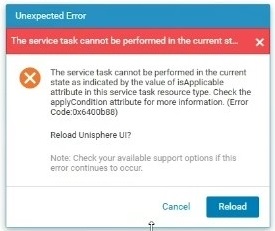
Message window Error Code: 0x6400b88
When the service password is changed, a message is received that the other SP is unavailable.

spa :~ /user# svc_service_password -s Service123#
WARNING: Peer SP is unavailable or in service mode.
Peer password will be changed once the SP reboots in to Normal Mode
Attempting to change service password ...
INFO: Service account password has been changed successfully
解决方案
Sequentially reboot both SPs, then run the command again to change the password using SSH.
- Dell Unity: How to Reboot a Storage Processor (User Correctable).
- Dell Unity: How to monitor the peer SP boot sequence (Dell Correctable)
If the issue persists, a full system shutdown may be required.
其他信息
For more detailed procedures, see SolVe Online: Self Service Procedures for Products.
受影响的产品
Dell EMC Unity, Dell EMC Unity XT 380, Dell EMC Unity XT 380F, Dell EMC Unity XT 480, Dell EMC Unity XT 480F, Dell EMC Unity 650F, Dell EMC Unity XT 680, Dell EMC Unity XT 680F, Dell EMC Unity Family |Dell EMC Unity All Flash, Dell EMC Unity Hybrid产品
Dell Unity 450F DC, Dell Unity 300 DC, Dell Unity 350F DC, Dell Unity 400 DC, Dell EMC Unity XT 880, Dell EMC Unity XT 880F, Dell Unity Operating Environment (OE)文章属性
文章编号: 000365604
文章类型: Solution
上次修改时间: 23 9月 2026
版本: 3
从其他戴尔用户那里查找问题的答案
支持服务
检查您的设备是否在支持服务涵盖的范围内。