NetWorker DD Boost 卷将进入只读模式
摘要: 磁盘类型卷处于只读模式。scanner 命令已运行。
本文适用于
本文不适用于
本文并非针对某种特定的产品。
本文并非包含所有产品版本。
症状
发现卷为只读:
守护程序日志中的消息:
$ /usr/sbin/mminfo -aVm -q "readonly"
state volume written (%) expires read mounts capacity flags
myvolume.123 42 TB 100% 01/28/2029 0 KB 19 0 KB r
守护程序日志中的消息:
07/26/2025 05:46:21 AM 0 1249888000 6096 nsrmmdbd Volume DB.104 mode changed to read-only.该卷不能用于备份,并且清理不会运行。
守护程序日志中的消息:
185765 2025-07-26 08:08:15 AM 2 5 0 3567675136 8898 0 myserver nsrsnmd NSR warning The 'read only' flag is set for the volume myvolume.123. Cannot recover space from the device mydevice.
原因
当 scanner 命令运行时,卷设置为只读。这是为了支持任何灾难恢复情形而设计的。
解决方案
提醒:在确认没有正在进行或不需要其他扫描程序运行或维护活动后,可以将卷更改回非只读状态。
使用 NMC:
- 检查卷状态:NMC公司 >磁盘卷

- 卸载设备:NMC公司 >设备 >设备 >选择设备>,右键单击设备 >卸载

- 将卷更改回可附加:NMC公司 >磁盘卷>右键单击卷 >更改模式>Appendable
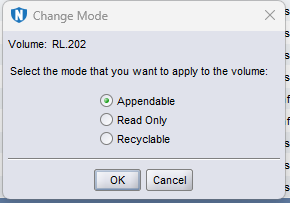

- 装载设备:NMC公司 >设备 >设备 >选择设备>,右键单击设备>装载

使用 CLI:
运行以下命令:
$   scanner -i -F -m -S 465737716 dev202
8909:scanner: using 'dev202' as the device name
8936:scanner: scanning Data Domain disk RL.202 on dev202
8939:scanner: Data Domain disk RL.202 already exists in the media index
29485:scanner: ssid 465737716: scan complete
8786:scanner: ssid 465737716: 498 KB, 23 file(s)

$  /usr/sbin/mminfo -aVm -q "readonly"
 state volume                  written  (%)  expires     read mounts capacity flags
       RL.202                  6997 KB 100%  10/31/25    0 KB     7      0 KB r

$  nsrmm | grep RL.202
Data Domain disk RL.202 mounted on dev202, write protected

$  nsrmm -y -u RL.202
Unmounted device: dev202

$  nsrmm -y -o notreadonly RL.202

$  nsrmm -y -m -f dev202
Data Domain disk RL.202 mounted on dev202, write enabled
受影响的产品
NetWorker产品
NetWorker Family文章属性
文章编号: 000376204
文章类型: Solution
上次修改时间: 06 11月 2025
版本: 2
从其他戴尔用户那里查找问题的答案
支持服务
检查您的设备是否在支持服务涵盖的范围内。