PowerEdge 17th Generation Servers with Delta Power Supplies may not show correctly in iDRAC UI and SEL logging after AC cycle
摘要: PowerEdge 17th Generation Servers with Delta Power Supplies may not show correctly in iDRAC UI and SEL logging after AC cycle.
本文适用于
本文不适用于
本文并非针对某种特定的产品。
本文并非包含所有产品版本。
症状
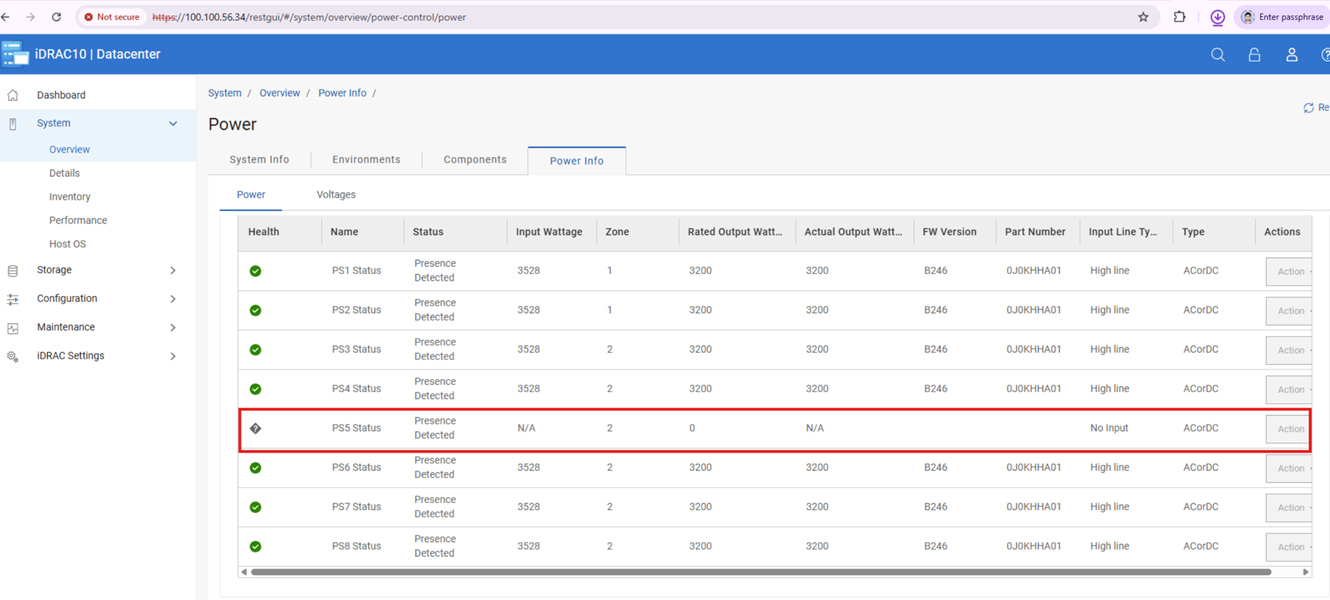
Post-AC cycle affected Delta 17G Power Supplies may function but display blank iDRAC telemetry, firmware, and Dell Part numbers of fields. However, performing another AC or virtual AC cycle after this state occurs triggers incorrect configuration or capacity mismatch errors in the SEL.
原因
After an AC or virtual AC cycle, iDRAC UI may miss power supply info and SEL may log PSU configuration or capacity mismatches (PWR2265/PWR2267/UEFI0059).
We identified that is Power Supplies limitation caused the loss of communication in a corner case, leading to the bus hang.
解决方案
Do not replace any hardware, this issue is not a hardware failure and can be resolved with Power Supply firmware updates.
Note: If a PSU mismatch occurs, unplug AC power and reseat the PSU after 2 minutes. Once remediated, update PSU firmware in line with the following information.
The following chart lists the Dell Part Numbers (DPN) and Firmware Version required to resolve this issue.
| Vendor | Wattage | Dell Part Number | Firmware Version |
| Delta | 3200 W | JNF12 | 1916 |
| J0KHH | BC46 | ||
| Y9NXM | C021 | ||
| 2400 W | 9KK0M | BC2B | |
| 1800 W | GF1GT | 192A | |
| 1500 W | GRD17 | BC31 | |
| DM12N | BC36 | ||
| 1400 W | 8HCRH | BC28 | |
| 1100 W | KMJFC | BC35 | |
| 49FWD | BC2C | ||
| 800 W | 8YNWG | BC2D | |
| R98X5 | BC2E |
The above firmware versions are available on each system model’s download page from the Dell Support site.
受影响的产品
Rack Servers, XE Servers, XR Servers文章属性
文章编号: 000471893
文章类型: Solution
上次修改时间: 05 6月 2026
版本: 1
从其他戴尔用户那里查找问题的答案
支持服务
检查您的设备是否在支持服务涵盖的范围内。