Dell Unity:複寫恢復表示在容錯移轉後已完全同步
摘要: 在 Dell Unity OE 5.0.x 中,在同步容錯移轉作業後顯示的繼續確認訊息,錯誤地指出所有選取的複寫工作階段將啟動完全同步。這只是使用者介面訊息問題,不會影響實際的複製行為。Dell Unity Development 已識別問題,並已排定在 Dell Unity OE 5.1 進行修正,其中的繼續摘要訊息會正確反映正在執行的複寫作業。
本文章適用於
本文章不適用於
本文無關於任何特定產品。
本文未識別所有產品版本。
症狀
在 Dell Unity OE 5.0.x 中,透過同步執行容錯移轉後,複寫工作階段的繼續選項會顯示一則確認訊息,表示將為所有受影響的複寫工作階段啟動完全同步。
此訊息在 Unity OE 5.0.x 中作為新功能推出,目的是通知使用者預期的同步行為。雖然訊息表示將進行完全同步,但 Dell Unity Development 已識別並正在未來的版本中修正此行為。
在同步容錯移轉作業後恢復複寫時,任何執行 Unity OE 5.0.x 的 Dell Unity 陣列上可能會顯示此訊息。
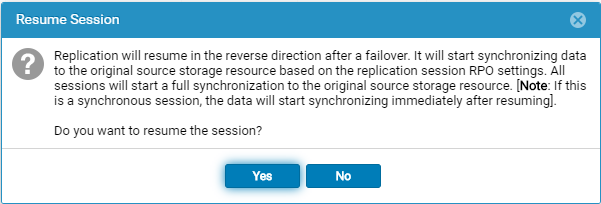
在同步進行容錯移轉後選取繼續選項時,會顯示下列訊息:
Replication will resume in the reverse direction after a failover. It will start synchronizing data to the original source storage resource based on the replication session RPO settings. All sessions will start a full synchronization to the original source storage resource. [Note: If this is a synchronous session, the data will start synchronizing immediately after resuming].

Do you want to resume the session?
原因
簡歷摘要消息不正確。執行同步容錯移轉後,選取繼續時顯示的確認訊息會指出所有複寫工作階段將啟動完全同步。但是,此消息不能準確反映實際的複製行為。
此問題僅限於使用者介面中顯示的消息,並不表示將發生完全同步。Dell Unity Development 已在 Unity OE 5.0.x 中識別此問題,並正在進行修正。
解析度
復原摘要訊息不正確,且會在未來的 Unity OE 版本中更正。
該消息當前指示將為所有複製會話啟動 完全同步 。這只是顯示問題,並不反映將要執行的實際複製操作。
此問題的修正已排定納入 Dell Unity OE 5.1 中。在此之前,使用者可以安全地忽略 Unity OE 5.0.x 中顯示的錯誤完整同步訊息。
正確的訊息應為:
故障復原確認訊息
Failback will perform a synchronization from the destination storage resource to the source storage resource, block access to the destination storage resource to allow it to be used for replication, and change the source storage resource access to read/write mode. Replication will then resume. The synchronization could be either delta or full synchronization depending on the replicated snapshots. This operation will be lengthy if a full synchronization is needed during failback.
When the failback operation is complete, you can then connect your hosts to the source storage resource.
Note: Before you begin, you should block writes to the destination storage resource because it will be placed in read-only mode.
失敗移轉時恢復確認
Replication will resume in the reverse direction after a failover. It will start synchronizing data to the original source storage resource based on the replication session RPO settings.
All sessions will start a synchronization to the original source storage resource. The synchronization could be either delta or full synchronization depending on the replicated snapshots.
Note: If this is a synchronous session, the data will start synchronizing immediately after resuming. Do you want to resume the session?
受影響的產品
Dell Unity 300, Dell EMC Unity 300F, Dell EMC Unity 400, Dell EMC Unity 400F, Dell EMC Unity 450F, Dell EMC Unity 500, Dell EMC Unity 550F, Dell EMC Unity 600, Dell EMC Unity 600F, Dell EMC Unity 650F, Dell EMC Unity Family產品
Dell EMC Unity XT 380, Dell EMC Unity XT 380F, Dell EMC Unity XT 480, Dell EMC Unity XT 480F, Dell EMC Unity XT 680, Dell EMC Unity XT 680F, Dell EMC Unity XT 880, Dell EMC Unity XT 880F, Dell EMC Unity Family |Dell EMC Unity All Flash
, Dell EMC Unity Family, Dell EMC Unity Hybrid, Dell EMC UnityVSA Professional Edition/Unity Cloud Edition
...
文章屬性
文章編號: 000063277
文章類型: Solution
上次修改時間: 16 7月 2026
版本: 8
向其他 Dell 使用者尋求您問題的答案
支援服務
檢查您的裝置是否在支援服務的涵蓋範圍內。