NetWorker:故障診斷 NetWorker 授權容量權益
摘要: NetWorker:故障診斷 NetWorker 授權容量權益
本文章適用於
本文章不適用於
本文無關於任何特定產品。
本文未識別所有產品版本。
說明
注意:本文提供 NetWorker 授權故障診斷步驟的一般概觀。如需更多詳細資訊,請參閱特定 NetWorker 版本的 Dell NetWorker 授權指南。所有 NetWorker 說明文件皆可透過以下方式取得:NetWorker 支援 |手冊與文件
問題包括:
安裝 25 TB 授權檔案後,一開始只顯示 1 TB。
錯誤包括:
Can't find license file.
Can't establish connection to the license server.
Can't find license file. Please obtain the license file.
NetWorker evaluation mode will expire in 30 days and the server will be disabled after that time.
License Server does not support the requested license.
nsrd NSR notice nsrlmc had problems with nsrd for CLP Capacity license - try again much later.
License server system does not support this feature.
要檢查的事項:
- 請確定授權檔案存在於以下
/nsr/lic在 Linux 上或C:\Program Files\EMC NetWorker\nsr\lic在 Windows 上- 目前正在使用的授權類型,請參閱:Dell NetWorker 授權 - 已供應、未供應及 XML 授權檔案之間的差異
- 確認授權檔案名稱。
- 驗證許可證檔是否具有讀取許可權,
- 驗證授權檔案:
nsrlic -C - 對於已服務許可證:
- 請確定 Dell License Server 服務正常運作。
- Linux:
lmstat - Windows:使用 LMTOOLS 軟體。
- Linux:
- 確保 NetWorker 伺服器和授權伺服器之間正確的名稱解析和連接埠連線。
- 連接埠 27000 必須開啟,請參閱:NetWorker 程序和連接埠
- 請確定 Dell License Server 服務正常運作。
- 重新啟動 NetWorker 服務。
- Linux:
systemctl restart networker - Windows (PowerShell):
net stop nsrd ; net start nsrd
- Linux:
管理 NMC 中容量權益的配置:
以下部分提供有關在安裝和設置許可證伺服器后可以修改的屬性的資訊。
若要修改 CLP UOM 和 CLP 重新整理屬性:
您可以使用 NMC 修改以下兩個新屬性:
- CLP - UOM 可讓您為特定資料區域分配更多容量。最初,僅簽出 1 TB。如果請求大於 0,則可以更改此數量。
- CLP 重新整理 - 設為任何值時,會提示 NetWorker 伺服器搜尋授權檔案的更新,或者在沒有授權檔案的情況下,強制伺服器要求容量授權和更新授權 (若適用)。
這些屬性會顯示在 NMC 的 NetWorker 伺服器內容授權標籤下,如以下螢幕所示。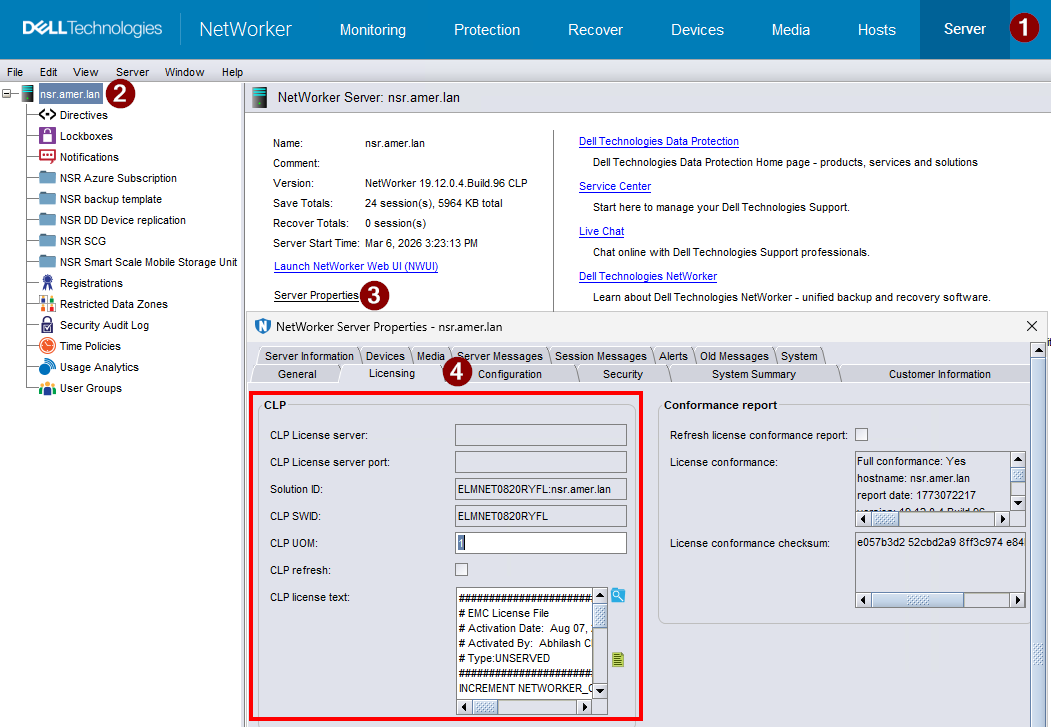
警告:並非所有的授權問題都可由 NetWorker 支援處理。如果您聯絡 NetWorker 支援以取得授權問題,且此問題必須由 Dell 授權部門解決,則會將您轉介至 Dell 授權部門尋求解決。
其他資訊
另如需其他資訊,請參閱:
受影響的產品
NetWorker產品
NetWorker文章屬性
文章編號: 000071240
文章類型: How To
上次修改時間: 09 3月 2026
版本: 7
向其他 Dell 使用者尋求您問題的答案
支援服務
檢查您的裝置是否在支援服務的涵蓋範圍內。