How to easily assess Optical Received Power on all Force10 Ports with link present
摘要: How to quickly and easily assess the optical receive power from any transceiver installed in any Force10 switch
本文章適用於
本文章不適用於
本文無關於任何特定產品。
本文未識別所有產品版本。
說明
The following article describes how to quickly and easily assess the optical receive power from any transceiver installed in any Force10 switch (C/E/Z/S-Series, MXL and IOA)
The following table shows the optical Min/Max (Optical budget) for SR (Short Reach) QSFP optical transceivers listed in the Dell Networking Optics & Cable Interop Matrix Spreadsheet:
Below is the CLI command to show only ports that are linked up and the respective optical received power:
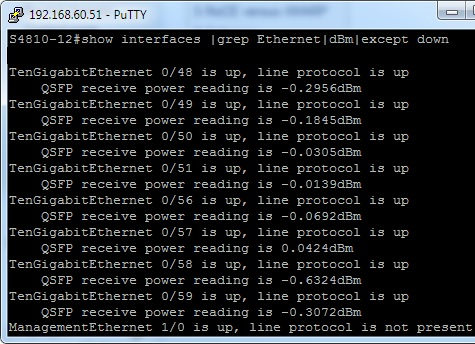
All optical measurements listed above are within the optical budget.
The following table shows the optical Min/Max (Optical budget) for SR (Short Reach) QSFP optical transceivers listed in the Dell Networking Optics & Cable Interop Matrix Spreadsheet:
| Description | Value |
| Transmitter Output Wavelength (nm) | 840 to 860 (850 nominal) |
| Receiver Input Wavelength (nm) | 840 to 860 |
| Transmit Output Power (dBm) | Max: 2.4 per lane |
| Min: -7.6 per lane | |
| Receive Input Power (dBm) | Max: 2.4 per lane |
| Min: -9.5 per lane |
Below is the CLI command to show only ports that are linked up and the respective optical received power:
All optical measurements listed above are within the optical budget.
受影響的產品
Force10 S2410-01-10GE-24P, Force10 S2410-01-10GE-24CP, Force10 S25N-S50N, Force10 S25-01-GE-24P, Force10 S25-01-GE-24T, Force10 S25-01-GE-24V, Force10 S50-01-GE-48T-V, Force10 S50-01-GE-48T, PowerSwitch S3048-ON, PowerSwitch S4048-ON
, PowerSwitch S4810P, PowerSwitch S4810-ON, PowerSwitch S5000, Force10 S50P, Force10 S55T, Force10 S60-44T, PowerSwitch S6000, Force10 Z9000, Dell Networking Z9500, PowerSwitch Z9100-ON
...
文章屬性
文章編號: 000120518
文章類型: How To
上次修改時間: 18 4月 2026
版本: 6
向其他 Dell 使用者尋求您問題的答案
支援服務
檢查您的裝置是否在支援服務的涵蓋範圍內。