OptiPlex 7060: Visual guide to your Computer
摘要: The following article provides a visual guide to your OptiPlex 7060 Computer and lists the external ports and features of your computer.
本文章適用於
本文章不適用於
本文無關於任何特定產品。
本文未識別所有產品版本。
症狀
Note: For a more detailed description about each location, please go to the system manuals at www.dell.com/manuals
Table of Contents:
原因
Mini Tower (MT) Front View
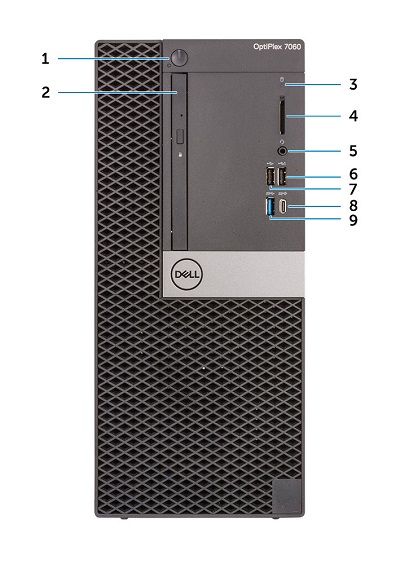
(Figure.1 MT Front View)
| 1 | Power Button and Power LED | 2 | Optical Drive (Optional) |
| 3 | Hard Drive Activity LED | 4 | Memory Card Reader (Optional) |
| 5 | Headset/Universal Audio Jack Connector | 6 | USB 2.0 Connector w/PowerShare (Supports battery charge capability) |
| 7 | USB 2.0 Connector | 8 | USB 3.1 Gen2 Type-C Connector w/PowerShare |
| 9 | USB 3.1 Gen1 Connector |
Mini Tower (MT) Rear View
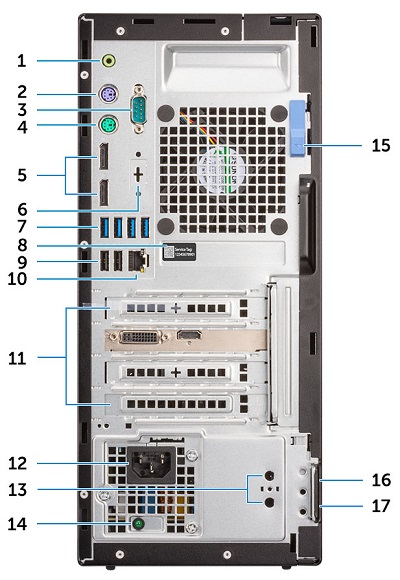
(Figure.2 MT Rear View)
| 1 | Line-Out Connector | 2 | PS/2 Keyboard Connector |
| 3 | Serial Connector | 4 | PS/2 Mouse Connector |
| 5 | DisplayPort Connector x2 | 6 | Option Slot (HDMI 2.0b/DisplayPort/VGA/USB Type-C Alt-mode) |
| 7 | USB 3.1 Gen1 Connector x4 | 8 | Service Tag Location |
| 9 | USB 2.0 Connector x2 (Supports SmartPower On) | 10 | Network Connector (NIC) |
| 11 | Expansion Card Slots x4 | 12 | Power Connector |
| 13 | External Antenna Connectors x2 (Optional) | 14 | Power Supply (PSU) Diagnostic LED |
| 15 | Release Latch | 16 | Kensington Security Cable Slot |
| 17 | Padlock Ring |
Small Form Factor (SFF) Front View
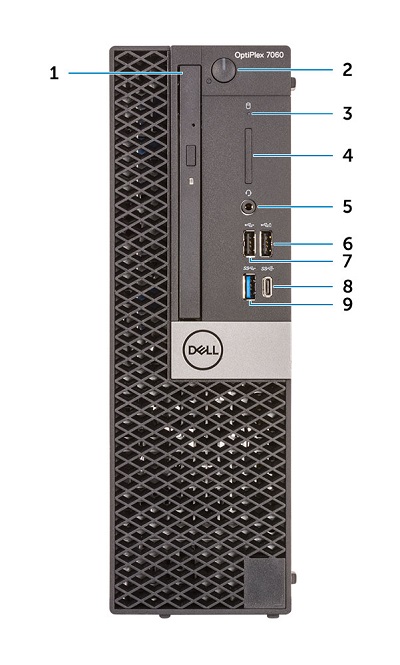
(Figure.3 SFF Front View)
| 1 | Optical Drive (Optional) | 2 | Power Button and Power LED |
| 3 | Hard-drive Activity LED | 4 | Memory Card Reader (Optional) |
| 5 | Headset/Universal Audio Jack Connector | 6 | USB 2.0 Connector w/PowerShare (Supports battery charge capability) |
| 7 | USB 2.0 Connector | 8 | USB 3.1 Gen2 Type-C Connector w/PowerShare |
| 9 | USB 3.1 Gen1 Connector |
Small Form Factor (SFF) Rear View
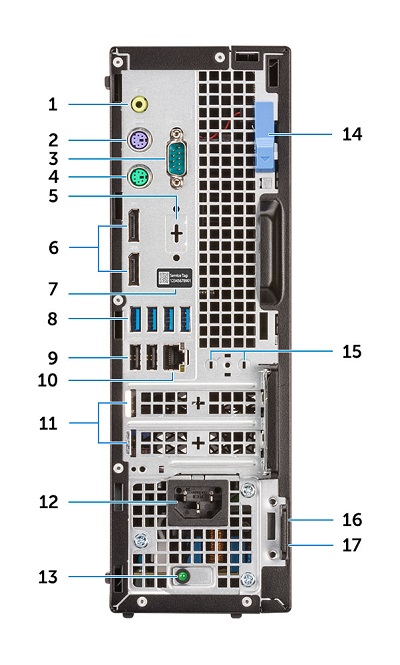
(Figure.4 SFF Rear View)
| 1 | Line-Out Connector | 2 | PS/2 Keyboard Connector |
| 3 | Serial Connector | 4 | PS/2 Mouse Connector |
| 5 | Option Slot (DisplayPort/HDMI 2.0b/VGA/USB Type-C Alt Mode) | 6 | DisplayPort Connector x2 |
| 7 | Service Tag Location | 8 | USB 3.1 Gen1 Connector x4 |
| 9 | USB 2.0 Connector x2 (Supports SmartPower On) | 10 | Network Connector (NIC) |
| 11 | Expansion Card Slots x2 | 12 | Power Connector |
| 13 | Power Supply (PSU) Diagnostic LED | 14 | Release Latch |
| 15 | Antenna SMA Connectors (Optional) | 16 | Kensington Security Cable Slot |
| 17 | Padlock Ring |
Micro Form Factor (MFF) Front View
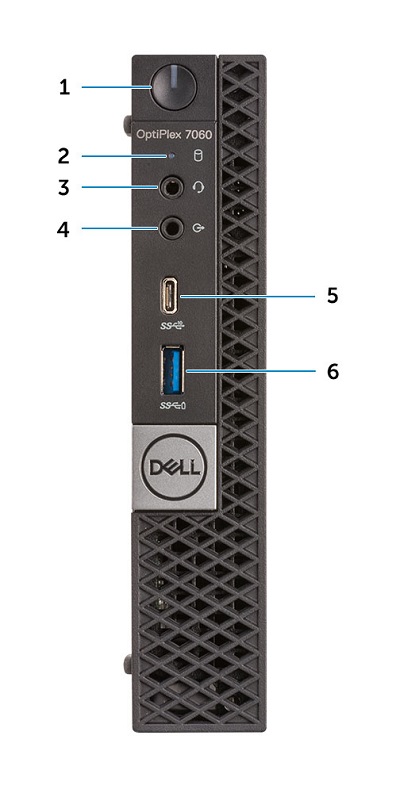
(Figure.5 MFF Front View)
| 1 | Power Button and Power LED | 2 | Hard Drive Activity LED |
| 3 | Headset/Universal Audio Jack Connector | 4 | Line-Out Connector |
| 5 | USB 3.1 Gen2 Type-C Connector w/PowerShare | 6 | USB 3.1 Gen1 Connector w/PowerShare |
Micro Form Factor (MFF) Rear View
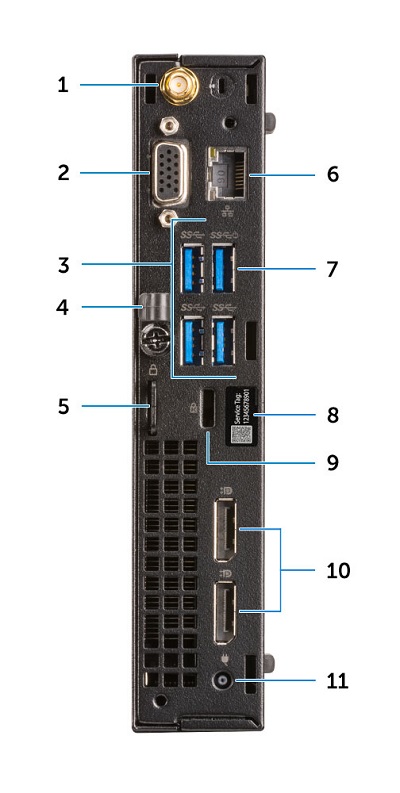
(Figure.6 MFF Rear View)
| 1 | External Antenna Connectors (Optional) | 2 | Option Slot (DisplayPort/HDMI 2.0b/VGA/USB Type-C alt mode) |
| 3 | USB 3.1 Gen1 Connector x3 | 4 | Cable Holder |
| 5 | Padlock Ring | 6 | Network Connector (NIC) |
| 7 | USB 3.1 Gen1 Connector (Supports SmarPower On) | 8 | Service Tag Location |
| 9 | Kensington Security Cable Slot | 10 | DisplayPort Connector x2 |
| 11 | Power Connector |
解析度
N/A
其他資訊
受影響的產品
OptiPlex 7060 Tower, OptiPlex 7060 Micro, OptiPlex 7060 Small Form Factor文章屬性
文章編號: 000131523
文章類型: Solution
上次修改時間: 19 4月 2026
版本: 8
向其他 Dell 使用者尋求您問題的答案
支援服務
檢查您的裝置是否在支援服務的涵蓋範圍內。