VPLEX:重設使用者密碼失敗,且無法使用核准的長度和特殊字元
摘要: 本文討論當使用者無法重設使用者密碼時該怎麼做,即使密碼遵循所有規則並包含核准的特殊字元。
本文章適用於
本文章不適用於
本文無關於任何特定產品。
本文未識別所有產品版本。
症狀
VPLEX:如何在 VPlexcli 中重設使用者帳戶密碼 (需要有 Dell 支援帳戶才能檢視此文章)
- 無法使用有效的密碼長度與特殊字元重設使用者密碼
- 以下錯誤如下:
VPlexcli:/> user reset -u testuser
Enter admin password:
Enter password for testuser:
Confirm password for testuser:
user reset: Evaluation of <<user reset ********>> failed.
cause: Command execution failed.
cause: Password can only contain A-Z a-z 0-9 . ? / * @ ^ % # + = - _ : space character(s),and the password cannot start with space(s).
原因
- 這裏的問題不在於為使用者配置檔選擇的密碼,而在於管理員密碼。
- 此處用來登入 VPLEX 重設使用者密碼的管理員密碼不符合 VPLEX 安全性組態指南 (SCG) 中提到的指南。
- 以下聲明適用於任何使用者帳戶密碼,無論是管理員還是任何使用者,
Password can only contain A-Z a-z 0-9 . ? / * @ ^ % # + = - _ : space character(s),and the password cannot start with space(s).
解析度
將管理員密碼變更為符合每個 SCG 指南行的新密碼,然後您可以繼續進行密碼重設動作,即重設使用者密碼。
請參考下方所列的 SCG 與 KB 文章;
安全性組態指南:
https://support.emc.com/docu31419_VPLEX-GeoSynchrony-Security-Configuration-Guide.pdf
如果本指南有機會更新並且上面的連結不起作用,您也可以轉到 https://www.dell.com/support/home 併為每個字段輸入值,如下所示,
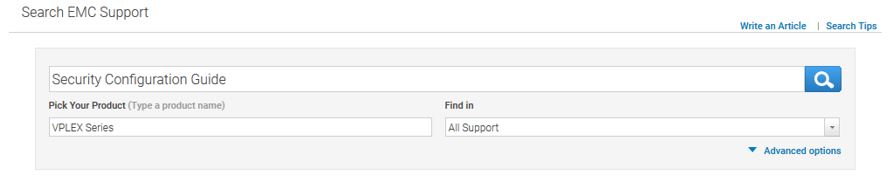
文章:
- KB 000166110:VPLEX:如果忘記、遺失或需要依公司政策來重設管理員密碼 (需要有 Dell 支援帳戶才能檢視此文章)
- KB 000156259:VPLEX:如何在 VPlexcli 中重設使用者帳戶密碼 (需要有 Dell 支援帳戶才能檢視此文章)
- KB 000160933:VPLEX:經核准用於 VPLEX 使用者密碼的字元 (需要有 Dell 支援帳戶才能檢視本文)
受影響的產品
VPLEX Series產品
VPLEX for All Flash, VPLEX Series, VPLEX VS2, VPLEX VS6文章屬性
文章編號: 000167720
文章類型: Solution
上次修改時間: 04 5月 2026
版本: 6
向其他 Dell 使用者尋求您問題的答案
支援服務
檢查您的裝置是否在支援服務的涵蓋範圍內。