Data Domain - Unable to SSO PowerProtect DD System Manager from DPC Console "System Management."
摘要: Unable to SSO PowerProtect DD System Manager UI from Data Protection Central (DPC) Console Every time when tried to open the DD System Manager from DPC Console - "System Management," it gave the following Error "You do not have any roles assigned in DD System Manager. Contact your DD administrator." ...
本文章適用於
本文章不適用於
本文無關於任何特定產品。
本文未識別所有產品版本。
症狀
Unable to SSO PowerProtect DD System Manager UI from Data Protection Central (DPC) Console
When trying to open the DD System Manager from DPC Console - "System Management," it gave the following Error:
"You do not have any roles assigned in DD System Manager. Please contact your DD administrator." 原因
The User Groups created on PowerProtect DD System Manager UI under Administration - Access - Authentication - Single Sign-On (SSO) were the below two User Groups.
DPC Group Domain Role
------------- --------- -----
admin dpc.local admin
administrator dpc.local admin
------------- --------- -----
With the above User Groups having names - "admin" and "administrator," DPC is unable to SSO to the Data Domain.
This is causing the error: "You do not have any roles assigned in DD System Manager. Contact your DD administrator." The naming is not correct for the User Groups.
解析度
To fix this issue, the User Groups "Admin and "Administrator" must be deleted and a new User Group with name "dp-admin" must be created on the PowerProtect DD System Manager UI under - Administration - Access - Authentication - Single Sign-On (SSO) with Domain Name as "dpc.local" and Management Role as "Admin." Please see the screenshot below for this setting done when creating the new User Group under SSO. And then Click OK.
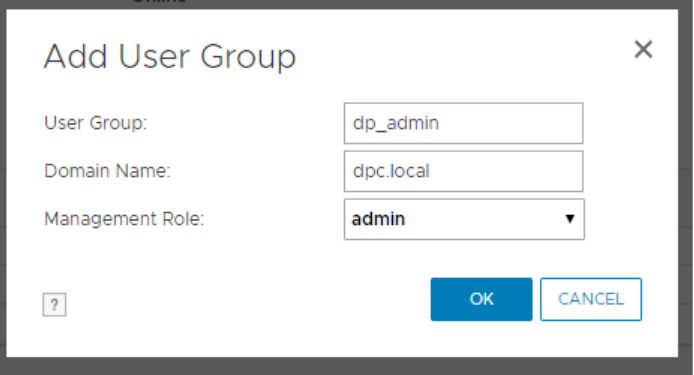
NOTE: If you are on an IDPA/PowerProtect DP appliance using the internal LDAP (ipdauser account), you have to add a second group with the following:
User Group:       dp_admin
Domain Name:      idpa.local
Management Role:  admin
Then try to SSO from the DPC Console, and you should be able to open DD UI System Manager from the DPC Console without any errors and without entering login credentials.
受影響的產品
Data Domain產品
Data Domain, Data Protection Central, DD OS文章屬性
文章編號: 000173331
文章類型: Solution
上次修改時間: 05 5月 2026
版本: 5
向其他 Dell 使用者尋求您問題的答案
支援服務
檢查您的裝置是否在支援服務的涵蓋範圍內。