SRM、SRA:TestFailover 失敗,並顯示錯誤「無法建立複本裝置的快照。無法建立複本裝置的快照 (DevID)
摘要: 儲存資源管理器 (SRM) 上的 TestFailover 在單一裝置配對上會失敗,但其他裝置配對則會成功。 裝置「00377」的儲存複寫配接卡 (SRA) 命令「testFailoverStart」失敗,顯示「執行測試容錯移轉啟動作業時發生錯誤。請檢查 EmcSrdfSra 記錄檔,以瞭解錯誤的詳細資訊。」
本文章適用於
本文章不適用於
本文無關於任何特定產品。
本文未識別所有產品版本。
症狀
SRA 命令 testFailoverStart 裝置「00377」失敗,顯示:
An error occurred while performing testfailover start operation. Please check EmcSrdfSra log file for more information on the error.
錯誤來自 EmcSrdfSra.log 在復原網站上:
[07/08 16:48:33.688  5992   346 SraDevicePairings::GetCopyInfo  ] [WARNING]: A valid CopyInfo block could not be found in the options file that has Symm [00XXXXXXXXX].

[07/08 14:02:38.725  5628  9647 TestFailoverStartCommand::RunOnDevices] [ERROR]: Invalid CopyInfo type specified in TestFailoverConfig file. Exiting with failure
原因
注意:只有當
AutoTargetDevice 選項未在以下位置中使用 (即設為「否」) EmcSrdfSraGlobalOptions.xml 檔案中所定義。
缺少預設參數 (
</CopyInfo>) 在 EmcSrdfSraTestFailoverConfig.xml 在第一個陣列的組態結束時:
<TestFailoverInfo>
  <Version>9.0</Version>
  <CopyInfo>
    <ArrayId>000XXXXXXX1</ArrayId>
    <CopyType>SNAPVX</CopyType>
    <CopyMode>COPY</CopyMode>
    <SavePoolName></SavePoolName>
    <DeviceList>
      <DevicePair>
        <Source>001BC</Source>
        <Target>001BB</Target>
 </DevicePair>
<DevicePair>
        <Source>00377</Source>
        <Target>00378</Target>
      </DevicePair>
    </DeviceList>

 <ArrayId>000XXXXXXXX2</ArrayId>
    <CopyType>SNAPVX</CopyType>
    <CopyMode>COPY</CopyMode>
    <SavePoolName></SavePoolName>
    <DeviceList>
      <DevicePair>
        <Source>0005C</Source>
        <Target>00053</Target>
      </DevicePair>
      <DevicePair>
        <Source>00577</Source>
        <Target>00578</Target>
      </DevicePair>
    </DeviceList>
  </CopyInfo>
</TestFailoverInfo>
解析度
在第一個陣列的組態結束時包含以下反白顯示的參數 (以下範例中的陣列 ID 6),以視為完整。
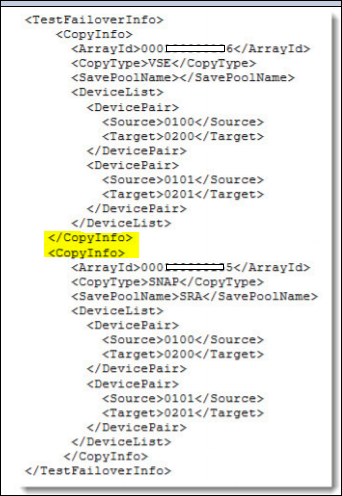
編輯後 EmcSrdfSraTestFailoverConfig.xml 如上所述,TestFailover 成功。
其他資訊
請參閱以下指南的第 164 至 165 頁:
Implementing-SRDF-Storage-Replication-Adapter-(SRA)-9.x-with-VMware-Site-Recovery-Manager-(SRM)
Implementing-SRDF-Storage-Replication-Adapter-(SRA)-9.x-with-VMware-Site-Recovery-Manager-(SRM)
文章屬性
文章編號: 000189456
文章類型: Solution
上次修改時間: 10 5月 2026
版本: 10
向其他 Dell 使用者尋求您問題的答案
支援服務
檢查您的裝置是否在支援服務的涵蓋範圍內。