Dell Encryption Enterprise 和個人存放庫損毀導致回報空白掃掠時間
摘要: 如果 Dell Encryption Enterprise 和 v10.9 之前版本的 SDE 存放庫損毀,則會回報空白的掃掠時間。
本文章適用於
本文章不適用於
本文無關於任何特定產品。
本文未識別所有產品版本。
症狀
受影響的產品:
- Dell Encryption Enterprise
- Dell Encryption Personal
- Dell Encryption External Media
- Dell Endpoint Security Suite Enterprise
受影響的版本:
- v10.8 及更早版本
受影響的作業系統:
- Windows
在 Dell Data Security Server 主控台中檢視端點時,「 掃掠開始 」和 「掃掠結束 」日期為空白。
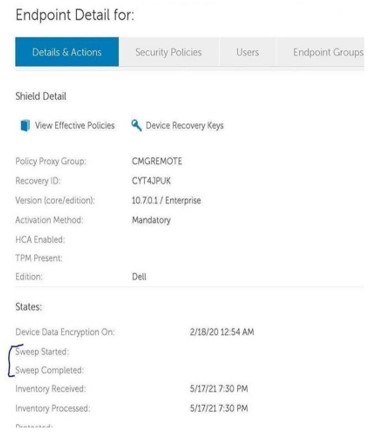
發生存放庫損毀時, cmgshield.log 檔案包含類似以下內容的行:
[06.24.21 17:59:00:437      CredFSys.cpp:  476 E] Vault - Failure in reading device cluster 1389 (UCID: ILHQ6MER) - decryption error
[06.24.21 17:59:00:458      CredFSys.cpp:  476 E] Vault - Failure in reading device cluster 1392 (UCID: ILHQ6MER) - decryption error
[06.24.21 17:54:23:610      CredFSys.cpp: 1356 E] Vault - Failed to read pre-existing DAT image
[06.24.21 17:54:23:611      CredFSys.cpp: 2750 E] Vault - Invalid number of  0 clusters needed to store the DAT and the FAT
原因
SDE 存放庫包含端點的使用者和裝置原則。如果保管庫已損壞,則設備沒有要強制執行的策略資訊。發生這種情況時,註冊表中的掃描時間將為空。當清查從端點傳送至 Dell Data Security 伺服器時,會回報空白或空白的掃掠時間。
解析度
若要解決此問題,請升級至 Dell Encryption Enterprise (或 Dell Encryption Personal) v10.9 或更新版本。10.9 新增了存放庫損毀偵測和修復的其他檢查。
如要聯絡支援部門,請參閱 Dell Data Security 國際支援電話號碼。
請前往 TechDirect,以線上產生技術支援要求。
如需更多深入見解與資源,請加入 Dell 安全性社群論壇。
受影響的產品
Dell Encryption, Dell Endpoint Security Suite Enterprise文章屬性
文章編號: 000190108
文章類型: Solution
上次修改時間: 11 5月 2026
版本: 14
向其他 Dell 使用者尋求您問題的答案
支援服務
檢查您的裝置是否在支援服務的涵蓋範圍內。