Dell Azure Stack HCI 非融合式網路組態
摘要: 為 Dell EMC 解決方案設定 Azure Stack HCI 叢集主機Microsoft非融合式網路的範例。此示例不包括使用者指南中記錄的備份網路或網路塑造配置。 本文資訊取自「適用於 Microsoft Azure Stack HCI 的 Dell EMC 解決方案 – 網路整合與主機網路組態選項」參考指南。
本文章適用於
本文章不適用於
本文無關於任何特定產品。
本文未識別所有產品版本。
說明
下列螢幕擷取畫面是使用 SET 網路團隊來設定 Azure Stack HCI 非融合式網路,以便進行管理網路通訊的硬體圖表檢視:
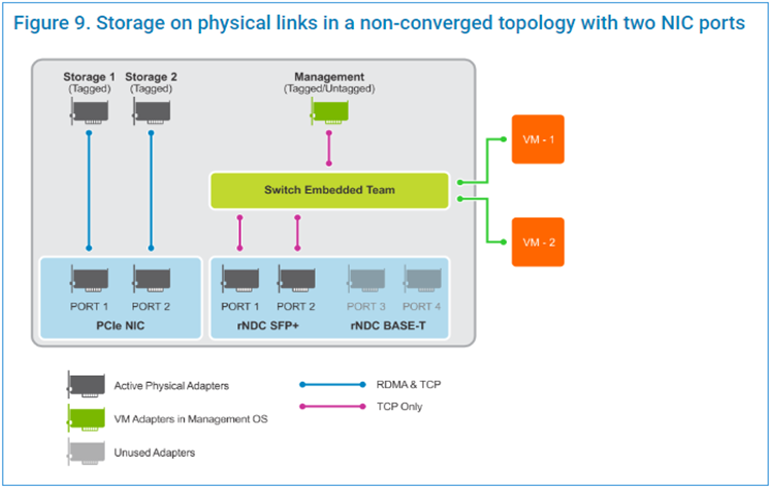
下列指令檔步驟會在系統管理 PowerShell 視窗中執行:
下列指令檔步驟會在系統管理 PowerShell 視窗中執行:
$ErrorActionPreference = 'Stop'

#region Variables for the scenario

## Management Adapter
$ManagementSwitchName = 'Management'
$ManagementNetAdapterName = @('NIC1','NIC2')
$ManagementAdapterName = 'Management'

# VLAN ID for host management traffic; if no VLAN is preferred set this to 0
$ManagementVlanId = 102

# Management Gateway address
$ManagementGateway = '10.0.0.1'

# DNS Server Address
$ManagementDns = '10.0.0.15'

# Set this to a string 'DHCP' for a dynamic IP address
$ManagementIPAddress = '10.0.0.51'

# Management address prefix (24 translates to subnet mask 255.255.255.0)
$ManagementAddressPrefix = 24

## Storage Adapters
### You must specify 2 or 4 network adapter port names
$StorageNetAdapterName = @('SLOT 2 PORT 1', 'SLOT 2 PORT 2')

### You must specify 1 or 2 or 4 VLANIDs
### Specify 0 if you want the network not tagged with any VLAN
$StorageVlanId = @(103, 104)

### You must specify 2 or 4 IP Addresses
### DHCP as a value is accepted if you want dynamically assigned IP addresses
$StorageIPAddress = @('172.16.101.1', '172.16.102.1')

### You can specify 1 or 2 or 4 prefix length values (24 translates to subnet mask
255.255.255.0)
$StorageAddressPrefix = @(24)
#endregion

## Create a VM switch for management
$null = New-VMSwitch -Name $ManagementSwitchName -AllowManagementOS 0 -NetAdapterName
$ManagementNetAdapterName -MinimumBandwidthMode Weight -Verbose

## Add VM Network Adapters and configure VLANs and IP addresses as needed
### Configure Management Adapter
$managementAdapter = Add-VMNetworkAdapter -SwitchName $ManagementSwitchName
-ManagementOS -Passthru -Name $ManagementAdapterName -Verbose
if ($ManagementVlanId -and ($ManagementVlanId -ne 0))
{
# Set VM Network adapter VLAN only if the VLAN ID specified is other than 0
Set-VMNetworkAdapterVlan -VMNetworkAdapter $managementAdapter -Access -VlanId
$ManagementVlanId -Verbose
Start-Sleep -Seconds 5
}
if ($ManagementIPAddress -ne 'DHCP')
{
$null = New-NetIPAddress -InterfaceAlias "vEthernet ($ManagementAdapterName)"
-IPAddress $ManagementIPAddress -DefaultGateway $ManagementGateway -PrefixLength
$ManagementAddressPrefix -Verbose
Set-DnsClientServerAddress -InterfaceAlias "vEthernet ($ManagementAdapterName)"
-ServerAddresses $ManagementDns -Verbose
}
{
# if there is a single VLAN for storage use the first and only element
if ($storageVlanId.Count -eq 1)
{
$storageVlan = $storageVlanId[0]
}
else
{
# else use the right index to get the VLAN ID
$storageVlan = $storageVlanId[$i]
}
# Check if only one prefix is provided
if ($StorageAddressPrefix.Count -eq 1)
{
$StoragePrefix = $StorageAddressPrefix[0]
}
else
{
# if more than one, use the right index to get the address prefix
$StoragePrefix = $StorageAddressPrefix[$i]
}
if ($storageVlan -and ($storageVlan -ne 0))
{
# Set VM Network adapter VLAN only if the VLAN ID specified is other than 0
Set-NetAdapterAdvancedProperty -Name $StorageNetAdapterName[$i] -DisplayName
'VLAN ID' -DisplayValue $storageVlan -Verbose
Start-Sleep -Seconds 5
}
if ($StorageIPAddress[$i] -ne 'DHCP')
{
$null = New-NetIPAddress -InterfaceAlias $StorageNetAdapterName[$i] -IPAddress
$StorageIPAddress[$i] -PrefixLength $StoragePrefix -Verbose
}
}
影片
受影響的產品
Dell EMC Cloud For Microsoft Azure Stack, Enterprise Hybrid Cloud產品
Enterprise Hybrid Cloud文章屬性
文章編號: 000200052
文章類型: How To
上次修改時間: 14 5月 2026
版本: 11
向其他 Dell 使用者尋求您問題的答案
支援服務
檢查您的裝置是否在支援服務的涵蓋範圍內。