Dell Optimizer Audio Panel Option Missing and Audio Jack Detection Issue after Windows 10 Installation
摘要: This article discusses the audio panel option missing and audio jack detection issue in Dell Optimizer on Latitude 5320 and 5520 after Windows 10 installation with BIOS 1.17.2 to 1.19.1. ...
本文章適用於
本文章不適用於
本文無關於任何特定產品。
本文未識別所有產品版本。
症狀
Affected Products:
- Dell Optimizer
Affected Platforms:
- Latitude 5320
- Latitude 5520
Affected Operating Systems:
- Windows 10 21H2
Affected Versions:
- BIOS v1.17.2 to 1.19.1
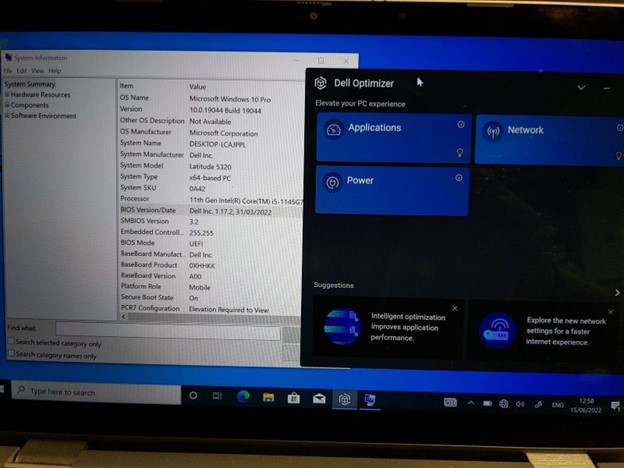
- When BIOS versions 1.17.2 to 1.19.1 are installed there appears to be an issue with detection of connected audio jack devices (headsets, headphones, speakers so on), which do not get detected at all, unless the audio device is connected on boot up (and then only until they are removed, not after replugging).
- When Dell Optimizer is installed, the Audio Panel and Option pane is missing,
- No Dell Optimizer audio settings and adjustments are available, severely limiting the functionality of the Latitude 5320.
- Dell Optimizer is required for full audio functionality, including microphone input using the audio jack.
原因
Interplay of BIOS, Audio driver, and Windows installation is the cause of the issue.
解析度
The engineering department is provided on a fix to be released in BIOS version 1.20.0 and later. The updated BIOS is posted to the computer's support page.
受影響的產品
Dell Optimizer, Latitude 5320, Latitude 5520文章屬性
文章編號: 000200858
文章類型: Solution
上次修改時間: 06 7月 2026
版本: 17
向其他 Dell 使用者尋求您問題的答案
支援服務
檢查您的裝置是否在支援服務的涵蓋範圍內。