The Second Monitor Does Not Display After Unplug or Plug the DP Cable in Daisy Chain Mode
摘要: This article provides information about the display issue in Daisy Chain Mode.
本文章適用於
本文章不適用於
本文無關於任何特定產品。
本文未識別所有產品版本。
症狀
The monitor occasionally does not light up with video after unplugging or unplugging the DP cable that is connected to Dock.
原因
Time communication issue between Dock and monitor.
解析度
- For single Monitor,
- Ensure that the MST option of monitor is set to Off.
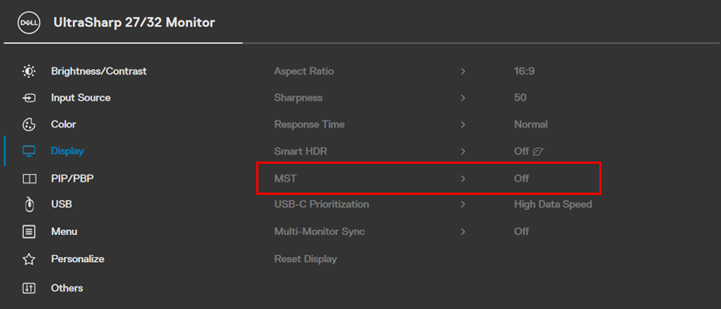
MST OFF
- For Multi-Monitor
- Set the MST option of each monitor to "Off" (same as above)
- Connect each monitor directly to the Dock’s DP port or HDMI port.
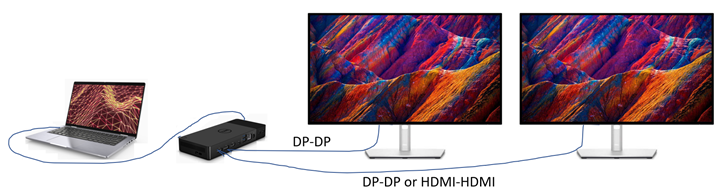
Multi-Monitor Connection
If the customer still prefers to daisy chain second monitor to first monitor (MST = On), set Monitor1 "Auto Select" to Off.
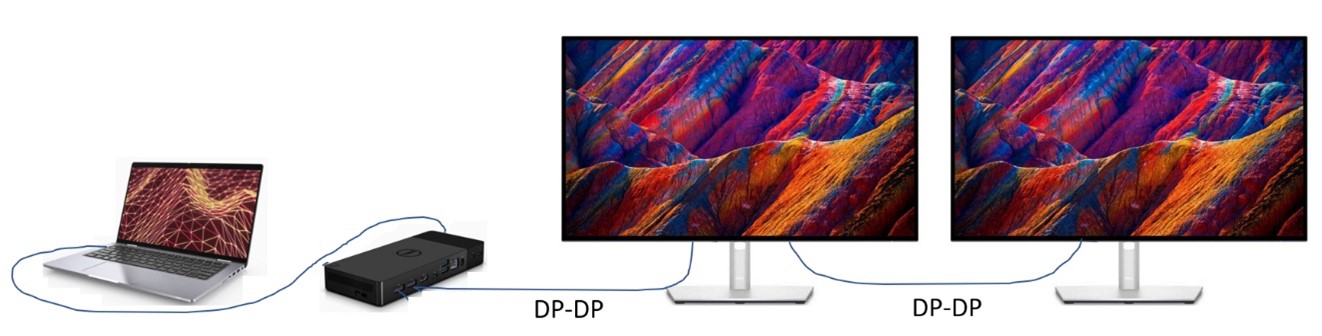
two monitor connection
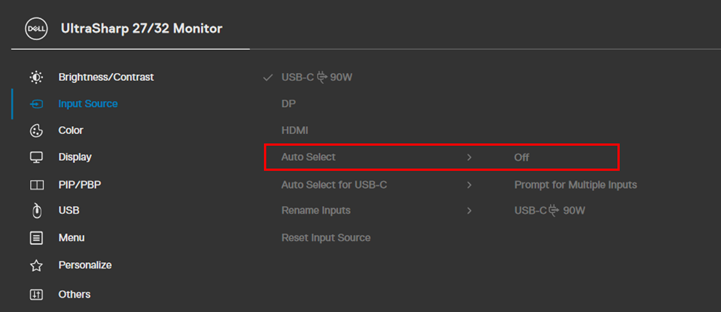
Auto select off.
受影響的產品
Dell 24 Video Conferencing Monitor C2422HE, Dell P2422HE, Dell P2223HC, Dell P2423DE, Dell P2723DE, Dell P3223DE, Dell U2723QE, Dell U3223QZ, Dell Thunderbolt Dock – WD22TB4文章屬性
文章編號: 000204691
文章類型: Solution
上次修改時間: 01 7月 2026
版本: 7
向其他 Dell 使用者尋求您問題的答案
支援服務
檢查您的裝置是否在支援服務的涵蓋範圍內。