PSQN |SWC5011:iDRAC 重新開機後,15G 伺服器未開啟電源 |MX 運算 SLED iDRAC9 網路無法存取 |RDU0002:風扇冗餘遺失
摘要: 本文記錄了在 iDRAC 開機期間,iDRAC9 無法從 CPLD 控制器接收準確的平台 ID 資訊時,可能發生的已知症狀。在 iDRAC 獨立於主機伺服器重新開機後,便可能會遇到此問題。
本文章適用於
本文章不適用於
本文無關於任何特定產品。
本文未識別所有產品版本。
症狀
在 iDRAC9 開機期間,CPLD 控制器會回報唯一的系統 ID,以允許 iDRAC9 為指定的伺服器平台載入正確的產品組態檔案。此交易會在 iDRAC9 控制器重新開機後發生。如果從 CPLD 接收的資料已損毀或無效,iDRAC9 會根據伺服器外形規格載入預設的伺服器組態檔案。如果發生這種情況,可能會遇到幾種已知癥狀。有關如何識別此問題發生時間的詳細資訊,請參閱以下各節。
執行下列任何 iDRAC 作業後,可能會發生問題:
- iDRAC 重新開機 (
racadm racreset) - iDRAC 韌體更新
LCWipe(racadm systemerase)- 將 iDRAC 重設為預設值 (
racadm racresetcfg)
問題 1:iDRAC 重新開機後,15G PowerEdge 伺服器無法開機,且生命週期記錄中SWC5011事件。
當在 15G 伺服器上的 iDRAC 註冊了不正確的平台 ID,根信任確認可能會因為 CPLD 和 iDRAC9 不相符而失敗。
如果伺服器在 iDRAC 重新開機後關閉電源或關閉電源,根信任故障可能會使伺服器無法重新開啟電源。發生這種情況時,將出現 SWC5011 事件會記錄在生命週期記錄中。
SWC5011 生命週期記錄範例:
2023-03-09 08:11:26         RAC0701         Requested system powerup.
2023-03-09 08:11:23         SWC5011         Unable to verify the BIOS image file because:  Internal Errors: Bypassing bios verification and booting the host.
2023-03-09 08:10:24         RAC0701         Requested system powerup.
問題 2:iDRAC9 重新開機後回報風扇備援和 RPM 錯誤。
在任何支援的伺服器上,將不正確的平台 ID 註冊至 iDRAC 時,可能會載入不正確的風扇控制器感應器配置。這可能會導致 FAN0000/FAN0001/RDU0002 系統事件記錄 (SEL) 和生命週期記錄中記錄的警告或錯誤事件。整體系統健全狀況進入嚴重狀態,且系統 ID LED 閃爍琥珀色。當 LCD 前蓋存在時,LCD 背光會變為琥珀色,並捲動 SEL 事件。
FAN00001/FAN00000/RDU00002 生命週期記錄範例:
2023-02-21 07:12:23         FAN0001         Fan 4D RPM is less than the lower critical threshold.
2023-02-21 07:12:21         FAN0000         Fan 4D RPM is less than the lower warning threshold.
2023-02-21 07:12:18         FAN0001         Fan 3D RPM is less than the lower critical threshold.
2023-02-21 07:12:17         FAN0000         Fan 3D RPM is less than the lower warning threshold.
2023-02-21 07:12:16         FAN0001         Fan 2D RPM is less than the lower critical threshold.
2023-02-21 07:12:14         FAN0000         Fan 2D RPM is less than the lower warning threshold.
2023-02-21 07:12:12         FAN0001         Fan 1D RPM is less than the lower critical threshold.
2023-02-21 07:12:11         FAN0000         Fan 1D RPM is less than the lower warning threshold.
2023-02-21 07:12:10         FAN0001         Fan 4C RPM is less than the lower critical threshold.
2023-02-21 07:12:08         FAN0000         Fan 4C RPM is less than the lower warning threshold.
2023-02-21 07:12:06         FAN0001         Fan 4B RPM is less than the lower critical threshold.
2023-02-21 07:12:05         FAN0000         Fan 4B RPM is less than the lower warning threshold.
2023-02-21 07:12:04         FAN0001         Fan 3B RPM is less than the lower critical threshold.
2023-02-21 07:12:02         FAN0000         Fan 3B RPM is less than the lower warning threshold.
2023-02-21 07:11:59         FAN0001         Fan 2B RPM is less than the lower critical threshold.
2023-02-21 07:11:58         FAN0000         Fan 2B RPM is less than the lower warning threshold.
2023-02-21 07:11:56         FAN0001         Fan 1B RPM is less than the lower critical threshold.
2023-02-21 07:11:55         FAN0000         Fan 1B RPM is less than the lower warning threshold.
2023-02-21 07:11:53         FAN0001         Fan 4A RPM is less than the lower critical threshold.
2023-02-21 07:11:47         FAN0000         Fan 4A RPM is less than the lower warning threshold.
2023-02-21 07:11:41         RDU0002         Fan redundancy is lost.
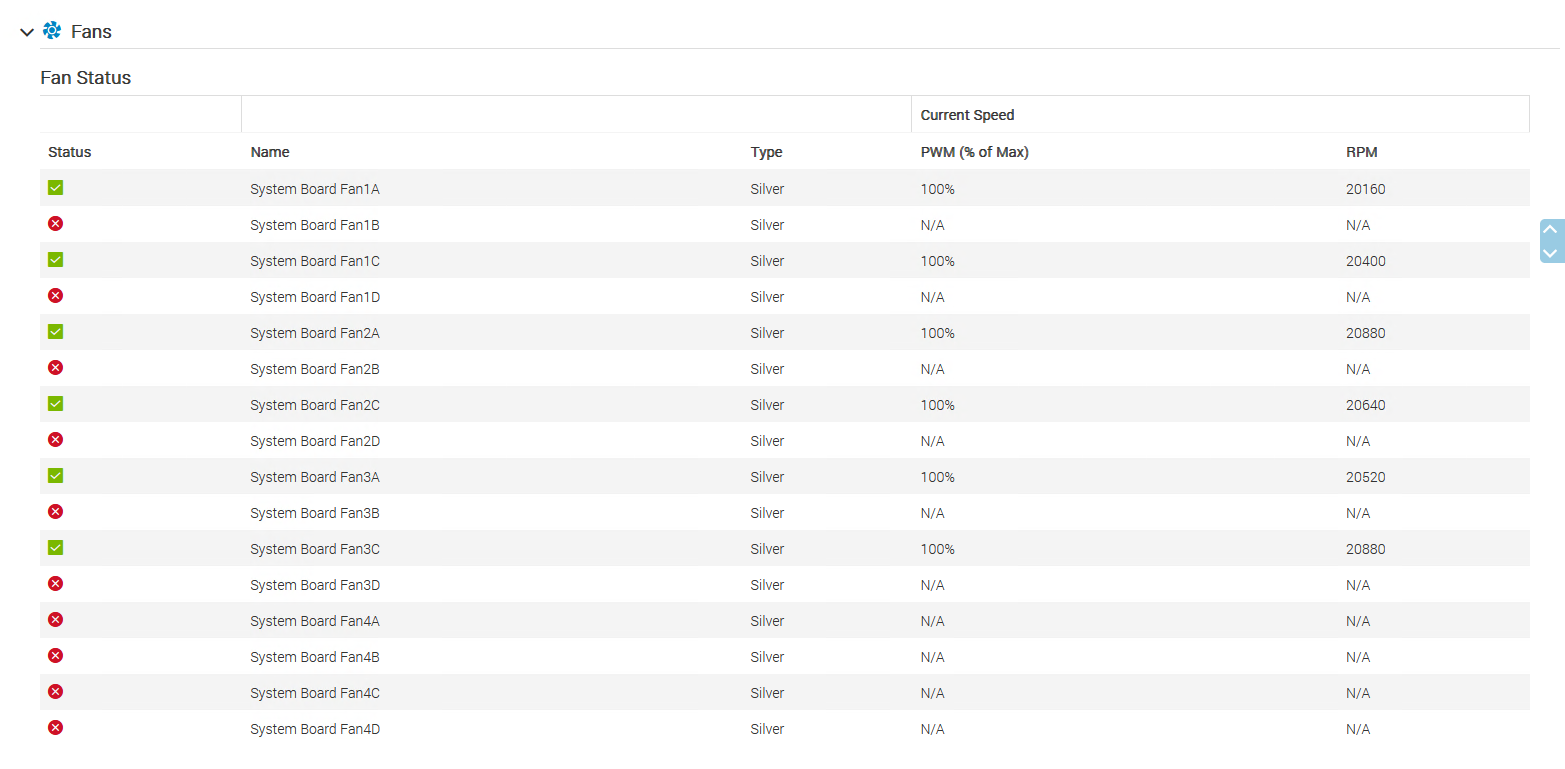
系統風扇狀態可能會在備援風扇上顯示嚴重錯誤,並在故障期間以 100 Pulse width Modulation (PWM) 驅動主要風扇。
iDRAC9 UI >>系統 >> 概觀 >> 散熱 >> 風扇 範例:
問題 3:14/15G MX 運算模組在 iDRAC 重新開機後無法開機,且 iDRAC 網路介面無法存取。
如果在 MX 運算 SLED 上的 iDRAC 註冊了不正確的平台 ID,iDRAC9 網路服務便無法正確載入。這會導致無法使用其網路介面存取 iDRAC9。這包括運算 SLED 正面的 iDRAC Direct 連接埠。MX7000 與 MX SLED 之間的通訊中斷。OME-Modular 應用程式會記錄 HWC1228 首頁上針對受影響 SLED 發出警告。
OME-模組化 HWC1228 範例:
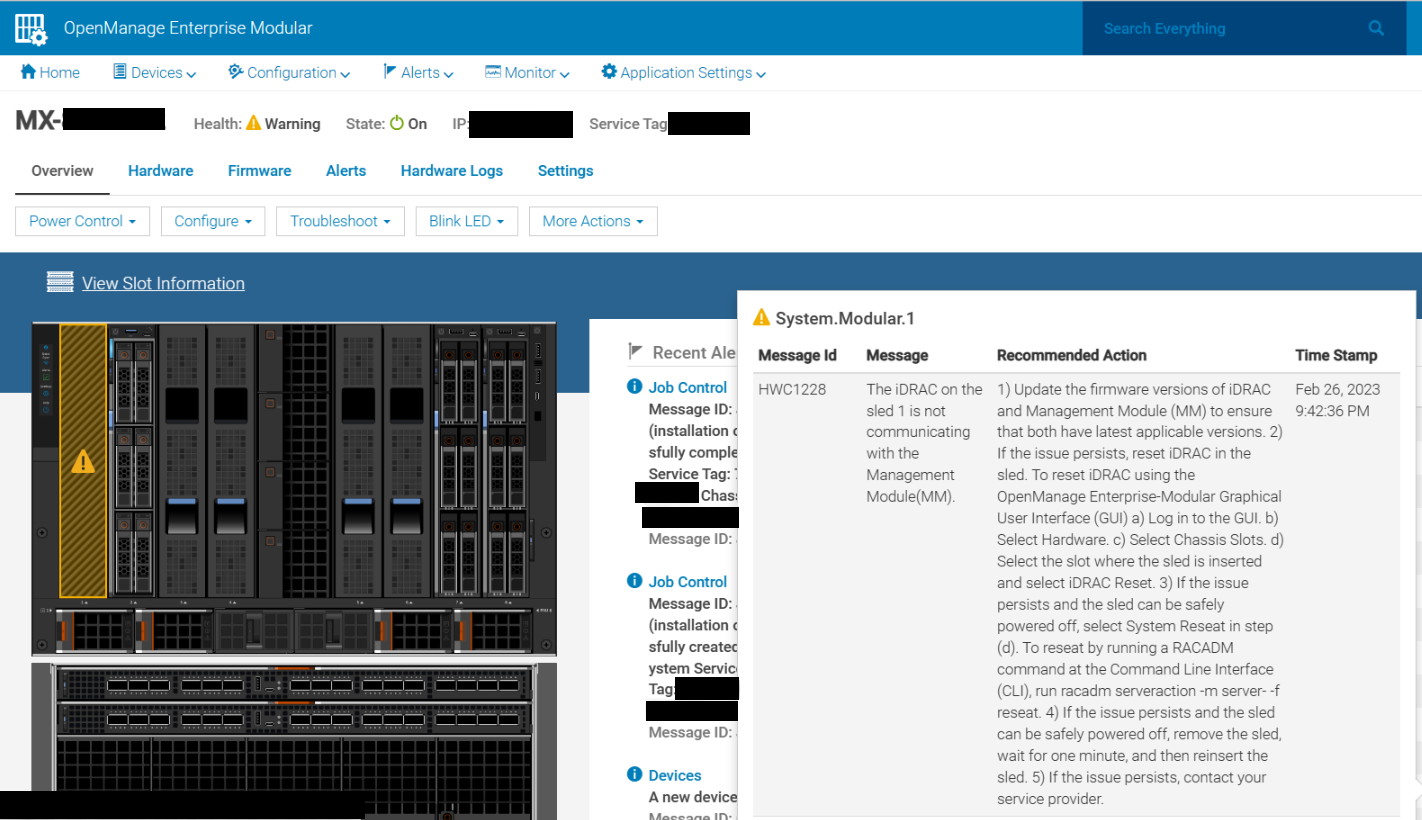
2023-02-26 21:42:36 HWC1228 The iDRAC on the sled 1 is not communicating with the Management Module (MM)
如果 MX 運算 SLED 處於開機狀態,當 racreset 發生時,伺服器可能會保持開啟電源。iDRAC 網路介面已關閉,無法透過網路存取 iDRAC。本機 RACADM 可用來確認 iDRAC 網路介面已完成。
RACADM GETNICCFG 範例:
IPv4 settings:
NIC Enabled          = 1
IPv4 Enabled         = 1
DHCP Enabled         = 1
IP Address           = 0.0.0.0
Subnet Mask          = 0.0.0.0
Gateway              = 0.0.0.0

...

LOM Status:
NIC Selection   = Dedicated
Link Detected   = Yes
Speed           = 10Mb/s
Duplex Mode     = Half Duplex
Active NIC      = None
原因
在 iDRAC 重新開機期間,當交易正在傳輸到 CPLD 時,CPLD 資料可能會不一致。因此,查詢平台 ID 時對 iDRAC 的資料回應可能是損毀的資料。
解析度
iDRAC9 韌體 6.10.30.20 (2023 年 3 月) 推出了一個因應措施,可在資料損毀或傳回值無效時,放棄初始 CPLD 回應。
隨後嘗試讀取相同的數據將返回預期的平臺ID值。
此補救措施可防止在 iDRAC 開機順序期間發生問題。
受影響的產品
iDRAC9, OEMR R250, OEMR XE R250, OEMR R350, OEMR XE R350, OEMR R450, OEMR R550, OEMR R5500, OEMR R650, OEMR R650xs, OEMR R6515, OEMR R6525, OEMR R750, OEMR R750xa, OEMR R750xs, OEMR R7515, OEMR R7525, OEMR T150, OEMR T350, OEMR T550, OEMR XR11
, OEMR XR12, OEMR XR4510c, OEMR XR4520c, PowerEdge C6520, PowerEdge C6525, PowerEdge MX750c, PowerEdge R250, PowerEdge R350, PowerEdge R450, PowerEdge R550, PowerEdge R650, PowerEdge R650xs, PowerEdge R6515, PowerEdge R6525, PowerEdge R750, PowerEdge R750XA, PowerEdge R750xs, PowerEdge R7515, PowerEdge R7525, PowerEdge T150, PowerEdge T350, PowerEdge T550, PowerEdge XE8545, PowerEdge XR11, PowerEdge XR12, PowerEdge XR4510c, PowerEdge XR4520c, PowerFlex appliance R650, PowerFlex appliance R6525, Powerflex appliance R750, PowerFlex custom node R650, PowerFlex custom node R6525, PowerFlex custom node R750, Dell EMC vSAN MX750c Ready Node, Dell EMC vSAN R650 Ready Node, Dell EMC vSAN R6515 Ready Node, Dell EMC vSAN R750 Ready Node, Dell EMC vSAN R7515 Ready Node, Dell EMC vSAN T350 Ready Node, PowerFlex appliance R7525
...
文章屬性
文章編號: 000210943
文章類型: Solution
上次修改時間: 17 5月 2026
版本: 9
向其他 Dell 使用者尋求您問題的答案
支援服務
檢查您的裝置是否在支援服務的涵蓋範圍內。