Connectrix B-Series: The Web Browsers Report "Cipher Mismatch, No Matching Ciphers" When Accessing WebTools UI Using HTTPS
摘要: AES256-SHA256 (0x3d) and AES128-SHA256 (0x3c) is blocked for TLS.
本文章適用於
本文章不適用於
本文無關於任何特定產品。
本文未識別所有產品版本。
症狀
The web browsers (Chrome, New Edge, or Firefox) refused to open the WebTools using HTTPS.
The error message contains "Cipher Mismatch" or "No Matching Ciphers."
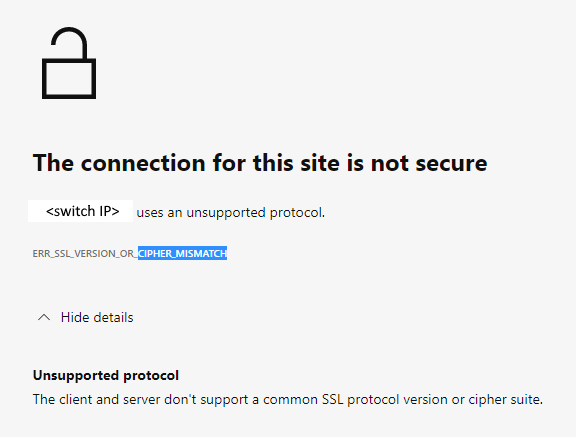
Figure 1: Screenshot of Error Message Showing Connection Not Secure, Unsupported Protocol
The switch is running in FOS 8.1 or 8.2 firmware.
The error message contains "Cipher Mismatch" or "No Matching Ciphers."
Figure 1: Screenshot of Error Message Showing Connection Not Secure, Unsupported Protocol
The switch is running in FOS 8.1 or 8.2 firmware.
原因
The switch HTTPS cipher setting only allows AES256-SHA256 and AES128-SHA256 for TLS 1.2 (the "default_generic" or "default_strong templates" of FOS 8.1 or 8.2).
The Wireshark dump shows that the client does not accept AES256-SHA256 (0x3d) or AES128-SHA256 (0x3c), hence the TLS handshake fails.
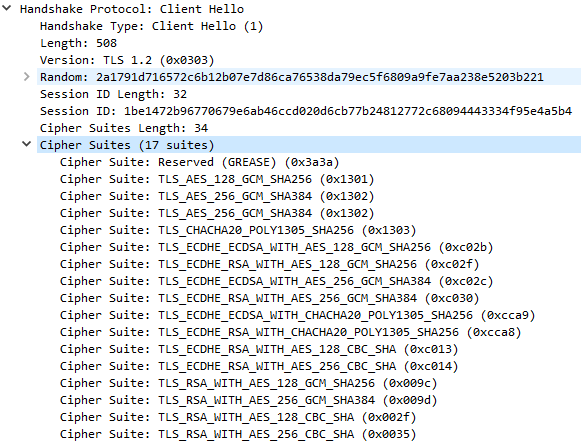
Figure 2: Screenshot of Wireshark Dump Showing Handshake Failure
<switchname>:root> seccryptocfg --show | grep HTTPS
HTTPS                    : !ECDH:!DH:HIGH:-MD5:!CAMELLIA:!SRP:!PSK:!AESGCM:!SSLv3
HTTPS                    : TLSv1.2

<switchname:root> openssl ciphers -v '!ECDH:!DH:HIGH:-MD5:!CAMELLIA:!SRP:!PSK:!AESGCM:!SSLv3'
AES256-SHA256           TLSv1.2 Kx=RSA      Au=RSA  Enc=AES(256)  Mac=SHA256
AES128-SHA256           TLSv1.2 Kx=RSA      Au=RSA  Enc=AES(128)  Mac=SHA256
The Wireshark dump shows that the client does not accept AES256-SHA256 (0x3d) or AES128-SHA256 (0x3c), hence the TLS handshake fails.
Figure 2: Screenshot of Wireshark Dump Showing Handshake Failure
解析度
Modify the switch HTTPS cipher setting to cover the client.
Example:
In this example, the current HTTPS cipher setting is "!ECDH:!DH:HIGH:-MD5:!CAMELLIA:!SRP:!PSK:!AESGCM:!SSLv3"
To enable AES256-GCM-SHA384 (0x9d) and AES128-GCM-SHA256 (0x9c), remove "!AESGCM" from the setting with the command:
Example:
In this example, the current HTTPS cipher setting is "!ECDH:!DH:HIGH:-MD5:!CAMELLIA:!SRP:!PSK:!AESGCM:!SSLv3"
To enable AES256-GCM-SHA384 (0x9d) and AES128-GCM-SHA256 (0x9c), remove "!AESGCM" from the setting with the command:
seccryptocfg --replace -type https -cipher '!ECDH:!DH:HIGH:-MD5:!CAMELLIA:!SRP:!PSK:!SSLv3'
其他資訊
Map OpenSSL cipher names (displayed in the OpenSSL command) with IANA cipher names (displayed in Wireshark dump) using the Mozilla document, Security/Cipher Suites - MozillaWiki

受影響的產品
Connectrix B-Series文章屬性
文章編號: 000213633
文章類型: Solution
上次修改時間: 18 5月 2026
版本: 6
向其他 Dell 使用者尋求您問題的答案
支援服務
檢查您的裝置是否在支援服務的涵蓋範圍內。