在搭載第 11 代 Intel 處理器的 Dell 電腦上使用 Dell MH3021P 免持聽筒時沒有音訊
摘要: 連接至搭載第 11 代 (Tiger Lake 或 Tiger Lake H) Intel Core 行動處理器的 Dell 電腦時,Dell MH3021P 免持聽筒沒有音訊的相關資訊。
本文章適用於
本文章不適用於
本文無關於任何特定產品。
本文未識別所有產品版本。
症狀
使用第 11 代 (Tiger Lake 或 Tiger Lake H) Intel Core 行動處理器的 Dell 電腦連接至 Dell MH3021P 擴音器時,可能沒有 USB 喇叭音訊。
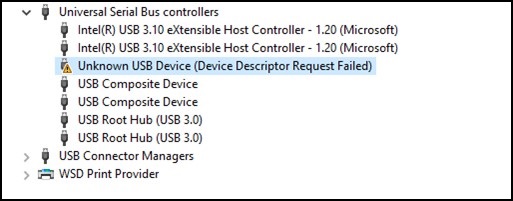
如果 Dell MH3021P 擴音器保持與電腦的連接時間超過 2 分鐘,可能會導致 USB 主機控制器匯流排停止回應。這可能會導致連接至電腦的其他 USB 裝置遺失。
這將導致這些問題:
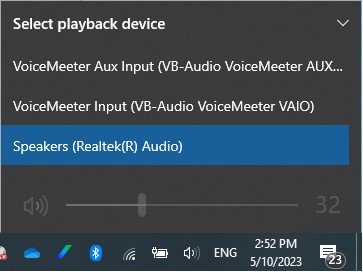
- 音訊裝置遺失,Dell MH3021P 擴音器將不會出現在工作列音量列下方。
- 由於藍牙模組無法與主機電腦通訊 (因為 USB 主機控制器掛斷),可能會失去與藍牙裝置的連線。
受影響的機型:
| Alienware m15 R6Alienware
x15 R1 Alienware x17 R1 Dell G15 5511 Inspiron 13 5310 Inspiron 14 5410 二合一 Inspiron 14 5410 Inspiron 14 5418 Inspiron 15 3511 Inspiron 15 5510 Inspiron 15 5518 Inspiron 15 7510 Inspiron 16 7610 Inspiron 5400 多合一 Inspiron 5401 多合一 Inspiron 5406 二 合一 Inspiron 7506 二 合一 Inspiron 7706 二合一 |
Latitude 3320
Latitude 3420 Latitude 3520 Latitude 5320 Latitude 5420 Latitude 5421 Latitude 5430 Latitude 5430 Rugged Latitude 5520 Latitude 5521 Latitude 5530 Latitude 7320 Latitude 7320 可 卸離 Latitude 7330 Rugged Extreme Latitude 7420 Latitude 7520 Latitude 9420 Latitude 9520 |
OptiPlex 3090 UltraOptiPlex
7090 Ultra Precision 3560 Precision 3561 Precision 5560 Precision 5760 Precision 7560 Precision 7760 Vostro 13 5310 Vostro 14 5410 Vostro 15 3510 Vostro 15 5510 Vostro 15 7510 Vostro 3400 Vostro 3420 Vostro 3520 XPS 13 9305 XPS 13 9310 XPS 15 9510 XPS 17 9710 |
受影響的作業系統:
- Windows 11 21H2
- Windows 10
原因
Intel Smart Sound Technology (Intel SST) 驅動程式安裝在搭載 Tiger Lake 或 Alder Lake 處理器的電腦上。如需有關如何識別 Intel 處理器世代的資訊,請參閱:如何識別 Intel Core 或 AMD Ryzen 處理器世代
Intel 智慧型音效技術是一種整合式音訊數位訊號處理器 (DSP),專為處理音訊、語音及語音互動而打造。Intel 智慧型音效技術可將音訊 USB 從 CPU 卸載至 Intel DSP。若電腦搭載 Intel 第 11 代或第 12 代 Tiger Lake 或 Alder Lake CPU 以外的任何其他處理器,則不受此問題影響。此問題是由於未能在應該禁用的情況下禁用英特爾 SST 音訊卸載引起的。
解析度
Intel 智慧型音效技術
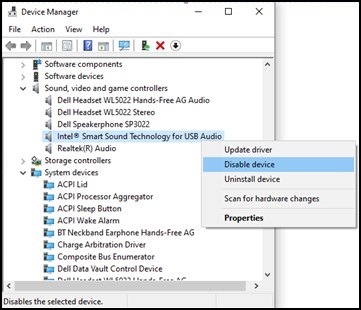
變更音訊裝置設定。
- 在「開始」 按鈕上按一下滑鼠右鍵,然後按一下「執行」。
- 輸入「
devmgmt.msc“,然後按下”Enter“。 - 以滑鼠右鍵按一下「適用於 USB 音訊的 Intel 智慧型音效技術」, 然後選取「停用」裝置。
受影響的產品
Alienware m15 R6, Alienware x15 R1, Alienware x17 R1, Dell Speakerphone with Multiport Adapter – MH3021P, Dell G15 5511, Inspiron 13 5310, Inspiron 5406 2-in-1, Inspiron 14 5410 2-in-1, Inspiron 15 3511, Inspiron 15 5510/5518, Inspiron 7506 2-in-1
, Inspiron 15 7510, Inspiron 16 7610, Inspiron 7706 2-in-1, Inspiron 5400 AIO, Inspiron 5401 AIO, Inspiron 7700 AIO, Latitude 3320, Latitude 5320, Latitude 7320, Latitude 7320 Detachable, Latitude 7330 Rugged Extreme, Latitude 3420, Latitude 5421, Latitude 5430 Rugged, Latitude 7420, Latitude 9420, Latitude 3520, Latitude 5520, Latitude 5521, Latitude 5530, Latitude 7520, Latitude 9520, Latitude 5420, Latitude 5430, OptiPlex 3090 Ultra, OptiPlex 7090 Ultra, Precision 3560, Precision 3561, Precision 5560, Precision 7560, Precision 5760, Precision 7760, Vostro 13 5310, Vostro 3400, Vostro 3420, Vostro 14 5410, Vostro 15 3510, Vostro 3520, Vostro 15 5510, Vostro 15 7510, XPS 13 9305, XPS 13 9310, XPS 15 9510, XPS 17 9710
...
文章屬性
文章編號: 000214132
文章類型: Solution
上次修改時間: 18 5月 2026
版本: 5
向其他 Dell 使用者尋求您問題的答案
支援服務
檢查您的裝置是否在支援服務的涵蓋範圍內。