PowerProtect - SQL discovery fails with ASD0002 or ASDS0018 error
摘要: PowerProtect Data Manager SQL discovery fails with ASD0002 or ASDS0018 error.
本文章適用於
本文章不適用於
本文無關於任何特定產品。
本文未識別所有產品版本。
症狀
Within PPDM, when attempting to run a discovery of a Microsoft SQL Server asset, the discovery may fail with the following errors:
In the DPSApps\AgentService\logs\OpAgentSvc* log, the following error is logged:
ADA0002: Unable to discover ASSETS on host <Server SQL Name> because of an agent issue.
Unable to perform applications discovery because agent failed to create the discovery session.
Or
ASDS0018: Discovery of Assets failed on the host <SQL Server Name> for AddOn MICROSOFT_SQL_DATABASE_SYSTEM.
In the DPSApps\AgentService\logs\OpAgentSvc* log, the following error is logged:
ErrCode: -2147467259, Error: SSL Provider: The certificate chain was issued by an authority that is not trusted.
In the System event logs on the SQL server, one or more of the following errors may be logged:
System Event Logs:
Log Name:      System
Source:        Schannel
Date:          <DATE>
Event ID:      36882
Task Category: None
Level:         Error
Keywords:
User:          SYSTEM
Computer:      <SQL Server Name>
Description:
The certificate received from the remote server was issued by an untrusted certificate authority. Because of this, none of the data contained in the certificate can be validated. The SSL connection request has failed. The attached data contains the server certificate.

Log Name:      System
Source:        Schannel
Date:          <DATE>
Event ID:      36884
Task Category: None
Level:         Error
Keywords:
User:          SYSTEM
Computer:      <SQL Server Name>
Description:
The certificate received from the remote server does not contain the expected name. It is therefore not possible to determine whether we are connecting to the correct server. The server name we were expecting is crcorpsqldev02. The TLS connection request has failed. The attached data contains the server certificate.

Log Name:      System
Source:        Schannel
Date:          <DATE>
Event ID:      36888
Task Category: None
Level:         Error
Keywords:
User:          SYSTEM
Computer:      <SQL Server Name>
Description:
A fatal alert was generated and sent to the remote endpoint. This may result in termination of the connection. The TLS protocol defined fatal error code is 48. The Windows SChannel error state is 552.
原因
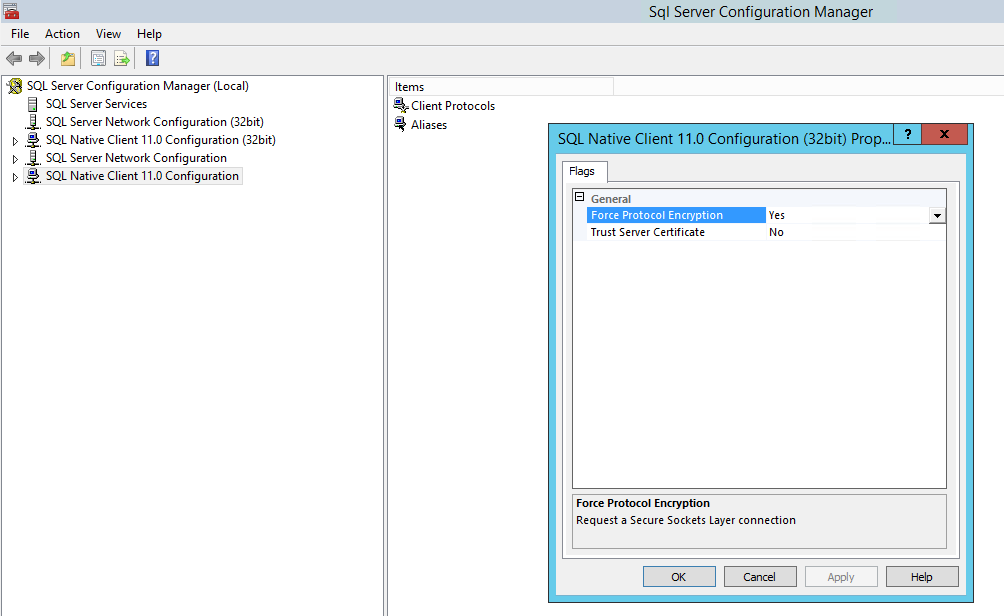
The failure is caused because "Force protocol encryption" is enabled on the SQL Native Client configuration under SQL Server Configuration Manager.
解析度
To resolve the issue, follow the steps below:
- Open the SQL Server Configuration Manager
- Right click on SQL Native Client 11.0 Configuration and select properties.
- Set the Force Protocol Encryption value to No and select OK.
- Perform the same steps for the SQL Native Client 11.0 Configuration (32 bit) configuration
- Reboot the SQL Server
- Once the SQL server is up and running, run Discovery from the PPDM UI.
Sometimes, it may be necessary to unregister or uninstall the Agent and reinstall for discovery to work.
受影響的產品
PowerProtect Data Manager文章屬性
文章編號: 000214332
文章類型: Solution
上次修改時間: 22 9月 2023
版本: 2
向其他 Dell 使用者尋求您問題的答案
支援服務
檢查您的裝置是否在支援服務的涵蓋範圍內。