Connectrix:B系列:執行 configdownload 命令時,發生組態檔案標頭無效的錯誤
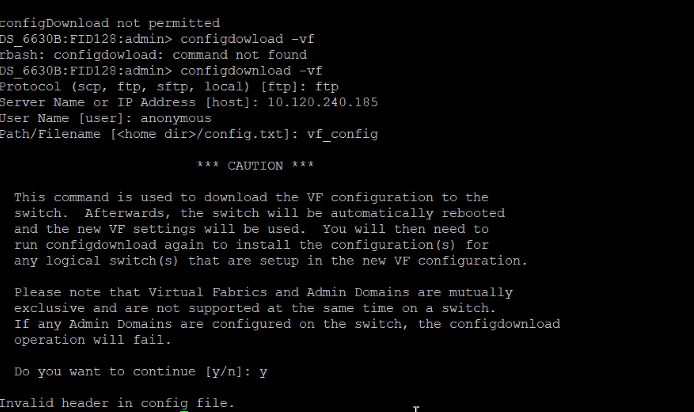
摘要: 使用「configdownload」命令將備份的交換器組態載入至交換器時,便會出現此問題。
本文章適用於
本文章不適用於
本文無關於任何特定產品。
本文未識別所有產品版本。
症狀
Error: Invalid header in config file
原因
此問題是由交換器橫幅的模式不同所導致。
在交換器更換過程中,舊交換器設定檔包含不同的交換器橫幅時,便會發生這種情況。新的交換器組態檔案有不同的模式,因此導致不相符。
在交換器更換過程中,舊交換器設定檔包含不同的交換器橫幅時,便會發生這種情況。新的交換器組態檔案有不同的模式,因此導致不相符。
解析度
步驟 1:比較舊的交換器設定檔和新交換器設定檔,並注意橫幅中的差異。
第 2 步:例如:
舊交換器橫幅
============================================================= ATTENTION: It is recommended that you change the default passwords for all the switch accounts. Refer to the product release notes and the administrator's guide if you need further information. =============================================================
新交換器橫幅:
-------------------------------------------------------------------------------------------- ATTENTION It is recommended that you change the default passwords for all the switch accounts. Refer to the product release notes and the administrator's guide if you need further information. --------------------------------------------------------------------------------------------
步驟 3:根據舊的交換器橫幅手動編輯新的交換器橫幅。
第 4 步:儲存組態檔案,並嘗試執行 configdownload。
受影響的產品
Connectrix B-Series文章屬性
文章編號: 000214361
文章類型: Solution
上次修改時間: 18 5月 2026
版本: 5
向其他 Dell 使用者尋求您問題的答案
支援服務
檢查您的裝置是否在支援服務的涵蓋範圍內。