在連接 AC 變壓器或 Dell 擴充基座時開啟電源時,Dell 筆記型電腦會顯示警告訊息
摘要: 本文提供在連接至 AC 變壓器或 Dell 擴充基座後開啟電腦時,Dell 筆記型電腦上顯示警告訊息的相關資訊。
本文章適用於
本文章不適用於
本文無關於任何特定產品。
本文未識別所有產品版本。
症狀
在連接至 AC 變壓器或 Dell 擴充基座時開啟電腦時,可能會顯示警告訊息。
在 BIOS 中設定為自動電源時,數種筆記型電腦型號會出現此問題。瓦數錯誤訊息可能因所連接的電力來源而有所不同。除了錯誤訊息之外,電腦也沒有正確充電。
請參閱下列警告訊息範例:
Alert! A 7W AC power adapter has been detected. The system can only boot when a 60W power adapter or greater.
Alert! A 15W AC power adapter has been detected. The system can only boot when a 60W power adapter or greater.
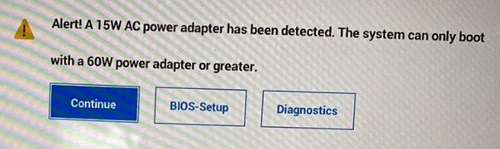
Alert! A 4W AC power adapter has been detected. The system can only boot when a 60W power adapter or greater.
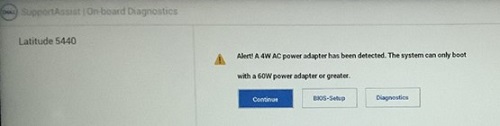

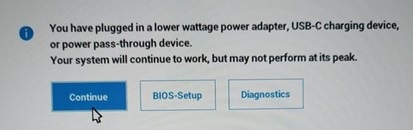
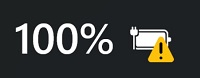
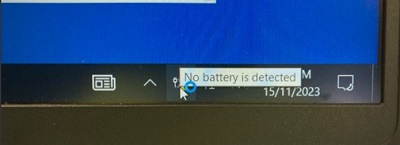
如果您使用的是 Windows 10,請開啟任何應用程式,例如 Microsoft Word 或 Microsoft PowerPoint,您可能會看到訊息「未偵測到電池」。當您將電腦閒置 10 至 30 分鐘後,也可能會看到此訊息。
受影響的平臺具有受影響的 BIOS 版本:
- Latitude 5340 - BIOS 1.5.0/1.6.0/1.7.1
- Latitude 5440 - BIOS 1.5.0/1.6.0/1.8.1
- Latitude 5540 - BIOS 1.5.0/1.6.0/1.7.1
- Latitude 7340 - BIOS 1.5.0/1.6.0/1.8.1
- Latitude 7440 - BIOS 1.5.0/1.6.0/1.8.1
- Latitude 7640 - BIOS 1.5.0/1.6.0/1.8.1
- Latitude 9440 二合一 - BIOS 1.3.2/1.4.1/1.6.0
- Precision 3480 - BIOS 1.5.0/1.6.0/1.8.1
- Precision 3580 - BIOS 1.5.0/1.6.0/1.7.1
- Precision 3581 - BIOS 1.5.0/1.6.0/1.7.1
受影響的擴充基座:
- Dell 擴充基座 WD19
- Dell 擴充基座 - WD19S
- Dell Thunderbolt 擴充基座 - WD19TB
- Dell Thunderbolt 擴充基座 - WD19TBS
- Dell 效能擴充基座 - WD19DC
- Dell 效能擴充基座 - WD19DCS
原因
沒有可用的原因資訊。
解析度
更新至最新版本的 BIOS 可解決問題。若要下載和安裝 BIOS,請參閱 BIOS 更新指南。
- Latitude 5340 - BIOS 1.10.0 或更新版本
- Latitude 5440 - BIOS 1.12.0 或更新版本
- Latitude 5540 - BIOS 1.10.1 或更新版本
- Latitude 7340 - BIOS 1.11.0 或更新版本
- Latitude 7440 - BIOS 1.12.0 或更新版本
- Latitude 7640 - BIOS 1.12.0 或更新版本
- Latitude 9440 二合一 - BIOS 1.8.0 或更新版本
- Precision 3480 - BIOS 1.12.0 或更新版本
- Precision 3580 - BIOS 1.10.1 或更新版本
- Precision 3581 - BIOS 1.10.1 或更新版本
受影響的產品
Dell Dock WD19, Dell Performance Dock - WD19DC, Dell Performance Dock – WD19DCS, Dell Dock – WD19S, Dell Thunderbolt Dock - WD19TB, Dell Thunderbolt Dock – WD19TBS, Latitude 5340, Latitude 7340, Latitude 5440, Latitude 7440, Latitude 9440 2-in-1
, Latitude 5540, Latitude 7640, Precision 3480, Precision 3580, Precision 3581
...
文章屬性
文章編號: 000216629
文章類型: Solution
上次修改時間: 18 5月 2026
版本: 16
向其他 Dell 使用者尋求您問題的答案
支援服務
檢查您的裝置是否在支援服務的涵蓋範圍內。