PowerProtect Data Manager:無法建立儲存裝置,錯誤代碼為CFG0001
摘要: 無法建立儲存裝置,錯誤代碼為 CFG0001
本文章適用於
本文章不適用於
本文無關於任何特定產品。
本文未識別所有產品版本。
症狀
建立新原則時,無法建立儲存裝置。
從 UI:
從 UI:
CFG0001: xxx: Unable to configure the protection policy because of the following error: Failed to connect to PowerProtect DD System. errorNum: 5007 errorMessage: operation is not implemented從工作記錄:
ddboost.log: 2023-08-11T23:15:17.931Z ERROR [] [pool-26-thread-1] [00000000-0000-4000-b000-000000000000][][][TRACE_ID:81a3388041e49793;JOB_ID:9ea4884359c07119][plc.id:2eab4e3d,asset.id:,pcs.id:] ddboost.log(52) - severity:1 msg:[D688:7FF690077BA0] ddp_connect_with_config() failed, Hostname: xxx, Err: 5007-nfs ddp getinfo failed (nfs: Operation not supported)確認沒有網路問題,沒有憑證問題,已在使用 sysadmin 新增 Data Domain (探索運作正常)。
原因
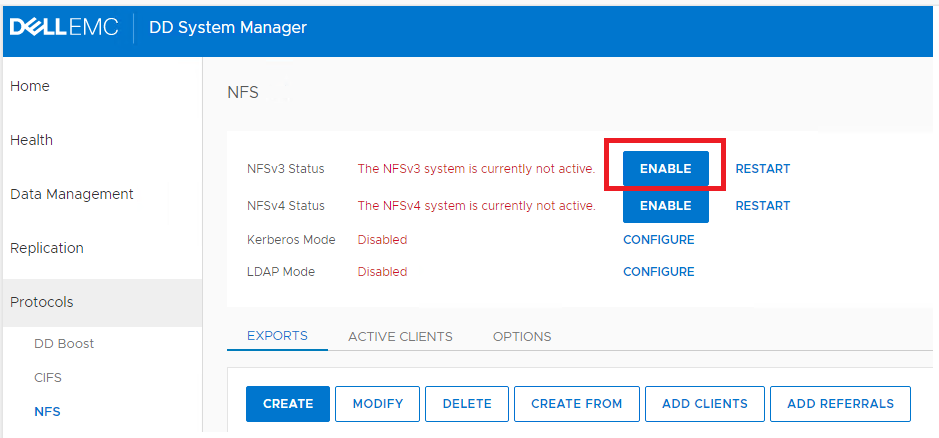
Data Domain NFS 服務已停用。
解析度
在 Data Domain UI 上,按一下「ENABLE」以啟用 NFSv3
受影響的產品
PowerProtect Data Manager, PowerProtect Software文章屬性
文章編號: 000216695
文章類型: Solution
上次修改時間: 18 5月 2026
版本: 6
向其他 Dell 使用者尋求您問題的答案
支援服務
檢查您的裝置是否在支援服務的涵蓋範圍內。