How to Modify Dell Data Security Uninstaller Values for Forensic Key Download
摘要: This article explains how to modify the Dell Data Security Uninstaller values for forensic key download using two registry entries.
本文章適用於
本文章不適用於
本文無關於任何特定產品。
本文未識別所有產品版本。
說明
Affected Products:
- Dell Encryption
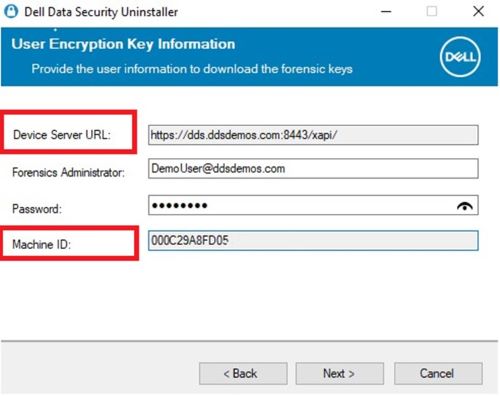
The Device Server URL and Machine ID are pulled through the registry when selecting Encryption Removal Agent - Download Keys from Server.
Warning: The next step is a Windows Registry edit:
- Back up the Registry before proceeding, reference How to Back Up and Restore the Registry in Windows
.
- Editing the Registry can cause the computer to become unresponsive on the next reboot.
- Contact Dell Data Security International Support Phone Numbers for assistance if you have concerns about performing this step.
To change these values, modify the following registry key at the following locations:
- Device Server URL:
HKLM\SYSTEM\CurrentControlSet\Services\CMGShield REG_SZ: ServletURL - Machine ID:
HKLM\SYSTEM\CurrentControlSet\Services\CMGSHIELD REG_SZ: MCID
受影響的產品
Dell Encryption文章屬性
文章編號: 000218564
文章類型: How To
上次修改時間: 15 7月 2026
版本: 7
向其他 Dell 使用者尋求您問題的答案
支援服務
檢查您的裝置是否在支援服務的涵蓋範圍內。