VxRail:VxRail 7.0 或 8.0 版本中的節點新增元件可能會逾時,並顯示訊息「在叢集上建立 VSAN 磁碟群組」
摘要: 如果 VSAN 加密且已啟用磁碟抹除功能,則 VxRail 7.0 或 8.0 版本上的 Dell VxRail 節點新增/橫向擴充可能會逾時,並顯示「在叢集上建立 VSAN 磁碟群組」訊息,因為在建立磁碟群組的過程中必須有額外的時間必須清除磁碟機。
本文章適用於
本文章不適用於
本文無關於任何特定產品。
本文未識別所有產品版本。
症狀
在 VxRail vCenter 附掛程式 UI 主機區段中,我們可以看到節點向外擴充失敗,並顯示訊息「在叢集上建立 VSAN 磁碟群組」,如下所示:
- 請注意,磁碟群組建立程序的 vCenter 相關工作仍在正常執行。
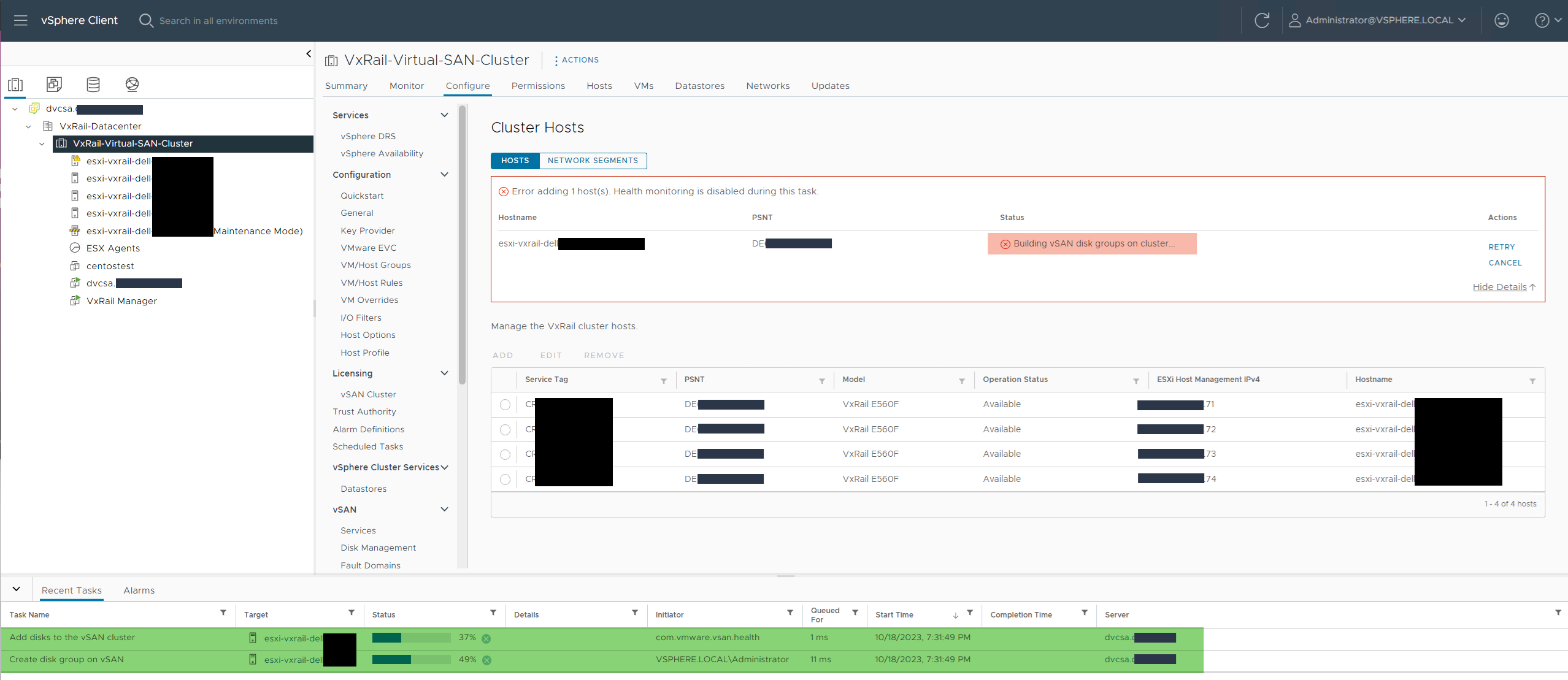
從 VxRail Manager /var/log/microservice_log/dayone.log 在等待磁碟群組建立工作時,橫向擴充程序達到 1200 秒逾時:
"2023-10-18 15:51:42,398" microservice.workflow-engine "2023-10-18T15:51:42.219708396Z stdout F ERROR [wfengine] WFException:Sync REST Task error after max retries(0): HTTPConnectionPool(host='storage-service', port=5000): Max retries exceeded with url: /v2/storage/vsan/host/dg/create/execute (Caused by ReadTimeoutError(""HTTPConnectionPool(host='storage-service', port=5000): Read timed out. (read timeout=1200)"",)) args=() kwargs={}"
"2023-10-18 15:51:42,398" microservice.workflow-engine "2023-10-18T15:51:42.226505935Z stdout F ERROR [luigi-interface] [pid 20358] Worker Worker(salt=712767566, workers=1, host=workflow-engine-65d8b8d9b5-w6jll, username=app, pid=20358) failed    host_vsan_diskgroups_create.default.host_vsan_diskgroups_create(instance_name=exp5058dc7e-9e01-40e4-bdd3-3220c81ca7a1, index_param=[], dryrun=False)"
...
"2023-10-18 15:51:42,398" microservice.workflow-engine "2023-10-18T15:51:42.226545488Z stdout F wfengine.exception.WFException: Sync REST Task error after max retries(0): HTTPConnectionPool(host='storage-service', port=5000): Max retries exceeded with url: /v2/storage/vsan/host/dg/create/execute (Caused by ReadTimeoutError(""HTTPConnectionPool(host='storage-service', port=5000): Read timed out. (read timeout=1200)"",))"
"2023-10-18 15:51:42,398" microservice.workflow-engine "2023-10-18T15:51:42.226684267Z stdout F INFO [wfengine.status] task host_vsan_diskgroups_create.default.host_vsan_diskgroups_create_False____exp5058dc7e_9e01_553895f688 failure"
"2023-10-18 15:51:42,398" microservice.workflow-engine "2023-10-18T15:51:42.234225571Z stdout F INFO [wfengine.status] store status to file"
"2023-10-18 15:51:42,398" microservice.workflow-engine "2023-10-18T15:51:42.242186416Z stdout F INFO [wfengine.status] notify {'level': 'step', 'id': 'host_vsan_diskgroups_create.default.host_vsan_diskgroups_create', 'state': 'FAILED', 'progress': 58, 'status': {'id': 'host_vsan_diskgroups_create', 'internal_id': 'host_vsan_diskgroups_create.default.host_vsan_diskgroups_create_False____exp5058dc7e_9e01_553895f688', 'internal_family': 'host_vsan_diskgroups_create.default.host_vsan_diskgroups_create', 'status': 'FAILED', 'startTime': 1697643101722, 'stage': 'default', 'params': {'vc_conn_info': {'host': 'dvcsa.domain', 'username': 'administrator@vsphere.local', '****** 'datacenter_name': 'VxRail-Datacenter', 'host_conn_info': {'host': 'ip.92', 'username': 'root', '****** 'host_name': 'esxi-vxrail-dell-xxxxx.domain', 'host_storage': {}, 'hw_model': 'VxRail E560F', 'customer_supplied': 'true', 'host_sn': 'F1Dservicetag', 'disk_group_type': None}, 'error': {'ori_err': 'WFException', 'ori_msg': 'Sync REST Task error after max retries(0): HTTPConnectionPool(host=\'storage-service\', port=5000): Max retries exceeded with url: /v2/storage/vsan/host/dg/create/execute (Caused by ReadTimeoutError(""HTTPConnectionPool(host=\'storage-service\', port=5000): Read timed out. (read timeout=1200)"",))'}}}"
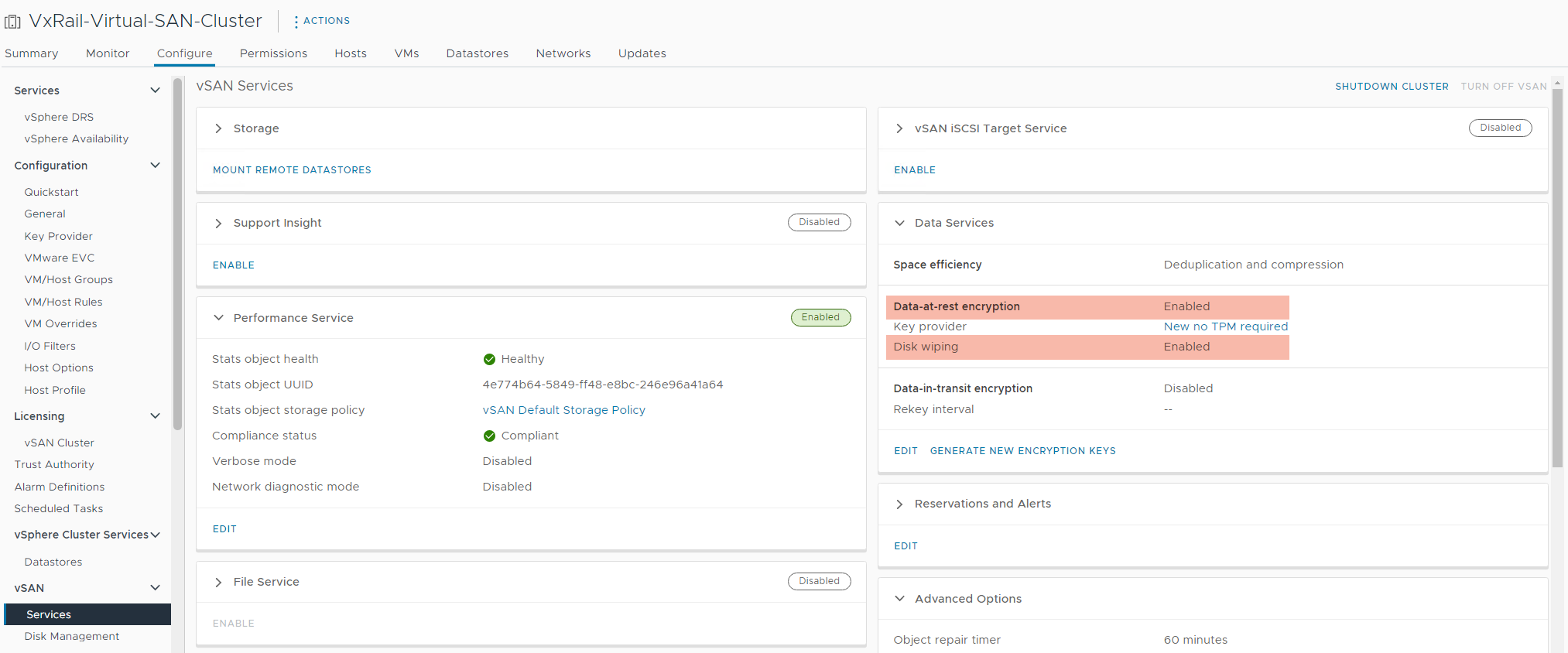
從 VSAN 設定中,我們可以看到「Disk wiping」功能已啟用,屬於叢集上使用的「Data at rest encryption」:
原因
VMware VSAN 使用先前稱為「使用前清除磁碟」的「磁碟抹除」功能,會指示 vSAN 從儲存裝置抹除現有資料,因為這些資料在建立磁碟群組期間已加密。視磁碟數量和磁碟大小而定,此選項可視磁碟數量和使用的磁碟大小大幅增加,從建立 30 秒的磁碟群組增加到 4-10 小時,因為隨機資料會寫入磁碟上,以確保清除任何殘餘資料。
如需其他 VMware 資訊,請參閱 https://blogs.vmware.com/virtualblocks/2018/07/16/ve-erase-disks-before-use/ 
由於未處理的逾時例外狀況,VxRail Manager 會達到 1200 秒 (20 分鐘) 逾時,使其看起來像發生問題,而實際上 vCenter 仍在建立磁碟群組。
解析度
同時,此問題可能會在 VxRail 7.0 和 8.0 程式碼版本系列上發生,並可以不同的方式處理:
- 遇到此問題之前:從 Dell 原廠新增 Dell VxRail 節點時,磁碟上不會有任何先前的客戶資料遭到隨機覆寫和安全清除,因此客戶可以考慮先停用「磁碟抹除」設定,再進行節點新增和擴充。
- 此功能專用於在已在生產中具有資料的叢集上啟用加密,以確保磁碟機上不會保留任何先前未加密的資料,正如新的 Dell VxRail 節點所指出的,沒有客戶資料,因此安全清除沒有任何附加價值。
- 停用「Disk wiping」設定不會影響已經執行中的現有磁碟群組,不會觸發任何重建,因此在與客戶討論後可以安全地完成此作業。
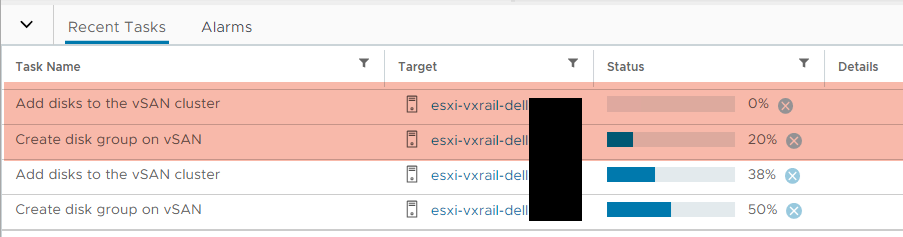
- 如果已發生逾時:請在 VxRail vCenter 附掛程式 UI 中重試失敗的節點新增和向外擴充工作之前,請先讓 vCenter 工作完成後 (這可能需要好幾個小時,視磁碟的大小和數量而定)。
- vCenter 工作完成後的重試會看到磁碟群組已完成後,並繼續進行剩餘的步驟。
- 在 vCenter 工作完成之前,請勿重試節點新增和向外擴充工作,因為這會導致重複的磁碟群組建立工作,而這些工作也會逾時或造成混淆。
如果對上述選項有任何疑慮或疑慮,請依需要聯絡 Dell 技術支援部門以取得進一步協助。
受影響的產品
VxRail Appliance Family產品
VxRail Appliance Family文章屬性
文章編號: 000219193
文章類型: Solution
上次修改時間: 19 5月 2026
版本: 5
向其他 Dell 使用者尋求您問題的答案
支援服務
檢查您的裝置是否在支援服務的涵蓋範圍內。