Rugged Control Center 麥克風狀態與系統麥克風不同步
摘要: 本文提供 Rugged Control Center (RCC) 麥克風狀態未與系統麥克風同步的相關資訊。
本文章適用於
本文章不適用於
本文無關於任何特定產品。
本文未識別所有產品版本。
症狀
當您從 Windows 設定將麥克風靜音或取消靜音時,RCC 無法在功能清單 UI 頁面上動態切換麥克風狀態。從 RCC 切換時,Windows 設定麥克風狀態會開始更新。
從 Windows 設定變更麥克風狀態時,您無法在 RCC 中看到麥克風狀態取得開關。
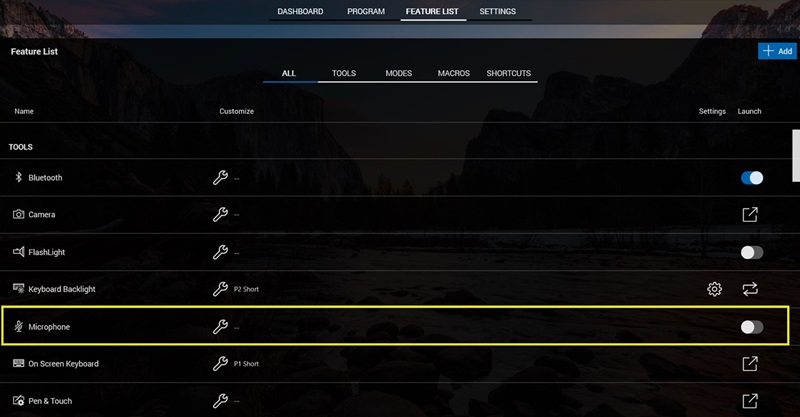
(圖 1 - Rugged Control Center)
受影響的產品:
- Rugged Control Center (RCC) 所有版本
受影響的系統:
- Latitude Rugged 5420
- Latitude Rugged 5424
- Latitude Rugged Extreme 7424
- Latitude Rugged Extreme 7212
- Latitude Rugged Extreme 7414
- Latitude Rugged 5414
- Latitude Rugged Extreme 7214
- Latitude Rugged Extreme 7220
- Latitude Rugged Extreme 7230
- Latitude Rugged 5430
- Latitude Rugged Extreme 7330
- Latitude Rugged Extreme 7030
原因
從視窗設定變更麥克風狀態時,不會產生任何 API 或事件。RCC 無法動態檢測和更改話筒狀態。
解析度
重新啟動 Rugged Control Center ,以與 Windows 設定和麥克風狀態同步。
受影響的產品
Latitude 7030 Rugged Extreme Tablet, Latitude 7212 Rugged Extreme Tablet, Latitude 7214 Rugged Extreme, Latitude 7220 Rugged Extreme Tablet, Latitude 7230 Rugged Extreme Tablet, Latitude 7330 Rugged Extreme, Latitude 5414 Rugged
, Latitude 5420 Rugged, Latitude 5424 Rugged, Latitude 5430 Rugged, Latitude 7414 Rugged, Latitude 7424 Rugged Extreme, Rugged Control Center
...
文章屬性
文章編號: 000227750
文章類型: Solution
上次修改時間: 21 5月 2026
版本: 3
向其他 Dell 使用者尋求您問題的答案
支援服務
檢查您的裝置是否在支援服務的涵蓋範圍內。