PowerEdge:R750 DSS NVIDIA Mellanox BlueField-2 DPU 卡 DPN-GRNMC PCIe 連結訓練失敗
摘要: 在使用 NVIDIA Mellanox BlueField-2 資料處理器 (DPU) 介面卡執行舊版的晶片上資料中心架構 (DOCA) 時,PowerEdge R750 資料中心可擴充解決方案 (DSS) 可能會遇到故障。
本文章適用於
本文章不適用於
本文無關於任何特定產品。
本文未識別所有產品版本。
症狀
NVIDIA Mellanox MT42822 BlueField-2 100G DPU 通道卡 DPN# GRNMC 是符合 DSS 資格的 DPU 介面卡,可能會根據某些 DSS/RCI 使用者特定需求,搭配部分 DSS 設定的 PowerEdge 伺服器。
此配接卡經由 Dell DSS/RCI 工程團隊提供的 NVIDIA DOCA 1.5.1 或更新版本認證和支援。
如果將 DOCA 映像變更為此特定配接卡上的 1.5.1 之前的版本,則可能會在伺服器上觀察到多個故障症狀。
例如:
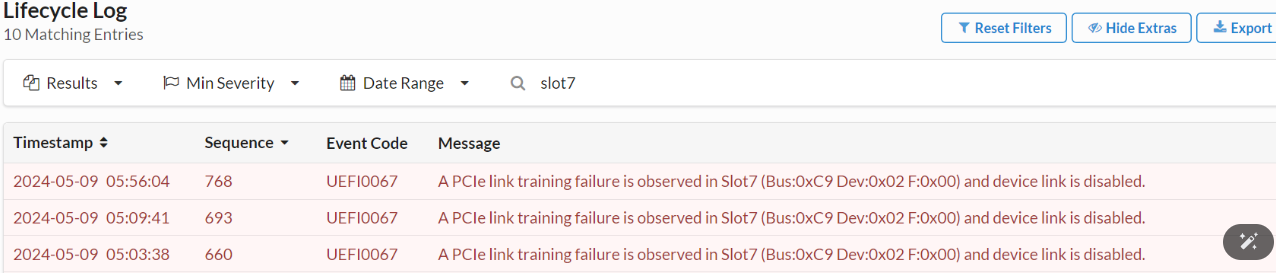
- PCIe 連結訓練失敗事件UEFI0067會記錄在 iDRAC/LifeCycle 記錄中:
- 主機作業系統 (OS) 無法初始化 DPU 配接卡。
[  133.575847] kernel: mlx5_core 0000:ca:00.1: firmware version: 24.35.2000
[  133.576304] kernel: mlx5_core 0000:ca:00.1: 252.048 Gb/s available PCIe bandwidth (16.0 GT/s PCIe x16 link)
[  153.576974] kernel: mlx5_core 0000:ca:00.1: wait_fw_init:195:(pid 821): Waiting for FW initialization, timeout abort in 100s
[  173.584974] kernel: mlx5_core 0000:ca:00.1: wait_fw_init:195:(pid 821): Waiting for FW initialization, timeout abort in 79s
[  193.592974] kernel: mlx5_core 0000:ca:00.1: wait_fw_init:195:(pid 821): Waiting for FW initialization, timeout abort in 59s
[  213.600975] kernel: mlx5_core 0000:ca:00.1: wait_fw_init:195:(pid 821): Waiting for FW initialization, timeout abort in 39s
[  233.608975] kernel: mlx5_core 0000:ca:00.1: wait_fw_init:195:(pid 821): Waiting for FW initialization, timeout abort in 19s
[  253.584980] kernel: mlx5_core 0000:ca:00.1: mlx5_function_setup:960:(pid 821): Firmware over 120000 MS in pre-initializing state, aborting
[  253.586029] kernel: mlx5_core 0000:ca:00.1: init_one:1366:(pid 821): mlx5_load_one failed with error code -16
[  253.587272] kernel: mlx5_core: probe of 0000:ca:00.1 failed with error -16
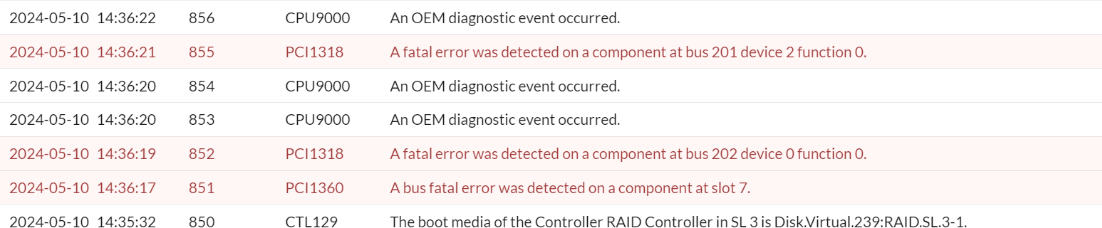
- PCIe 匯流排嚴重錯誤事件會記錄在 iDRAC/Lifecycle 記錄中,並指向安裝 DPU 配接卡的插槽。
原因
DSS/RCI 工程部門認證了兩種型號的 Mellanox BlueField-2 DPU 通道配接卡。
從 DOCA 1.5.1 LTS 版本開始,支援兩種型號,DPN#CH5RM 和 DPN#GRNMC。
NVIDIA Mellanox 建議使用 DOCA 套件 (LTS) 1.5.7 或更新版本。
- 32G NVIDIA Mellanox BlueField2 DPU 介面卡 (DPN#CH5RM,型號 # MBF2H516A-CEEOT)
- 128G NVIDIA Mellanox BlueField2 DPU 卡 (DPN#GRNMC,型號 # MBF2H516C-CECOT)
從 DOCA 1.5.1 LTS 版本開始,支援兩種型號,DPN#CH5RM 和 DPN#GRNMC。
NVIDIA Mellanox 建議使用 DOCA 套件 (LTS) 1.5.7 或更新版本。
解析度
如果 Dell PowerEdge 伺服器在使用 DSS 合格的 NVIDIA Mellanox BlueField2 DPU 配接卡 (DPN#GRNMC) 時遇到上述故障症狀,請確認已正確安裝 DOCA 1.5.1 LTS 或更新版本。
如果 DOCA 映像在此 128G DPU 配接卡上重新整理為較舊的不支援版本,請使用下列程序來還原 DPU:
如果 DOCA 映像在此 128G DPU 配接卡上重新整理為較舊的不支援版本,請使用下列程序來還原 DPU:
安裝可在 https://developer.nvidia.com/networking/doca
上找到的 DOCA 主機驅動程式 範例:若為 Ubuntu 20.04 主機作業系統
- wget https://content.mellanox.com/DOCA/DOCA_v2.7.0/host/doca-host_2.7.0-204000-24.04-ubuntu2004_amd64.deb
-
dpkg -i doca-host_2.7.0-204000-24.04-ubuntu2004_amd64.deb
apt-get update
apt install doca-all
下載並安裝最新的 BF2 DOCA 套件。
- wget https://content.mellanox.com/BlueField/BFBs/Ubuntu22.04/bf-bundle-2.7.0-33_24.04_ubuntu-22.04_prod.bfb
-
bfb-install --bfb bf-bundle-2.7.0-33_24.04_ubuntu-22.04_prod.bfb --rshim rshim0
在 BF2 上完成 DOCA 安裝後,請重設 BF2。
-
echo "SW_RESET 1" > /dev/rshim0/mis
受影響的產品
Datacenter Scalable Solutions, Mellanox Family of Adapters, Ubuntu Server LTS文章屬性
文章編號: 000228342
文章類型: Solution
上次修改時間: 21 5月 2026
版本: 4
向其他 Dell 使用者尋求您問題的答案
支援服務
檢查您的裝置是否在支援服務的涵蓋範圍內。