PowerProtect:vSphere 安裝套裝部署失敗,錯誤代碼ABV0032
摘要: 在 Broadcom ESXi 主機上,vSphere 安裝套裝 (VIB) 部署或更新失敗,錯誤代碼為 ABV0032。
本文章適用於
本文章不適用於
本文無關於任何特定產品。
本文未識別所有產品版本。
症狀
在部署或更新適用於 Transparent Snapshot Data Mover (TSDM) 的 PowerProtect Data Manager vSphere 安裝套裝時,組態工作會失敗,並出現類似以下的錯誤訊息:
ABV0032: VM Direct Engine is unable to configure protection for the host "ESXi Host" on vCenter "VCenterName"
在錯誤詳細資料區段下會報告類似以下內容的錯誤訊息:
Unable to install vSphere Installation Bundle on host "ESXi Host". vCenter task is failed with /usr/sbin/esxupdate returned with exit status: 15
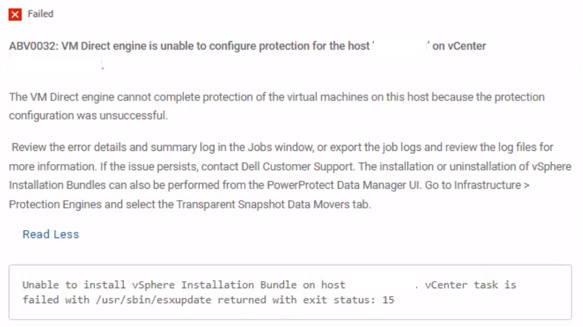
圖 1.ABV0032錯誤訊息
原因
在 vCenter 伺服器上,需要儲存掃描。如果沒有,則會在 esxupdate Broadcom ESXi 主機上的記錄檔:
esxupdate: xxxxxxx: Transaction: INFO: Final list of VIBs being installed: DEL_bootbank_tsdm_19. 18. 0. 3-10EM. 703. 0.0.18644231
esxupdate: xxxxxxx: imageprofile: INFO: Adding VIB DEL_bootbank_tsdm_19. 18.0.3-10EM. 703. 0.0.18644231 to ImageProfile (Updated) ESXi-7. OU3n-21930508-standard
esxupdate: xxxxxxx: esxupdate: ERROR: An esxupdate error exception was caught:
esxupdate: xxxxxxx: esxupdate: ERROR: Traceback (most recent call last) :
File "/lib64/python3.8/site-packages/vmware/esximage/Utils/HostInfo.py", line 217, in getFileSystems
return runCli ( ['storage', 'filesystem', 'list' ], True)
File "/lib64/python3.8/site-packages/esxutils.py", line 220, in runCli
esxupdate: xxxxxxx: esxupdate: ERROR: esxutils. EsxcliError: Errors:
esxupdate: xxxxxxx: esxupdate: ERROR: Error getting data for filesystem on '/vmfs/volumes/xxxxxxxx-xxxxxxxx-xxxx-xxxxxxxxxxx': Cannot open volume: /vmfs/volumes/xxxxxxxx-xxxxxxxx-xxxx-xxxxxxxxxxx, skipping.
esxupdate: xxxxxxx: esxupdate: ERROR:
ERROR:
esxupdate: xxxxxxx: esxupdate:
esxupdate: xxxxxxx: esxupdate: ERROR: During handling of the above exception, another exception occurred:
esxupdate: xxxxxxx: esxupdate: ERROR:
esxupdate: xxxxxxx: esxupdate: ERROR: Traceback (most recent call last) :
File "/usr/sbin/esxupdate", line 222, in main
cmd. Run ()
File "/lib64/python3.8/site-packages/vmware/esx5update/Cmdline.py", line 153, in Run
File "/lib64/python3.8/site-packages/vmware/esximage/Transaction.py", line 852, in InstallVibsFromSources
inst, removed, exitstate = self. installVibs (curprofile,
File "/lib64/python3.8/site-packages/vmware/esximage/Transaction.py", line 1098, in installVibs
exitstate = self. validateAndInstallProfile(
File "/lib64/python3.8/site-packages/vmware/esximage/Transaction.py", line 1267, in validateAndInstallProfile
resVibCache = ReservedVibCache ()
File "/lib64/python3.8/site-packages/vmware/esximage/ImageManager/HostSeeding.py", line 995, in init
self. loadCachedVibs ()
File "/lib64/python3.8/site-packages/vmware/esximage/ImageManager/HostSeeding.py", line 1032, in loadCachedVibs
for fsPath in HostInfo.GetVmfslFileSystems () :
File "/lib64/python3. 8/site-packages/vmware/esximage/Utils/HostInfo.py", line 260, in GetVmfslFileSystems
return [fs['Mount Point'] for fs in getFileSystems ()
File "/lib64/python3.8/site-packages/vmware/esximage/Utils/HostInfo.py", line 220, in getFileSystems
raise Errors. InstallationError (e, None, msg)
esxupdate: xxxxxxx: esxupdate: ERROR: vmware. esximage. Errors. InstallationError: Failed to query file system stats: Errors:
esxupdate: xxxxxxx: esxupdate: ERROR: Error getting data for filesystem on '/vmfs/volumes/xxxxxxxx-xxxxxxxx-xxxx-xxxxxxxxxxx': Cannot open volume: /vmfs/volumes/xxxxxxxx-xxxxxxxx-xxxx-xxxxxxxxxxx, skipping.
esxupdate: xxxxxxx: esxupdate: ERROR:
esxupdate: xxxxxxx: esxupdate: DEBUG: <<<
解析度
重新掃描儲存裝置以解決問題。
此 Broadcom 知識文章包含如何執行儲存裝置重新掃描的指示:在 ESXi 主機上執行儲存裝置重新掃描 (外部連結,最後檢查日期為 2026 年 4 月 14 日)
受影響的產品
PowerProtect Data Manager, PowerProtect Data Manager Essentials產品
PowerProtect Data Manager Software文章屬性
文章編號: 000293446
文章類型: Solution
上次修改時間: 14 4月 2026
版本: 4
向其他 Dell 使用者尋求您問題的答案
支援服務
檢查您的裝置是否在支援服務的涵蓋範圍內。