使用 CloudLink 將 PowerFlex 4.x 作業系統更換至 SUSE 的 CentOS 失敗
摘要: 執行從 CentOS 到 SLES 的作業系統遷移時,當已安裝 CloudLink (clc-agent) 時,會失敗且無法重試,因為「取代」標籤將會停用。
本文章適用於
本文章不適用於
本文無關於任何特定產品。
本文未識別所有產品版本。
症狀
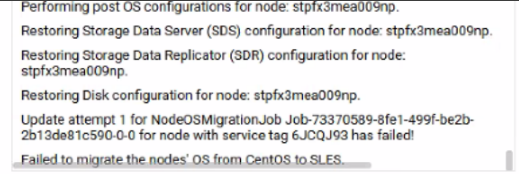
如在 PowerFlex Manager 平台 (PFMP) UI 中所見,遷移工作已失敗:
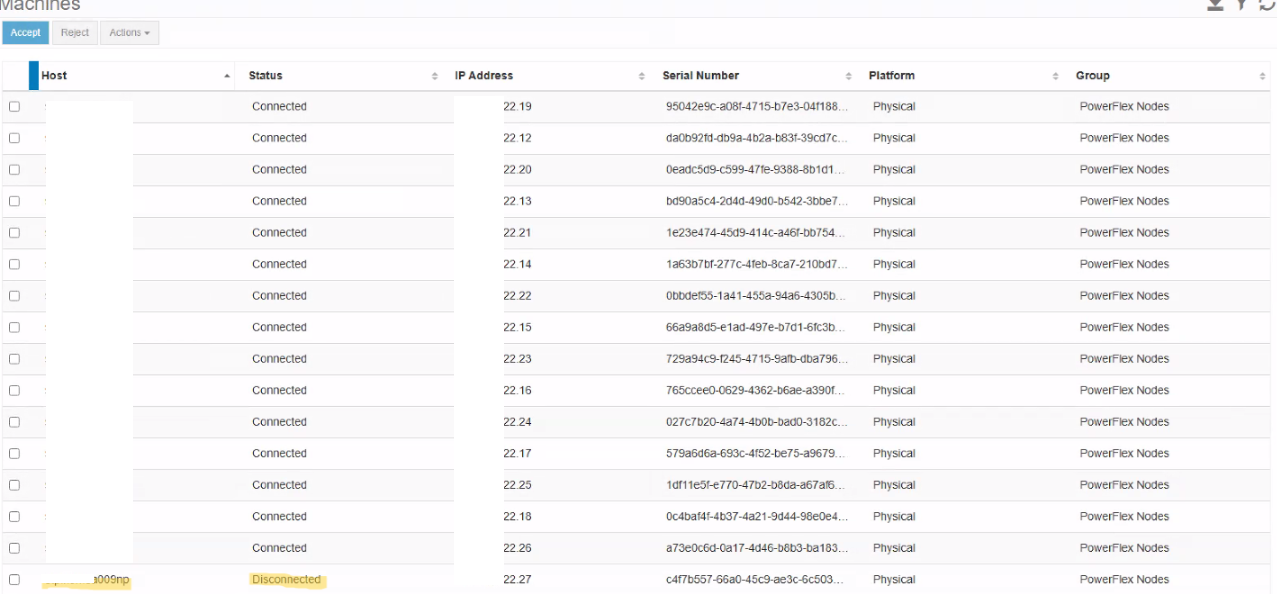
如在 CloudLink UI 中所見,裝置處於中斷連線狀態:

deployment.log
DEBUG [2025-03-31T07:39:59.703290] 2345512: provider/elementmanager/scaleio.rb:3934:in `update_device_original_path': scaleio-block-legacy-gateway: Updating the original path of device /dev/mapper/svm_nvme15n1
legacy-gateway: Endpoint: /api/instances/Device::df7d8fba000f0004/action/updateDeviceOriginalPathname Payload: {}
INFO  [2025-03-31T07:40:24.967795] 2345512: provider/elementmanager/scaleio.rb:1197:in `post_request': scaleio-block-legacy-gateway: VXOS REST API error encountered in post_request: {"message"=>"Device has an unhandled error that cannot yet be cleared", "httpStatusCode"=>500, "errorCode"=>564}
DEBUG [2025-03-31T07:40:24.968923] 2345512: provider/configuration/centos_sles_migration.rb:469:in `restore_disk_configuration': rackserver-6jcqj93: Failed to update disk configuration. {"message"=>"Device has an unhandled error that cannot yet be cleared", "httpStatusCode"=>500, "errorCode"=>564}:ASM::Provider::Elementmanager::Scaleio::WrappedRestClientException:/opt/asm-deployer/lib/asm/provider/elementmanager/scaleio.rb:1198:in `post_request'
/opt/asm-deployer/lib/asm/provider/elementmanager/scaleio.rb:3935:in `update_device_original_path'
DEBUG [2025-03-31T07:47:18.696164] 2345512: type/server.rb:3832:in `block in linux_ready?': rackserver-6jcqj93: OS is not yet ready: Net::SSH::ConnectionTimeout
deployer/rules/service/configuration_lane_provision_rule.rb> failed to run: VXFM332::Failed to perform OS Replacement for node stpfx3mea009np.
ERROR [2025-03-31T08:17:45.344924] 2345388: service_deployment.rb:672:in `process': VXFM332::Failed to perform OS Replacement for node stpfx3mea009np.
ERROR [2025-03-31T08:17:45.393236] 2345388: service_deployment.rb:675:in `process': VXFM332::Failed to perform OS Replacement for node stpfx3mea009np.
ERROR [2025-03-31T08:17:45.393600] 2345388: service_deployment.rb:676:in `process': ["/opt/asm-deployer/lib/asm/provider/configuration/centos_sles_migration.rb:864:in `process!'", "/opt/jruby/jruby-9.4.6.0/lib/ruby/stdlib/forwardable.rb:238:in `process!'", "/opt/asm-deployer/rules/configuration/common_configuration_rule.rb:16:in `block in (eval)'", "/opt/asm-deployer/lib/asm/rule_engine/rule.rb:204:in `run'", "/opt/asm-deployer/lib/asm/rule_engine/rule.rb:235:in `process_state'", "/opt/asm-deployer/lib/asm/rule_engine.rb:88:in `block in process_rules'", "/opt/asm-deployer/lib/asm/rule_engine/rules.rb:75:in `block in by_priority'", "org/jruby/RubyArray.java:1983:in `each'", "/opt/asm-deployer/lib/asm/rule_engine/rules.rb:74:in `by_priority'", "/opt/asm-deployer/lib/asm/rule_engine.rb:76:in `rules_by_priority'", "/opt/asm-deployer/lib/asm/rule_engine.rb:86:in `process_rules'", "/opt/asm-deployer/lib/asm/service/processor.rb:45:in `process_state'", "/opt/asm-deployer/lib/asm/service/processor.rb:52:in `block in process_state_threaded'"]
INFO  [2025-03-31T08:17:45.394190] 2345388: service_deployment.rb:678:in `process': Status: Error
exception.log和os-migration.log
#<ASM::UserException: VXFM332::Failed to perform OS Replacement for node stpfx3mea009np.>
/opt/asm-deployer/lib/asm/provider/configuration/centos_sles_migration.rb:864:in `process!'
/opt/jruby/jruby-9.4.6.0/lib/ruby/stdlib/forwardable.rb:238:in `process!'
/opt/asm-deployer/rules/configuration/common_configuration_rule.rb:16:in `block in (eval)'
/opt/asm-deployer/lib/asm/rule_engine/rule.rb:204:in `run'
/opt/asm-deployer/lib/asm/rule_engine/rule.rb:235:in `process_state'
/opt/asm-deployer/lib/asm/rule_engine.rb:88:in `block in process_rules'
/opt/asm-deployer/lib/asm/rule_engine/rules.rb:75:in `block in by_priority'
org/jruby/RubyArray.java:1983:in `each'
影響
在安裝了已加密所有磁碟的 CloudLink 的系統上,OS 從 CentOS 遷移至 SLES 失敗。
原因
若要成功更換使用 CloudLink 之系統的作業系統,PFMP 要求 CloudLink 相容。確認相容性後,PFMP 會中斷 CLC 代理程式與 CentOS 的連線,並將其安裝在 SLES 上。連線至 CloudLink 伺服器並交換金鑰後,裝置即可成功解除鎖定磁碟機,確保使用 CloudLink 順利遷移。
在 CloudLink 處於不相容狀態時執行作業系統更換時,系統會忽略 CloudLink 遷移,這與在沒有 CloudLink 的系統上更換標準作業系統類似。 PFMP 不會中斷 CentOS 上的 clc 代理程式,也不會安裝在 SLES 上,導致裝置進入錯誤狀態。
解析度
|
若要在新安裝的 SLES 節點上安裝 CloudLink,請使用下列步驟:
請在執行命令前先變更 IP。
注意 -G 代表群組 ID。

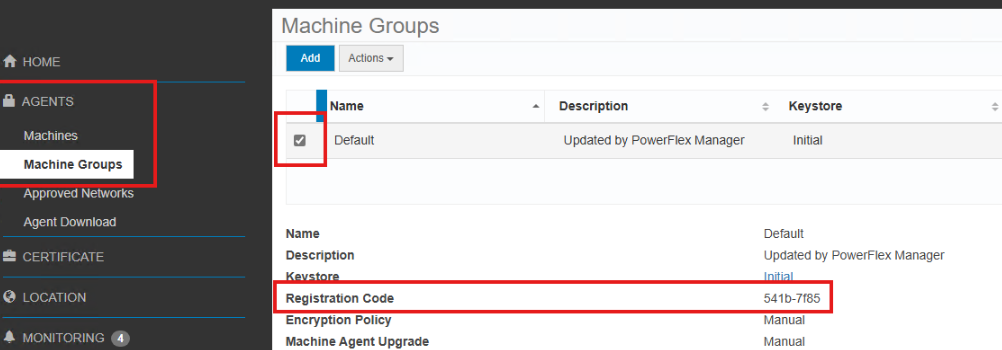
群組 ID」是雲端連結中群組的註冊代碼,如螢幕擷取畫面所示。
如果未提供組 ID,則會將電腦添加到預設組中。
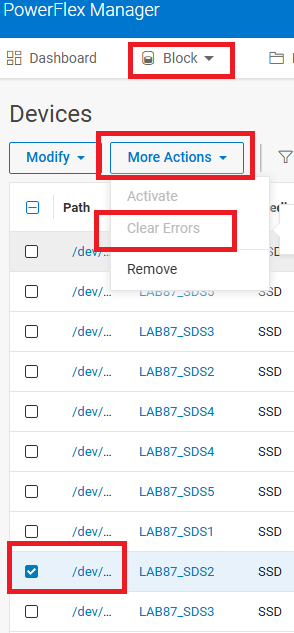
如果裝置是手動移除的,請加回。 |

| 受影響的版本
4.x |
產品
PowerFlex rack, VxFlex Ready Nodes, PowerFlex custom node, PowerFlex appliance R650, PowerFlex appliance R6525, PowerFlex appliance R660, PowerFlex appliance R6625, Powerflex appliance R750, PowerFlex appliance R760, PowerFlex appliance R7625
, PowerFlex appliance R640, PowerFlex appliance R740XD, PowerFlex appliance R7525, PowerFlex appliance R840
...
文章屬性
文章編號: 000314988
文章類型: Solution
上次修改時間: 11 8月 2025
版本: 2
向其他 Dell 使用者尋求您問題的答案
支援服務
檢查您的裝置是否在支援服務的涵蓋範圍內。